

I always turn to trusted sites when I need a high-quality printed model. In 2026, I find Thingiverse, Printables.com, MyMiniFactory, Cults3D, and Thangs lead the field for free downloads. For premium files, Gambody and Creality Cloud offer impressive selections. Each platform brings unique features and strong communities. I recommend trying different sources to match your project goals and budget.
Key Takeaways
-
Explore multiple platforms like Thingiverse and MyMiniFactory to find a variety of 3D models that suit your project needs.
-
Utilize advanced search features on sites like Thangs to quickly locate models based on shape and compatibility.
-
Check user reviews and model specifications before downloading to ensure quality and compatibility with your printer.
-
Participate in community forums and groups to gain insights, share experiences, and improve your 3D printing skills.
-
Always scan downloaded files for safety and ensure you understand the licensing terms for remixing models.
Top Printed Model Websites
Thingiverse
When I search for a printed model, Thingiverse often becomes my first stop. The platform stands out with its massive database and open-source spirit. I find it easy to navigate thanks to clear categories and a user-friendly interface. The community interaction on Thingiverse feels vibrant—users like, comment, and share feedback on models, which helps me choose the best files for my projects.
|
Unique Feature |
Description |
|---|---|
|
Extensive Database |
Thingiverse hosts a vast collection of 3D models, making it a key resource for users. |
|
Community Interaction |
Users can like, comment, and describe models, fostering a collaborative environment. |
|
Open-Source Nature |
Anyone can upload and download files, promoting creativity and sharing among users. |
|
User-Friendly Organization |
The platform categorizes models into various sections, simplifying the search process for users. |
Printables.com
Printables.com impresses me with its curated selection of printed model files. The site avoids duplicates and ensures each model is unique. I enjoy participating in their monthly design contests, which encourage creativity and offer prizes. The platform supports community groups based on interests, languages, and printer brands, making it easy for me to connect with others who share my passion. Accessibility options and a database of 3D printing partners add extra value, especially when I need support or want to try new printers.
MyMiniFactory
MyMiniFactory specializes in high-quality printed model collections. I often browse their tabletop gaming miniatures and terrain pieces, which dominate the platform’s popularity. The site also offers toys, educational models, functional gadgets, decorative pieces, and cultural artifacts. I appreciate how MyMiniFactory supports creators through direct audience engagement and the 'Tribes' subscription system. This feature lets me support my favorite designers and access exclusive content. The platform partners with major entertainment brands, so I can find authentic collectibles and high-fidelity products.
|
Category |
Description |
|---|---|
|
Tabletop Gaming |
Dominates popularity with miniatures for RPGs. |
|
Terrain Pieces |
Builds immersive worlds for gaming. |
|
Accessories |
Completes gaming setups. |
|
Toys |
Includes action figures and creative puzzles. |
|
Educational Models |
Teaches concepts through tangible models. |
|
Functional Gadgets |
Organizes spaces and aids daily tasks. |
|
Decorative Pieces |
Adorns homes with artistic designs. |
|
Cultural Artifacts |
Preserves history through digitization. |
Tip: MyMiniFactory’s artist-focused storefront makes it easy for me to discover new designers and support their work directly.
Cults3D
Cults3D offers a mix of free and premium printed model files. I like the platform’s modern interface and the way it highlights trending designs. Cults3D supports designers by allowing them to sell their creations, which means I can find exclusive models not available elsewhere. The site’s search and filter tools help me quickly locate the exact type of model I need, whether for home decor, cosplay, or functional gadgets.
Thangs
Thangs has become a powerhouse in the printed model world. I can access over 24 million 3D printable models, which gives me endless options for any project. The platform’s advanced search uses geometric deep-learning technology, so I can find models based on their shape or how they fit with other parts. This feature saves me time when I need compatible components or want to remix existing designs.
-
Thangs hosts over 24 million 3D printable models as of 2026.
-
The platform features advanced search capabilities powered by geometric deep-learning technology.
-
Users can find models based on their physical relationships.
Yeggi
Yeggi acts as a search engine for printed model files across the web. I use it when I want to compare results from multiple platforms at once. The site’s advanced search criteria let me filter by free or paid models, and I can sort results by best match or latest uploads. Yeggi covers a wide variety of models, from motorcycles to figurines, making it a versatile tool for any project.
|
Feature |
Description |
|---|---|
|
Advanced Search Criteria |
Users can filter by free or paid models. |
|
Sorting Options |
Sort by 'best match' or 'latest' models. |
|
Variety of Models |
Includes everything from motorcycles to figurines. |
Gambody
Gambody focuses on premium printed model files, especially for fans of video games, movies, and comics. I turn to Gambody when I want highly detailed, professional-grade models. The platform’s quality control ensures that every file meets strict standards, which gives me confidence in the final print. Gambody’s community features, such as user ratings and detailed previews, help me make informed choices before purchasing.
Creality Cloud
Creality Cloud integrates seamlessly with my 3D printer setup. I can browse, download, and even edit printed model templates directly within the Halot Box software. The platform supports remote control of my printer and lets me save sliced files for later use. With over 500,000 models available, I always find something new to print or share with the community. Creality Cloud’s direct connection to Creality Print streamlines my workflow and keeps all my resources in one place.
-
Creality Cloud integrates with Halot Box, allowing users to browse and import 3D models directly within the software.
-
Users can manage the entire printing process through their Creality Cloud account, including searching, downloading, and editing templates.
-
Halot Box supports remote control of 3D printing and allows saving sliced files for later transmission to the printer.
-
Creality Print provides direct links to Creality Cloud, offering access to a vast library of pre-designed models.
-
Users can find over 500,000 models created by other users or share their own creations on the Cloud.
Makeronline
Makeronline provides a straightforward experience for finding and sharing printed model files. I appreciate the platform’s focus on user-generated content and its easy-to-use interface. Makeronline encourages collaboration by allowing users to remix and improve existing models. The site’s community-driven approach helps me discover creative solutions and new ideas for my projects.
YouMagine
YouMagine, created by Ultimaker, supports open-source 3D printing. I use it as a resource for collaborating with other designers and enthusiasts. The platform aims to build a library of print-ready models and encourages sharing and improvement. YouMagine’s community-driven ethos aligns with my values as a maker, and I often find unique models that reflect the creativity of its users.
-
YouMagine is created by Ultimaker, a company known for open-source 3D printers.
-
It serves as a community resource for 3D printing enthusiasts and designers.
-
The platform aims to facilitate collaboration among creatives to build print-ready 3D models.
GrabCAD
GrabCAD caters to professionals and educators who need advanced printed model files. I rely on its training packages and industry-specific resources for projects in fields like manufacturing, design, and rapid prototyping. GrabCAD offers support options, including 3D printing services and uptime kits. I also download eBooks and brochures to stay updated on the latest trends and techniques.
-
Training Packages
-
Industry-specific resources such as:
-
Education
-
Railway
-
Art and Fashion
-
Defence
-
Manufacturing
-
Jigs and Fixtures
-
Production Parts
-
Rapid Prototyping
-
Packaging
-
Design
-
Composite Tooling
-
-
Support options including:
-
3D Printing Service
-
Uptime Kits
-
-
Downloads for eBooks, brochures, and more
XYZprinting 3D Gallery
XYZprinting 3D Gallery offers a curated selection of printed model files, especially for users of XYZprinting hardware. I find the platform’s integration with their printers convenient, as it simplifies the process from download to print. The gallery features educational models, toys, and functional objects, making it a good choice for both beginners and experienced makers.
Note: Each of these platforms brings something unique to the table. I recommend exploring several sites to find the printed model that best fits your needs and printer setup.
Standout Platforms Overview
Thingiverse Features
I rely on Thingiverse for its unmatched community and open-source approach. The platform’s tagging system and curated collections help me find the right printed model quickly. I often join discussions in the comments, where users share print settings and troubleshooting tips. Thingiverse’s remix culture encourages me to adapt existing designs, which keeps the creative process fresh.
Printables.com Cosplay Models
Printables.com stands out for its dedicated cosplay section. I find detailed armor pieces, props, and accessories designed for easy assembly and painting. The site’s contest-driven environment motivates creators to upload innovative designs. I appreciate the active feedback loop—users rate models and share photos of their finished prints, which helps me gauge quality before starting a project.
Tip: I always check the “Makes” gallery to see how others have brought a model to life.
Yeggi Search Engine
Yeggi acts as my go-to search engine when I need to compare models across multiple sites. I enter a keyword, and Yeggi aggregates results from Thingiverse, MyMiniFactory, Cults3D, and more. The advanced filters let me sort by price, popularity, or file type. This saves me time and ensures I do not miss out on unique designs.
Thangs Geometric Search
Thangs impresses me with its geometric search technology. I can upload a part or sketch, and Thangs finds models with similar shapes or compatible connectors. This feature proves invaluable when I need replacement parts or want to remix components. The platform’s collaboration tools allow me to share projects and receive feedback from other makers.
|
Platform |
Unique Feature |
Community Support |
|---|---|---|
|
Thangs |
Geometric deep-learning search |
Project collaboration |
Gambody Premium Files
Gambody remains my top choice for premium, high-detail models. I often download collectibles inspired by games and movies. The platform’s strict quality control means I receive files optimized for printing, with clear assembly instructions. User ratings and detailed previews help me make informed purchases.
Note: While Gambody focuses on premium content, I see a trend toward innovation across the industry. Platforms like MeshyAI and Mastrex introduce AI-driven modeling and accessible metal printing, pushing the boundaries of what a printed model can achieve.
Finding the Right Printed Model
Using Filters and Categories
I always start my search by using filters and categories. Most platforms let me sort models by type, popularity, or print difficulty. I narrow my choices by selecting the category that matches my project, such as toys, cosplay, or functional parts. I also use filters for free or premium files, which helps me stay within my budget. This approach saves time and ensures I find a printed model that fits my needs.
Tip: I often use advanced search options to filter by printer type or material. This helps me avoid compatibility issues later.
Checking Model Quality
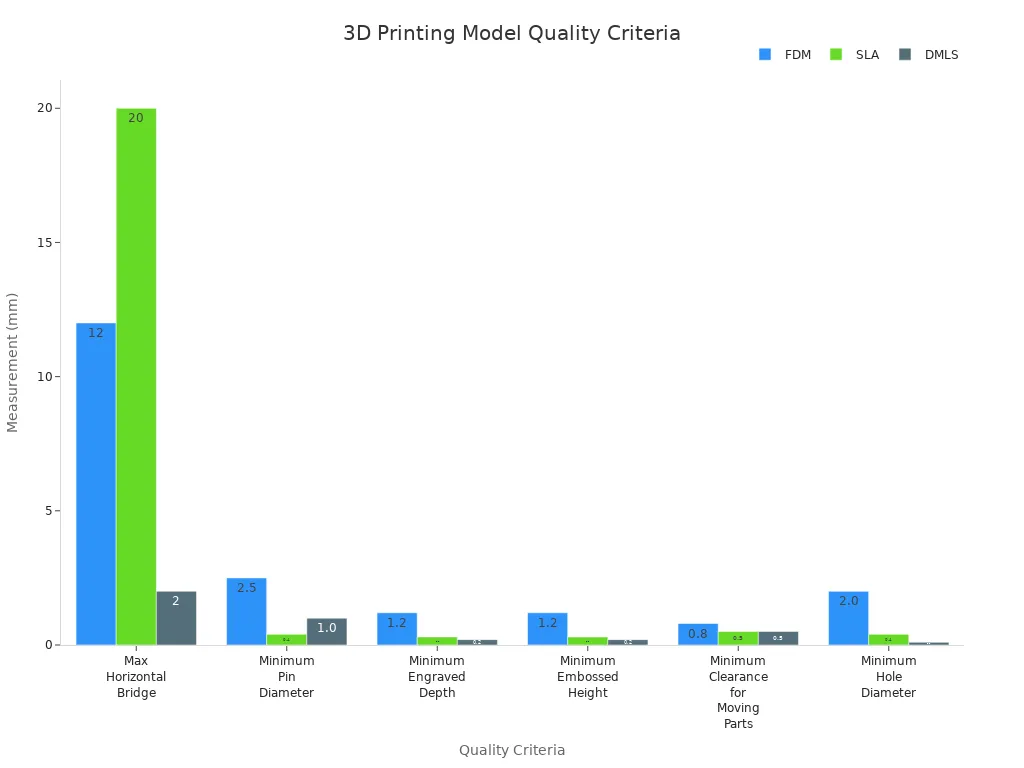
Before I download any file, I check the model’s technical details. I compare the specifications for different printing methods, such as FDM, SLA, SLS, and DMLS. The table below shows the minimum requirements for each method:
|
Criteria |
FDM |
SLA |
SLS |
DMLS |
|---|---|---|---|---|
|
Minimum Overhang Angle |
45° |
Always |
N/A |
45° |
|
Max Horizontal Bridge |
12 mm |
20 mm |
N/A |
2 mm |
|
Minimum Pin Diameter |
2.5 mm |
0.4 mm |
0.8 mm |
1.0 mm |
|
Minimum Engraved Depth |
1.2 mm |
0.3 mm |
0.8 mm |
0.2 mm |
|
Minimum Embossed Height |
1.2 mm |
0.3 mm |
0.8 mm |
0.2 mm |
|
Minimum Clearance for Moving Parts |
0.8 mm |
0.5 mm |
0.8 mm |
0.5 mm |
|
Minimum Hole Diameter |
2.0 mm |
0.4 mm |
1.6 mm |
0.1 mm |
Reading Reviews
I always read user reviews before I commit to a download. Reviews reveal common issues, print success rates, and tips for assembly. I look for models with high ratings and detailed feedback. Photos of finished prints help me judge the final result. I trust platforms with active communities because users share honest opinions and troubleshooting advice.
Printer Compatibility
I check the file format before I download any printed model. In 2026, STL, OBJ, AMF, 3MF, and STEP are the most common formats. STL works well for basic models and most printers, but it struggles with complex shapes. OBJ and AMF offer better detail for intricate designs. The 3MF format is becoming the standard for advanced projects, so I make sure my printer supports it. I always match the file format to my printer’s capabilities to avoid wasted time and filament.
-
Don’t worry if your first print is a disaster. I treat failures as learning opportunities.
-
Bed adhesion is a life skill. I pay attention to surface preparation for successful prints.
-
Cheap filament will cost you more. I invest in quality materials to prevent clogging and warping.
-
Automatic bed leveling is a sanity saver. I use this feature to simplify setup.
-
Printing fast doesn’t mean finishing fast. I focus on quality over speed for better results.
Downloading and Preparing Models
Download Options
When I choose a model, I always check the download options available on the platform. Most sites offer a direct download button for the main file. Some platforms, like Printables.com and MyMiniFactory, let me download a ZIP archive that includes all related files, such as instructions and images. I prefer downloading the full package when possible. This approach ensures I have everything I need for a successful print.
Tip: I always scan downloaded files with antivirus software before opening them. This step protects my computer from potential threats.
Some platforms also support cloud-based downloads. For example, Creality Cloud allows me to send models directly to my printer or cloud storage. This feature saves time and keeps my workflow organized.
File Formats
I pay close attention to file formats before starting a print. The most common formats I encounter include STL, OBJ, 3MF, and AMF. Each format has strengths and weaknesses. I use the table below to compare them:
|
Format |
Best For |
Notes |
|---|---|---|
|
STL |
Basic shapes |
Widely supported, small size |
|
OBJ |
Detailed models, colors |
Supports textures, larger size |
|
3MF |
Complex projects |
Advanced features, metadata |
|
AMF |
Multi-material prints |
Supports color and materials |
I always match the file format to my printer’s capabilities. This step prevents compatibility issues and wasted material.
Preparing for Print
After downloading a model, I prepare it for printing using slicing software. I import the file, adjust the scale, and set the print orientation. I check for errors in the mesh and repair them if needed. I select the right layer height and infill settings based on the model’s purpose.
-
I use supports for overhangs.
-
I preview the sliced layers to catch mistakes.
-
I save the final G-code to an SD card or send it directly to my printer.
Note: Careful preparation leads to better prints and fewer failures. I always double-check my settings before starting the print job.
Community and Support
Forums and Groups
I rely on forums and groups to solve problems and learn new techniques. Most major platforms host active discussion boards where users share advice and troubleshoot issues. I often join groups based on printer brands or specific interests, such as cosplay or engineering. These communities help me stay updated on the latest trends and software updates. I find that asking questions in forums leads to quick answers from experienced makers. Many sites also offer private messaging, which allows me to connect with designers directly.
-
Popular forums include:
-
Thingiverse Community
-
Printables Groups
-
MyMiniFactory Tribes
-
Tip: I always introduce myself when joining a new group. This helps me build connections and get better support.
Tutorials and Help
I use tutorials and help sections to improve my skills and avoid common mistakes. Most platforms provide step-by-step guides for beginners and advanced users. I watch video walkthroughs to learn slicing techniques and troubleshooting methods. Written guides explain printer calibration, material selection, and model repair. I often bookmark helpful articles for future reference. Some sites feature live chat support or ticket systems, which I use when I need immediate assistance.
|
Resource Type |
Example |
Benefit |
|---|---|---|
|
Video Tutorials |
YouTube, Printables TV |
Visual learning |
|
Written Guides |
Blog posts, FAQs |
Detailed explanations |
|
Live Support |
Chat, Email |
Fast problem-solving |
Sharing and Remixing
I enjoy sharing my finished models and remixing designs from other creators. Most platforms encourage users to upload photos of completed prints and share print settings. Remixing allows me to customize models for my own needs. I often credit the original designer when I publish a remix. This practice builds trust and strengthens the community. I participate in remix contests to challenge my creativity and learn new design skills.
Note: Sharing and remixing not only improve my skills but also contribute to the growth of the 3D printing community. I recommend giving feedback and supporting other makers whenever possible.
I explored the best sites for 3D printed models in 2026. Each platform offers unique strengths, from community support to advanced search tools. I always test print quality, reliability, and ease of setup before choosing a favorite. The table below highlights essential features for success:
|
Feature |
Description |
|---|---|
|
Build Platform Leveling |
Automatic leveling ensures smooth, accurate prints. |
|
Z-axis Calibration |
Proper calibration improves print quality and reliability. |
3D printing blends creativity with technology. I encourage you to try different platforms, join active communities, and share your results. Start your next project today!
FAQ
What file formats do most 3D model sites support?
I usually find STL, OBJ, and 3MF formats on major platforms. STL works for basic prints. OBJ supports colors and textures. 3MF offers advanced features. I always check my printer’s compatibility before downloading.
How do I know if a model will print well on my machine?
I read user reviews and check the model’s specifications. I look for details about printer type, material, and print settings. I also preview the sliced file in my software to spot potential issues.
Are there risks when downloading 3D models from online platforms?
I always scan files with antivirus software before opening them. Some sites may host unsafe or corrupted files. I trust platforms with active moderation and user feedback.
Can I remix or modify downloaded models for personal use?
|
Platform |
Remix Allowed |
Attribution Required |
|---|---|---|
|
Thingiverse |
✅ |
✅ |
|
Printables.com |
✅ |
✅ |
|
Gambody |
❌ |
❌ |
I check each site’s license terms before remixing or sharing models.
Share:
Why 3D printers are perfect for families
Advantages of the Sovol SV08 Max 3D Printer compared to other brands