
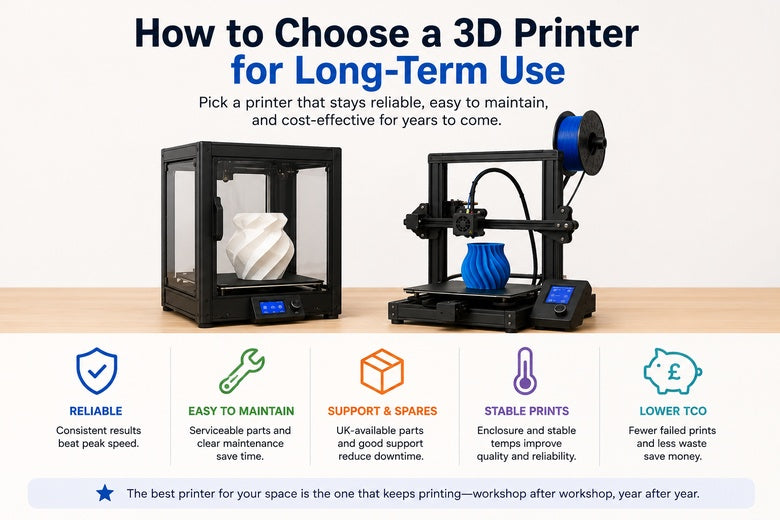
If you’re choosing a printer for a makerspace, a school club, or a community you mentor, “works on day one” isn’t the bar.
The real question is: will it still be printing reliably after months of workshops, beginner mistakes, and busy weekends—without one person becoming the full-time printer mechanic?
Key takeaways (the short version)
-
Optimise for repeatability, not peak speed. A printer that hits “good enough” settings consistently will beat a faster machine that needs constant tuning.
-
Ask “how does this get fixed?” before you ask “how fast is it?” Long-term ownership is mostly about access to spares, documentation, and straightforward 3D printer maintenance.
-
Enclosures and fumes control are a longevity feature. Stable temperatures help print quality and reduce “mystery failures,” especially with ABS/ASA.
-
Plan for total cost of ownership (TCO). Failed prints, time spent calibrating, and consumables can cost more than the printer over 1–3 years.
-
Check support and spare parts availability in the UK. Fast access to parts and clear support channels reduces downtime.
-
Treat openness as a risk-reducer (when you have the skills). Open-source firmware ecosystems can make repairs and community support easier—but only if you’re prepared to manage settings responsibly.
A quick comparison table: what “good for 2+ years” looks like
|
Criterion |
What to look for |
Why it matters long-term |
|---|---|---|
|
Frame & motion system |
Rigid frame, clean motion path, easy belt access/tensioning |
Reduces layer shifts, vibration, and constant re-tuning |
|
Extruder + hotend |
Serviceable design, widely available nozzles/consumables, clear maintenance steps |
These are the most frequently serviced parts |
|
Bed system |
Flat, stable bed + reliable first-layer workflow (ABL helps, but isn’t magic) |
First-layer issues are a top driver of wasted time/filament |
|
Thermal control |
Enclosure option, stable temps for your materials, predictable cooling |
Reduces warping and “works yesterday, fails today” behaviour |
|
Software & firmware |
Active updates, transparent change logs, solid default profiles |
Keeps the printer usable as slicers and features evolve |
|
Spares & support |
UK-available parts, clear warranty terms, a help centre you can actually use |
Downtime is usually a logistics problem, not a physics problem |
|
Community footprint |
Active forums/Discord/GitHub, common mods, known fixes |
You want searchable answers when something breaks |
|
Noise & shared-space fit |
Manageable noise, tidy filament path, safe operation |
Matters in makerspaces and classrooms more than people admit |
Long-term checklist: how to choose a 3D printer for long-term use
Before you compare models, anchor the decision in the future reality of your space and users.
Step 1: Start with the use case you’ll still have in 12 months
Before you compare models, write down the future reality:
-
Who will use it? (Beginners only? Mixed levels? A few advanced members pushing edge cases?)
-
How hard will it be driven? (Occasional projects vs. weekly workshops vs. semi-continuous use)
-
What materials actually matter? PLA only is a different world from ABS/ASA, TPU, or abrasive composites.
-
What sizes do you print 90% of the time? Oversizing the bed is a common way to pay more for less reliability.
Pro Tip: If you run workshops, prioritise “first-layer success rate” over fancy features. The fastest printer in the room is the one that doesn’t need a rescue mission halfway through a class.
Step 2: Choose a machine you can maintain (without tearing it apart)
In other words: you’re optimising for 3D printer reliability, not just features.
A long-term printer is basically a small machine tool. Parts wear. Filament dust happens. Beginners crash nozzles into beds.
So the key question isn’t whether maintenance exists—it’s whether maintenance is predictable.
A useful mental model comes from UltiMaker’s reliability framing: long-term reliability isn’t one spec, it’s a combination of durable hardware, thoughtful design, and ongoing software/firmware support as the ecosystem evolves (UltiMaker: “What makes a 3D printer reliable?” (2025)).
Hotend and nozzle: consumables should be boring
Nozzles and hotend components are where “long-term” lives or dies. Look for:
-
Nozzle access that doesn’t require full disassembly
-
Clear guidance for clearing clogs and replacing parts
-
Easy sourcing for replacement nozzles and heater/thermistor parts
Even in the UK, routine consumables add up. A practical breakdown of desktop printing costs notes nozzles are often a small, regular replacement cost—quoted as around £5–10 per nozzle in one UK-focused cost discussion (Lunia 3D: “The Real Cost of 3D Printing” (2025)). The exact number isn’t the point—the point is that your printer choice should make this kind of maintenance easy.
Extruder design: stability beats cleverness
Extruders fail in boring ways: worn gears, slipping filament, inconsistent feeding.
To reduce long-term issues, prefer:
-
A design with easy access to the drive gears
-
A clean, constrained filament path
-
Good documentation for tension adjustment and calibration
If your community prints TPU or you want fewer “mystery under-extrusion” cases, choose a system that handles flexible materials without heroic tuning.
Step 3: Treat the first layer as a “system,” not a setting
If you’re making a decision for a group, the first layer is your largest hidden cost.
Long-term-friendly printers tend to have:
-
A bed surface that’s easy to clean and refresh
-
A consistent bed heating system
-
A repeatable Z-offset workflow
Auto bed levelling can help, but it doesn’t eliminate:
-
dirty build plates
-
incorrect Z-offset
-
wet filament
-
uneven mechanical assemblies
If you expect mixed-experience users, choose a printer where the “first-layer routine” is simple enough to teach in five minutes.
Step 4: Noise, enclosure, and fumes are not optional in shared spaces
In UK makerspaces and schools, the printer has to coexist with people.
Long-term ownership gets easier when:
-
Noise is low enough that people don’t avoid using the room
-
The machine can be enclosed (or already is)
-
You have a plan for ventilation, especially for ABS/ASA
Enclosures aren’t just about fumes. They also stabilise temperature—which is a big part of getting repeatable results once you move beyond PLA.
⚠️ Warning: If you plan to print ABS/ASA in a shared space, treat ventilation and filtration as part of the “printer budget,” not an afterthought.
Step 5: Don’t ignore firmware and profiles—this is where printers age
Over 2–3 years, slicers change. Firmware features evolve. Your “known good” settings drift.
When evaluating long-term fit, look for evidence of:
-
active firmware updates
-
clear documentation
-
a community that shares profiles, mods, and fixes
If your group values open-source friendliness, that can be a real advantage—because it tends to correlate with community troubleshooting and long-term supportability. That’s one reason some communities prefer platforms that support open-source firmware and openly shared printer profiles.
Step 6: Spares, warranty clarity, and UK logistics are the difference between 2 days and 2 months downtime
Two printers can be equally capable—until something breaks.
For long-term ownership in the UK, ask:
-
Can you get belts, fans, build surfaces, and hotend parts quickly?
-
Are warranty terms clear enough that you know what’s covered?
-
Is support documentation easy to find and actionable?
This is also where total cost of ownership becomes real. Stratasys makes the (often ignored) point that TCO isn’t only the printer and filament—it’s also the cost of failed prints and time spent tuning and troubleshooting (Stratasys: “FDM vs FFF… total cost of ownership” (2026)).
You don’t need enterprise budgets to apply the logic. In community settings, the scarce resource is usually mentor time.
Red flags that predict long-term frustration
If you’re deciding between shortlisted options, these are common warning signs:
-
Maintenance requires deep disassembly for routine tasks (nozzle changes, belt tension)
-
Hard-to-source consumables or proprietary parts with no clear supply path
-
No clear documentation for calibration and common failures
-
A “spec-sheet” pitch with no real support ecosystem (community, profiles, spare parts)
-
Unrealistic speed claims without explaining what quality settings they were tested at
A short note on Sovol UK (for UK buyers who want local support)
If you’re comparing options and you want a UK-based purchase and support path, you can start with:
-
The current lineup on Sovol UK 3D printers
-
Documentation and downloads via Firmware & STL & User Manual
-
UK support and policy info in the Help Center
-
Background on the brand’s open-source/community approach on About Sovol
This doesn’t replace the checklist above—but it makes it easier to evaluate logistics and long-term support alongside specs.
Next steps: shortlist like a maintainer
-
Pick 2–3 models that fit your real use case (materials, size, throughput).
-
Run them through the table at the top and mark:
-
your must-haves
-
your deal-breakers
-
the “maintenance burden” you’re willing to accept
-
-
Make support and spares availability part of the final decision—not an afterthought.
If you want to keep your comparison grounded in UK availability and support paths, browse Sovol UK’s current lineup, then use the checklist above to decide whether a specific model is a fit for your community.
Share:
Large Build Volume vs High Speed: Which Matters More for Large-Format 3D Printing?
How to Improve 3D Print Quality With a Better 3D Printer Setup