
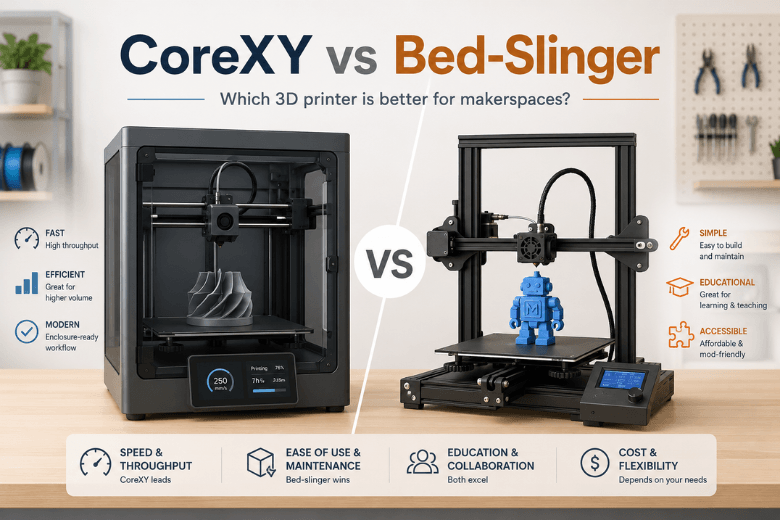
Key takeaways
-
For shared printer fleets (makerspaces, schools, clubs), CoreXY often reduces queue time because it can sustain higher acceleration without slinging a heavy bed back and forth.
-
For teaching the basics (and for straightforward hands-on repairs), a bed-slinger still makes sense—especially when you’ll print at moderate speeds.
-
The regret-proof choice is usually about operations, not kinematics: parts availability, support response time, calibration drift, and how tolerant the machine is of novice users.
-
Treat “700 mm/s” as a headline, not a promise. Your real limit is typically quality at acceleration (ringing/ghosting) plus flow/cooling—not top speed.
CoreXY vs bed-slinger: a fast decision matrix (CoreXY vs bed slinger)
|
Decision factor |
CoreXY tends to be a better buy when… |
Bed-slinger tends to be a better buy when… |
|---|---|---|
|
Print throughput |
You want more completed prints per day; faster travel + higher acceleration matters. |
Speed isn’t the bottleneck; you print fewer jobs or smaller parts. |
|
Quality at speed |
You want to push speed without the machine feeling “shaky” (less Y-axis inertia). |
You’ll run conservative profiles and don’t mind longer print times. |
|
Shared-space ergonomics |
You want a tidy footprint without needing clearance for the bed’s full Y travel. |
You have space around the printer and want easier open access. |
|
Learning & teaching |
You’re teaching modern workflows (input shaping, automation, enclosed printing). |
You want the simplest motion model to explain and diagnose hands-on. |
|
Maintenance reality |
You’re happy to tune belt paths/gantry once for long-term speed. |
You want the simplest mechanics to service and keep running. |
|
Materials & enclosure |
You want an enclosure-friendly platform (especially for hotter materials). |
You’re mostly printing PLA and prefer simple, open-frame cooling. |
Who should buy what (2026 verdicts for a 3D printer for makerspace use)
Buy CoreXY if any of these are true
-
You’re responsible for throughput (workshops, classes, community members queueing jobs).
-
You care about quality at higher acceleration (less ringing/ghosting on fast direction changes).
-
You want a printer that’s naturally compatible with enclosure-first operation (safer in shared spaces; more controlled for engineering filaments).
The underlying physics is simple: a CoreXY 3D printer typically keeps motors stationary and reduces moving mass, which helps it reach higher acceleration and speed—but it can demand more careful belt alignment and squareness. That’s the core trade-off described in 3Dnatives’ 2025 comparison of FDM motion systems.
Buy a bed-slinger if any of these are true
-
You want the clearest “see the machine, understand the machine” platform for teaching basics.
-
Your priority is low-cost, straightforward repairs with a predictable mechanical layout.
-
You print at moderate speeds where the moving-bed inertia doesn’t become your main quality limiter.
A bed slinger 3D printer can still produce excellent parts—especially if you’re not chasing aggressive acceleration. Where it starts to show limits is when you try to combine speed with clean corners and consistent surface quality, because the printer is repeatedly accelerating a heavier bed assembly.
Pro Tip: If you’re buying for a makerspace, don’t ask “Which is better?” Ask “What’s our failure mode?” If the biggest pain is queue time and rushed settings causing failures, CoreXY often pays back. If the biggest pain is novice maintenance and you need a training platform, a bed-slinger stays valuable.
The criteria that matter (and how kinematics changes the risk)
1) Speed vs quality at speed: acceleration is the real differentiator
Most buyer advice gets stuck on “top speed.” But most real prints are made of short moves, corners, infill turns, and travel hops—so the printer’s acceleration and vibration control determine how much time you actually save.
A UK buyer guide published in Dec 2025 claims a large example: an 80mm Benchy at 0.2mm layer height finishing in 14–18 minutes on CoreXY vs 45–60 minutes on bed-slingers (identical settings), attributing the gap to moving-mass physics and acceleration limits (UnderstandTech UK’s Benchy time comparison, Dec 2025).
You don’t need to accept those exact numbers for the point to be useful:
-
If you want faster prints that still look good, you’re buying “clean acceleration,” not a headline mm/s figure.
-
In a CoreXY vs bed slinger decision, the practical win is usually that a stationary bed doesn’t add Y-axis inertia as you push acceleration.
2) Reliability and uptime in a shared space
For maker community leaders, “reliability” isn’t a vibe. It’s the operational math:
-
How often does a novice user knock it out of tune?
-
How quickly can you recover from a failed first layer?
-
Can the machine detect common failures (runout, clogs, tangles) before a print becomes a bin of spaghetti?
CoreXY doesn’t automatically equal uptime—but the platform trend in 2026 is that many CoreXY machines are designed around repeatable, higher-acceleration workflows, where calibration and vibration control are treated as first-class features.
Key Takeaway: If you’re buying one printer for many users, prioritize “hard to misuse” features (calibration automation, clear docs, failure detection) over raw kinematics.
3) Footprint, clearance, and bench layout
If you’ve ever tried to place a bed-slinger on a shallow shelf, you’ve felt the hidden constraint: the bed needs full Y travel clearance. CoreXY designs generally keep motion inside a more box-like footprint, which can make it easier to position machines on shared benches (though the overall machine can still be large—especially when enclosed).
Your practical test before buying:
-
Tape out the real footprint including cable and bed travel.
-
Confirm you can still reach the rear, clean the bed, and service the hotend without dismantling the bench.
4) Maintenance and teaching burden
Here’s the honest CoreXY vs bed slinger trade:
-
Bed-slingers are often easier to explain and maintain because the motion system is straightforward.
-
CoreXY can require more careful belt path/tension alignment and benefits from a rigid, well-squared frame.
If you’re equipping a makerspace, consider a mixed approach:
-
A couple of higher-throughput machines (often CoreXY) as the workhorses.
-
One or two simpler machines for instruction, maintenance training, and experimentation.
5) Materials and enclosure reality (PLA is easy; the edge cases decide the purchase)
If you mostly print PLA, both platforms can serve you well. The more you care about higher-temp filaments and consistent thermal conditions, the more enclosure-friendly designs matter.
That doesn’t mean “CoreXY = engineering filaments.” It means: when you want enclosure-first workflows, CoreXY architectures are commonly packaged that way in 2026.
Named Sovol examples (neutral, UK-available, and evidence-bound)
If you want to anchor your evaluation in printers available through the UK site, here are CoreXY examples with first-party citations:
-
Sovol SV08 is described on the product page as using CoreXY kinematics (“The SV08 utilizes CoreXY kinematics…”), and the page includes speed/acceleration headline specs plus open-source positioning.
-
Sovol SV08 Max lists “CoreXY Kinematics” and “Control System: Klipper,” and it highlights features aimed at repeatability such as “Advanced Eddy Current Scanning… contactless bed leveling,” alongside “Fully open-source firmware and hardware.”
-
Sovol Zero is positioned as a CoreXY machine with high headline speed, high nozzle temperature capability, open-source positioning, and additional features like input shaping and filtration.
A buyer-regret checklist (print this before you spend)
Use this whether you choose CoreXY or a bed-slinger:
-
Support & parts path: Where do spare parts ship from, and what’s the realistic turnaround when a printer is down?
-
Calibration drift: How often do you need to re-level/re-tension/re-square in normal use?
-
Noise & shared-space safety: Is an enclosure possible or practical for your environment?
-
Failure detection: Runout, clog/tangle detection, power-loss recovery—what does the machine actually handle?
-
House profiles: Can you standardise two or three slicer profiles that novices won’t break?
For ongoing fleet care, it helps to standardise a weekly routine (cleaning, lubrication checks, belt inspection, and a simple acceptance test print).
FAQ
Is CoreXY always better in 2026?
No. A CoreXY 3D printer usually gives you a higher ceiling for acceleration and throughput, but bed-slingers still win on simplicity, teaching transparency, and often upfront cost. The “better” choice depends on what you’re optimizing for.
If I buy CoreXY, what’s the fastest way to avoid disappointment?
Don’t chase top speed first. Start with a conservative profile, validate clean corners, then increase acceleration in steps. If quality falls apart, you’ve found your vibration/flow/cooling limit.
If I buy a bed-slinger, what’s the fastest way to make it feel more reliable?
Standardise setup and habits: consistent bed cleaning, first-layer checks, a known-good PLA profile, and a short troubleshooting flow for stringing and adhesion. The goal is reducing operator variation.
Next steps
If you’re buying for a UK makerspace or community, the most useful next step isn’t a brand decision—it’s an evaluation plan:
-
Pick two test prints (a Benchy + a large square/diagonal test).
-
Run them at one conservative profile and one faster profile.
-
Score the printer on: first-layer success rate, corner quality, noise, and how quickly a novice can recover from mistakes.
If you want to explore CoreXY options with open-source positioning and UK availability, start with the product pages above and keep Sovol’s documentation hub bookmarked: Firmware & STL & User Manual.
Share:
What Can You Print with the Sovol SV08 Max Build Volume?
Wet Filament in the UK: Why Weather Ruins 3D Printer Filament