
There’s a moment almost every new maker hits.
You’ve got a printer on the bench, a model on the screen—and the question stops being “Can I make this?” and becomes “Why wouldn’t I just make this?”
That’s the leap.
But here’s the part that actually determines whether the next month feels like magic or misery: your first 3D printer is a system, not a device.
If you lead a UK makerspace (or run a big online maker community), you see this at scale. One person gets a perfect print and calls it “easy.” The next person uses the same printer and gets spaghetti.
The difference usually isn’t talent.
It’s inputs and habits.
This post is a short, awareness-stage guide you can hand to new members. The thesis is simple:
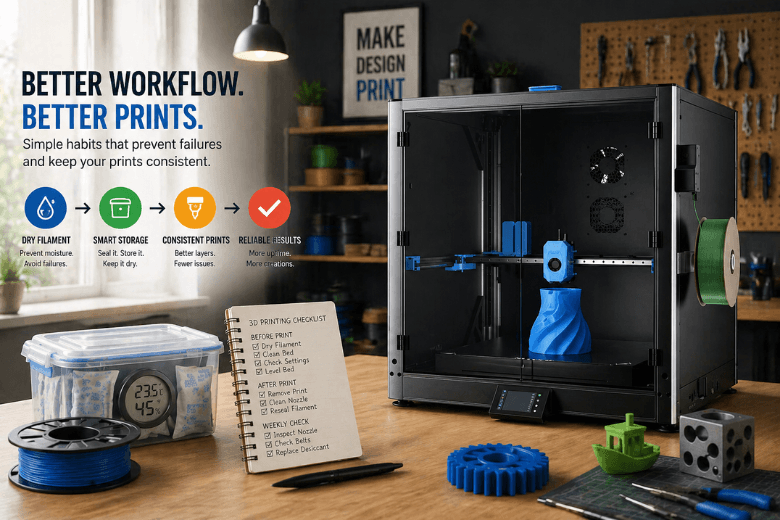
Key Takeaway: The upgrade that changes everything isn’t a mod. It’s a workflow—especially dry filament and predictable storage.
The “mystery failures” are often moisture failures
Most beginners think they’re fighting the printer.
A lot of the time, they’re fighting water.
Filament absorbs moisture from the air. In the hotend, that moisture flashes into steam, which disrupts extrusion and layer bonding. The result can look like random printer chaos:
-
popping/hissing from the nozzle
-
bubbles or pinholes on the surface
-
stringing and fuzz
-
weak, inconsistent layers
These are classic wet filament symptoms—and it’s why drying and storage fixes can feel “too easy” the first time they work.
Sovol’s practical rundown of what to look for is in Sovol’s “How to Tell If Your Filament Is Wet During Printing” (2025), and Polymaker’s materials-focused troubleshooting note in “Wet Filament” (Polymaker Wiki) maps to the same failure mode.
Why makerspaces get hit harder
In a shared space, filament is communal. Spools get left out. Bags don’t get resealed. “Someone else” was going to put it away.
So even if your printer is well set up, your inputs aren’t stable.
And stable inputs are what turn 3D printing into a teachable skill.
The workflow upgrade that scales: filament storage + drying people will actually follow
You don’t need a perfect lab setup. You need a setup that your community will follow without a lecture.
Here’s a makerspace-friendly baseline:
1) Make “reseal immediately” a rule, not a suggestion
The easiest failure to prevent is the one you never introduce.
Put resealing on the same level as “return the soldering iron to its stand.” No exceptions.
2) Use one default storage method across the space
Pick one standard and make it boring:
-
an airtight box (clear) + desiccant + a cheap hygrometer
-
or a dry box / filament dryer for the spools that live on the printers
If you want a simple internal resource link for that category, use Sovol Filament Dryers as the “community default” page—then standardise on whatever model(s) you choose.
3) Label spools like tools
Add two dates to every spool:
-
opened on
-
last dried on
That alone turns troubleshooting from folklore into a quick decision.
The 10-minute habit loop that buys you uptime
A community doesn’t rise to the level of its most skilled member.
It rises to the level of its default habits.
Teach this loop in induction and you’ll prevent a lot of “printer drama.”
Before every print (2 minutes)
-
confirm the spool was stored properly (or dry it if you’re unsure)
-
wipe the build surface (finger oils are real)
-
check first-layer setup (Z-offset / leveling routine)
-
sanity-check slicer settings (material + temps match the spool)
After every print (3 minutes)
-
remove the print cleanly (don’t gouge the plate)
-
reseal the spool immediately
-
if the print succeeded, write the profile name somewhere visible so others can reuse it
Once a week (5 minutes)
-
quick nozzle check
-
quick belt/fastener check
-
recharge/replace desiccant
This is the difference between “a temperamental machine” and “a reliable workshop tool.”
Mini buyer’s guide: choosing a first 3D printer for a community (with Sovol examples)
Most “first 3D printer” advice starts with a spec sheet.
For a makerspace, specs matter less than repeatability.
Use these criteria to evaluate any printer you’re considering:
-
Repeatability for beginners: can a new member succeed without a wizard present?
-
Uptime: does it keep running through lots of small jobs?
-
Documentation + support: can you fix issues quickly?
-
Open-source friendliness: can your community tinker without vendor lock-in?
-
Total cost of ownership: time, spares, consumables—not just sticker price.
Sovol is a reasonable brand to evaluate through that lens because it leans open-source and community-driven, and it has a UK storefront for local availability.
Here are scenario-based recommendations (treat them as examples, not absolutes):
If you want “beginner-friendly speed” with a modern interface
Tom’s Hardware’s SV07 review (2023) frames the SV07 as a Klipper-powered printer aimed at beginners.
Fit: workshops where you want faster iteration without turning setup into a research project.
If you want CoreXY-style performance for a more advanced makerspace
Tom’s Hardware calls the SV08 a “speedy Voron tribute” in their SV08 review (2024).
Fit: spaces with mentors who can standardise profiles and keep workflow discipline tight.
If you want large-format printing for jigs, fixtures, and big community builds
Large-format printing amplifies every workflow mistake—especially moisture.
If this is your direction, read Sovol’s positioning note in “Why the Sovol SV08 Max is so popular among makers” (2025), then treat drying and storage as non-negotiable.
Fit: communities printing big organisers, cosplay parts, workshop fixtures, and prototypes.
“Do we really need a filament dryer?” (a sane answer)
Sometimes: no.
Often: yes.
A reality-check that’s worth sharing with members:
-
If you mostly print PLA, in a fairly dry room, and you reseal spools reliably, you can often get away without a dryer for a while.
-
If you print PETG/TPU a lot, your space is humid, or spools sit out between sessions, a dryer pays for itself in fewer failed prints.
For a maker-style, tested view of the tradeoffs, Tom’s 3D explores it in “How bad is wet filament really is” (2021).
The point isn’t owning a dryer.
The point is having a rule people can follow:
-
“If it was left out overnight, it gets dried.”
-
“If it pops or strings unexpectedly, we dry before we troubleshoot anything else.”
Next steps (make this easy for your members)
If you lead a community, your job isn’t to become the best tuner.
It’s to make success repeatable.
Start this week:
-
pick one storage standard and make it the default
-
label every spool with “opened on” and “last dried on”
-
teach the 10-minute habit loop in induction
And when someone inevitably hits their first snag mid-workshop, keep two pages bookmarked: Firmware and Manuals and the Sovol Support Center.
Key takeaways
-
Your first 3D printer changes everything when you build a workflow, not when you chase upgrades.
-
Wet filament causes predictable failures—learn the symptoms and remove moisture from the equation.
-
In a UK makerspace, prioritise uptime and teachability over spec-sheet wins.
-
Standardise storage, drying, and habits so beginners can succeed without heroics.
Share:
From First Print to Full Projects: A 3D Printing Learning Path for UK Makerspaces
FDM vs Resin 3D Printer: Which Is Better for Home Users?