
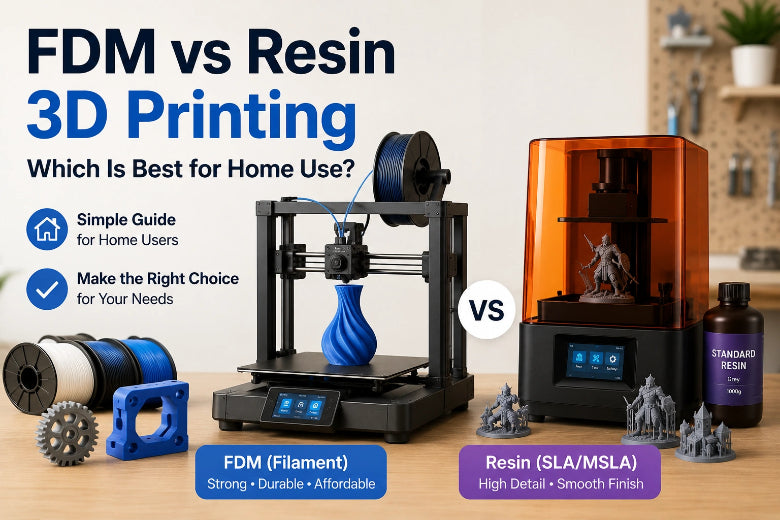
If you’re choosing between FDM/FFF (filament) and resin (SLA/MSLA) 3D printing for a home setup, the “best” option usually comes down to three home realities:
-
How much mess and odour you’re willing to manage
-
How noise-sensitive your household is
-
What you actually print most often (functional parts vs fine-detail models)
A good rule of thumb: start with FDM for everyday, low-fuss printing; add resin when detail is the whole point—and you’re ready for a controlled workflow.
Quick comparison matrix (home user focus)
|
Criteria |
FDM/FFF (filament) |
Resin (SLA/MSLA) |
Home-user winner |
|---|---|---|---|
|
Fine detail & surface finish |
Good, but layer lines are visible |
Excellent detail and smooth surfaces |
Resin |
|
Functional strength & durability |
Strong thermoplastics (PLA/PETG/ABS/TPU) |
Many resins are more brittle (though “tough” resins exist) |
FDM |
|
Upfront + ongoing costs |
Lower ongoing costs (filament is simpler) |
Higher ongoing costs (resin + wash/cure + PPE + consumables) |
FDM |
|
Mess/odour/safety steps |
Cleaner workflow |
Requires PPE, ventilation, wash + cure, careful waste handling |
FDM |
|
Noise |
Can be loud without mitigation |
Typically quieter in operation |
Resin |
|
Best for |
Functional parts, bigger prints, general-purpose use |
Miniatures, highly detailed models, small precision parts |
Depends |
For a broader technology overview, UltiMaker’s guide to resin vs FDM printing (SLA resin vs filament) is a solid baseline.
FDM vs resin 3D printer: the decision framework in 60 seconds
Ask yourself four questions:
-
Do I need tiny detail, or durable utility? (Resin for detail; FDM for durable parts.)
-
Can I run a chemical workflow every print? (Resin requires it.)
-
What’s my real budget after supplies? (Resin usually has a higher ongoing cost.)
-
Am I printing near sleeping people? (Resin is often quieter; FDM can be quieted.)
If you want the short verdict: for most homes, FDM is the safer default. Resin is the specialist tool.
Print quality & detail: when resin is genuinely worth it
If your definition of “quality” is sharp details, smooth surfaces, and tiny features, resin tends to win. That’s why tabletop miniatures, jewellery masters, and highly detailed figurines are commonly associated with resin printing.
If your definition of “quality” is parts that fit, survive use, and can be iterated cheaply, FDM often wins—even if you can still see layer lines.
Practical decision tip:
-
Choose resin if you’ll be annoyed by any layer lines and your models are mostly small.
-
Choose FDM if you expect to print brackets, mounts, enclosures, workshop tools, or anything you’ll actually handle.
Strength, durability, and real-world materials
For home users, material choice is where FDM quietly dominates.
With FDM you can choose from widely available thermoplastics (PLA, PETG, ABS, TPU) and tune for strength, flexibility, and temperature resistance. Resin can produce beautiful parts, but many standard resins behave more like hard plastics: crisp, but not always forgiving.
If you’re choosing based on “will it snap when a beginner drops it?”, Protolabs’ overview of SLA vs FDM for prototyping notes that FDM parts are often considered stronger and more durable than SLA parts in many practical cases.
Total cost of ownership (TCO): what home users actually pay
The sticker price of the printer is only the start.
FDM ongoing costs (typical)
-
Filament (PLA/PETG)
-
Occasional nozzles, build surfaces, and basic maintenance
Resin ongoing costs (typical)
-
Resin (and you’ll waste some during learning)
-
IPA or wash fluid
-
Gloves + wipes + consumables
-
FEP film replacements (and other wear parts)
-
A curing solution (dedicated UV station or a controlled setup)
Formlabs’ overview of how to choose between FDM vs SLA vs SLS is helpful for understanding why resin material costs often land higher than filament for comparable print volume.
If your priority is budget + predictable running costs, FDM is usually the calmer choice.
Smell, mess, and safety workflow: the make-or-break category
You selected “low-odour / low-mess” as a constraint—so let’s be direct:
-
FDM can smell a bit depending on filament, but it usually doesn’t require a chemical workflow.
-
Resin printing is a chemical workflow. You can do it safely at home, but you can’t do it casually.
A good “sanity check” is whether you’re willing to wear gloves and treat uncured resin as hazardous until the part is washed and fully post-cured.
RadTech’s safe handling guidance for 3D printing resins is a practical starting point, and University of Edinburgh Health & Safety’s 3D printer hazardous substances guidance adds a useful UK-context framing.
⚠️ Warning: If you don’t have a place to ventilate properly—and you’re not willing to use nitrile gloves and keep uncured resin off skin and surfaces—skip resin for now. You’ll hate it, and it’s not worth the risk.
Noise in a home environment (and how to reduce 3D printer noise)
If you’re printing in a flat, a spare room, or anywhere near sleeping people, noise matters.
Why FDM gets loud
FDM noise usually comes from motion: stepper motors, fans, and vibration resonating through furniture.
How to reduce 3D printer noise with FDM
You don’t need to accept “workshop loud” as the default. The biggest wins are:
-
Vibration isolation (rubber feet + foam + a paving stone)
-
An enclosure (also helps with drafts)
-
Sensible speed/acceleration settings
CNC Kitchen’s write-up on reducing 3D printer noise with a concrete paver is a practical starting point.
Is resin quieter?
Resin printers are often quieter in motion because they don’t have the same fast back-and-forth gantry movement. The trade-off is that “quiet” doesn’t automatically mean “low impact” in a home—odour and cleanup are the bigger constraints.
Speed & throughput: what “fast” actually means at home
“Which is faster?” is the wrong question.
A better question is: which gives you more finished parts per week with less frustration?
-
FDM can be faster for bigger parts and “one-off functional prints.”
-
Resin can be efficient for batches of small parts—but you still have to wash and cure.
So if you want fast iteration for functional projects, FDM usually feels faster end-to-end. If you want a tray of miniatures, resin can feel dramatically more efficient.
Space & workflow footprint
If you’re tight on space, factor in the whole workflow:
-
FDM footprint: printer + filament storage.
-
Resin footprint: printer plus a wash/cure zone, gloves/PPE, waste storage, and a surface you can clean confidently.
In a makerspace, you can dedicate this. In a home, it can quickly take over a room.
Who should choose which? (decision-stage scenarios)
Choose FDM/FFF if…
-
You want the most budget-predictable path to reliable printing.
-
You mostly print functional parts, enclosures, mounts, brackets, workshop tools, jigs.
-
You want low mess and a simpler “print → remove → done” rhythm.
-
You need to manage noise, and you’re willing to use vibration isolation or an enclosure.
If you’re evaluating modern FDM options in the UK and you value open-source friendliness, a CoreXY-class machine can be a sensible direction to shortlist. As a neutral example of what’s available, you can look at the Sovol SV08 Max 3D Printer alongside your other candidates—then score it using the criteria above.
Choose resin (SLA/MSLA) if…
-
Your primary output is miniatures or very fine-detail display models.
-
You’re happy to run a PPE + ventilation workflow every time.
-
You can dedicate a cleanable surface and a consistent post-processing routine.
Consider “FDM first, resin later” if…
-
You’re new to 3D printing and want confidence quickly.
-
You want low mess now, but you know you’ll want miniatures later.
-
You’re outfitting a community and you want the majority of members to succeed on day one.
Common buyer mistakes (and how to avoid regret)
-
Buying resin because the photos look better (without planning the workflow). If you can’t ventilate, it’s the wrong choice.
-
Underestimating ongoing costs. Resin setups often need more consumables and “support equipment.”
-
Ignoring filament moisture on FDM. If you’re fighting stringing and inconsistent first layers, dry filament can be the simplest fix—see Sovol’s filament dryer collection for what that category looks like.
-
Trying to print quietly at maximum speed. Noise is motion + resonance; control both.
FAQ
Is resin 3D printing safety at home manageable for beginners?
Yes—if you set up ventilation and treat uncured resin seriously from day one (gloves, eye protection, careful washing, full post-curing, and correct waste handling). If you can’t commit to that workflow, FDM is usually the better first printer.
Which is better for a small flat with neighbours?
Resin is often quieter in operation, but it can introduce odour and post-processing mess. If you can’t ventilate properly, a quieted FDM setup (vibration isolation + enclosure) is usually the more realistic option.
Which is cheaper long-term?
For many home users, FDM ends up cheaper and simpler to run because filament workflow is straightforward and consumables are minimal. Resin can be worth it when detail is the primary requirement.
Is FDM vs SLA the same as resin vs filament 3D printer?
In most consumer contexts, yes: FDM/FFF typically means filament extrusion, and SLA/MSLA typically means resin photopolymer printing.
Key takeaways
-
If you want low mess + predictable costs, FDM/FFF is usually the better home starting point.
-
If you want miniature-level detail, resin is hard to beat—but it’s a workflow commitment.
-
For noise-sensitive homes, resin is often quieter, while FDM can be made much quieter with isolation and an enclosure.
-
The best decision isn’t “which is higher quality?”—it’s “which workflow will I actually keep using?”
Next steps
If you’re making a purchase decision for a home or community setup, shortlist 2–3 printers and score them against the criteria above (noise plan, mess tolerance, real running costs, and the projects you’ll print most). If you’re comparing UK-stock FDM options, you can browse the Sovol UK store and evaluate models alongside your other candidates using the same checklist.
Share:
Your First 3D Printer Changes Everything
3D printer for home, school and workshop: buying guide