
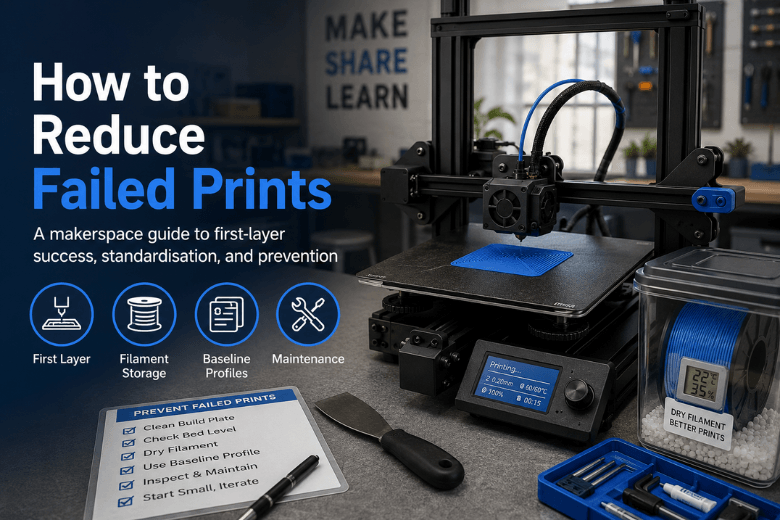
If you run a makerspace (or you’re the person everyone pings when a printer acts up), “failed print” usually means more than wasted filament. It means queue chaos, mentor time, and confidence loss.
The good news: most failures come from a small set of repeatable issues. The fastest way to reduce failed prints is to stabilise the first layer, standardise the variables that drift in shared spaces, then troubleshoot what’s left with a strict one-change-at-a-time approach.
Key takeaways
-
Treat the first 10 minutes as a repeatability check: clean surface, confirm Z-offset, slow first layer.
-
Standardise what changes most in shared spaces: build surface, filament storage, and baseline slicer profiles.
-
Don’t tune blind. Log failure types for a month, then upgrade the weakest link.
-
Spend money where it reduces repeat work: consistent bed leveling, a reliable build surface, and drying when moisture symptoms show.
A prevention-first baseline (30 minutes per printer)
This is the “stop the bleeding” routine. It’s designed to be teachable and repeatable.
1) Clean the surface like it matters (because it does)
First layer adhesion depends on the surface being clean, flat, and correctly installed. Prusa’s troubleshooting order starts with surface cleanliness and nozzle height for a reason. Their Prusa Knowledge Base guidance on first-layer issues is a solid reference for what to check and in what order.
In practice, the easiest makerspace rule is: if you touched the build plate with your fingers, clean it again.
What failure looks like when this is the problem: the first layer lines don’t merge, corners lift early, or the print detaches during a travel move.
2) Make Z-offset a routine, not an emergency
Most “mystery” failures are just a Z-offset that drifted after a nozzle swap, a sheet change, or a bump.
Use a one-layer test patch and live-adjust Z in tiny increments until the lines touch, look slightly flattened, and don’t get ploughed up by the nozzle.
A practical, step-by-step order you can turn into an SOP is Sovol UK’s bed-adhesion fix order.
This is also where 3D printer bed leveling belongs: not as an occasional “deep clean day”, but as a repeatable check triggered by specific events (moving the printer, changing nozzle, changing sheet).
3) Slow the first layer and ramp cooling later
Make the first layer easy to win:
-
Slow first-layer speed
-
Slightly wider first-layer line width
-
Fan off/low for the first couple of layers, then ramp up
If the first layer is solid, you can usually recover from small issues later. If the first layer is marginal, everything after it is a gamble.
4) Lock temperatures before you touch exotic slicer tweaks
A reliable baseline is boring:
-
Nozzle temperature appropriate for the filament
-
Bed temperature appropriate for the filament
-
No sudden bed-temp drops after layer 1
If you change temperature, do it in small steps and re-run the one-layer patch.
Standardise the variables that drift in shared spaces
If you want fewer failures, focus less on “perfect profiles” and more on removing hidden variation.
The standardisation ladder (biggest wins per pound)
|
Standardise this |
Why it reduces failed prints |
What it prevents |
|---|---|---|
|
One surface type per printer |
Keeps adhesion and temps predictable |
Start failures that look random |
|
One first-layer test file on every SD/USB |
Makes Z-offset checks routine |
Long prints launched on bad first layers |
|
One filament storage rule (sealed + desiccant) |
Reduces moisture-driven variability |
Stringing, weak layers, inconsistent flow |
|
One baseline profile per material |
Stops settings drift |
Cooling/temp/retraction mismatches |
|
One maintenance cadence |
Catches clogs and looseness early |
Mid-print failures and downtime |
Pro Tip: Put a laminated print-start checklist on each printer: clean plate, confirm material/profile, check spool path, run first-layer patch after any change.
Own a “known good” profile for the materials you actually run
Pick the 2–3 materials that do most of your work (often PLA and PETG). For each, maintain one baseline profile per printer family.
If you need variants, name them by purpose, not by person:
-
PLA-detail
-
PLA-fast
-
PETG-functional
That keeps FDM 3D printer troubleshooting grounded. When a print fails, you’re comparing behaviour against a known baseline, not against someone’s untracked tweaks.
Turn maintenance into risk reduction
For decision-stage ops, the question is simple: what reduces downtime and mentor load?
A checklist-based cadence is easier to teach than “feel-based” maintenance. Sovol UK’s 3D printer maintenance checklist is a good starting point.
Prioritise checks that directly map to failures:
-
Nozzle condition (partial clogs, wear)
-
Belts and mounts (loose hardware causes shifts and vibration)
-
Cable drag/snags (sudden mid-print failures)
-
Plate condition (worn or contaminated surfaces)
Upgrade decisions: what actually reduces failures most
Don’t buy upgrades because they’re popular. Buy them because they remove your most common failure type.
Here’s the decision ladder most makerspaces end up following.
1) Improve bed-level consistency (process first, then automation)
If your fleet fails at the start, you’re paying a first-layer tax.
Start with process:
-
Trigger rules for re-leveling
-
One-layer patch before long prints
-
A clear “stop and reset” rule when the first layer looks wrong
Automation can reduce manual error, but it adds calibration and another component to maintain. In a shared space, that’s fine as long as someone owns the procedure.
2) Choose a build surface you can keep consistent
A consistent surface reduces first-layer failures more than most slicer “optimisations.” Pick what fits your materials and your users, then standardise.
If you’re also deciding between printer architectures for stability at speed, understand how motion system design affects vibration and ringing. Sovol’s guide to CoreXY printer technology explained is useful background for that decision.
3) Add drying when you see wet-filament symptoms
A filament dryer isn’t mandatory for every spool, but it’s a high-leverage fix when the evidence points to moisture.
If you’re seeing wet filament signs (popping/hissing, inconsistent extrusion, fuzzy surfaces, stringing that never quite goes away), drying plus better storage often reduces failures without touching the printer.
4) Use an enclosure for warping, drafts, and large parts
Enclosures help when failures are driven by temperature swings or drafts, especially with large, warp-prone parts.
They are not a universal upgrade. If your main issue is first-layer inconsistency, fix that first.
5) Treat nozzle/hotend health as part of uptime
If failures happen mid-print, don’t ignore the boring suspects:
-
partial clogs
-
worn nozzles
-
high spool drag
-
inconsistent flow
Delamination and weak layer bonding are often a combination of temperature, flow, cooling, and speed. The Wevolver guide to layer separation (delamination) is a useful reference for the most common causes and what to change first.
Troubleshooting ladder (after the baseline is stable)
Use this like triage. One symptom, one likely cause, one first fix.
Symptom: the first layer won’t stick at all
Likely causes:
-
dirty plate
-
Z-offset too high
-
first layer too fast / cooling too high
First fix:
-
Run the ordered check: clean → one-layer patch → tiny Z adjustments → small temperature steps → then slicer tweaks.
Symptom: one side sticks, the other doesn’t
Likely causes:
-
bed not level / mesh out of date
-
sheet not seated flat
First fix:
-
Print a larger one-layer patch to reveal the pattern.
-
Re-level/refresh mesh.
-
Check for debris under the sheet.
Symptom: print starts fine, then corners lift (warping)
Likely causes:
-
drafts or cold airflow
-
bed temp too low
-
too much cooling early
First fix:
-
eliminate drafts
-
increase bed temp in small steps
-
add a brim for sharp-corner parts
Symptom: sudden under-extrusion mid-print
Likely causes:
-
partial clog
-
spool drag/tangles
-
heat creep (printer/environment dependent)
First fix:
-
inspect the spool path and drag
-
clear the nozzle / run cleaning filament
-
treat repeats as a maintenance issue, not a one-off
Symptom: weak parts that split along layers
Likely causes:
-
nozzle temp too low
-
cooling too high
-
speed too high for your hotend’s flow
First fix:
-
increase nozzle temp in small steps and re-test
-
reduce fan and/or slow down on thicker sections
Next steps: reduce failures, then decide what to upgrade
For community leaders, the best outcome isn’t a “perfect” printer. It’s a system that beginners can use without constant rescue.
Start with the baseline and standardisation ladder. Track failures for a month by category (first layer, warping, extrusion, layer bonding). Then spend money only where it removes repeat work.
If you’re comparing options with UK shipping and support in mind, use a criteria-led checklist. As one example destination to review specs and support terms, you can look at the Sovol SV08 Max 3D Printer page and ask: does it reduce your top two failure modes, and can your team maintain it?
Share:
Why my 3D prints look bad even with the right settings
Why Your 3D Print Looks Bad Even with the Right Settings