
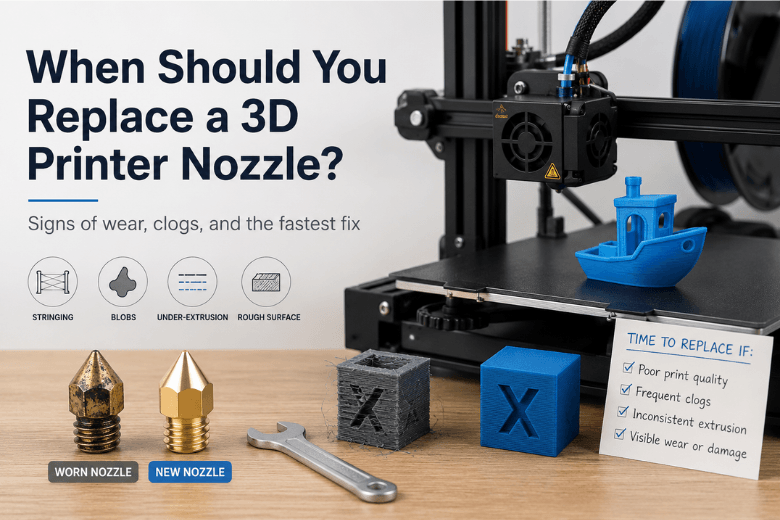
If you run a makerspace (or you’re the person everyone asks when a printer starts acting up), you’ve seen this movie: prints that were fine last month suddenly start stringing, under-extruding, or leaving weird blobs—then everyone argues about whether it’s the filament, the settings, or “the nozzle’s gone.”
The truth is boring but helpful: nozzles are consumables, and replacement is often the fastest way to restore reliability—but only after you’ve ruled out the handful of problems that look like nozzle wear.
Key takeaways
-
If print problems persist after a proper clean and a quick flow test, replacing the nozzle is usually the fastest fix.
-
Abrasive filaments (carbon/glass fibre filled, glow-in-the-dark) can destroy a standard brass nozzle quickly—E3D’s abrasive wear test (updated 2025) found heavy wear after just 250g of carbon-fibre filament on a brass 0.4mm nozzle.
-
“Nozzle wear” is often tip damage, not just a bigger hole—CNC Kitchen’s abrasion experiment (2019) shows how rounding/shortening can quietly wreck first layers.
-
Changing a nozzle is safe if you hot-tighten correctly and don’t twist the heatbreak; you’ll still need to re-check Z-offset / first layer after the swap.
Nozzle wear vs clog: replace vs clean vs recalibrate
Use this table to make a fast call before you burn time “tuning around” a failing nozzle.
|
What you’re seeing |
Most likely cause |
Try first |
Replace the nozzle when… |
|---|---|---|---|
|
Under-extrusion that comes and goes; extruder clicks; flow looks uneven during a purge |
Partial clog / contamination |
Heat + purge; cold pull; check filament path |
It improves briefly, then returns; purge flow is still inconsistent |
|
Sudden stringing/blobs without slicer changes; surfaces look rougher; detail is worse |
Wear or damaged tip/orifice |
Visual check; purge test |
Tip is rounded/shortened; flow bends/curls; same gcode keeps failing |
|
First layer suddenly “too close” after months; you’re chasing Z-offset; nozzle drags |
Tip shortening (wear) or bed/gantry drift |
Re-level bed; check probe mount; inspect nozzle tip |
You’ve re-leveled and it still drifts; nozzle tip shows missing material |
|
Random leaks of melted plastic around the heater block |
Poor seal / loose nozzle / heatbreak interface |
Hot-tighten properly; clean threads |
Leak returns after correct tightening, or threads look damaged |
Pro Tip: When you’re troubleshooting in a shared space, swap a known-good nozzle in first. If the problem disappears, you’ve just saved an hour of “maybe it’s retraction” debates.
Signs of a worn 3D printer nozzle (the checks that actually help)
(These are the fastest checks to run before you decide to swap parts.)
Symptoms like stringing, blobs, or rough top layers can come from a dozen places. The goal isn’t to memorise a list—it’s to run a few quick checks that help you separate wear from clogging and calibration.
1) The “flow shape” test (quick purge)
Heat the hotend, lift the nozzle well clear of the bed, and extrude filament slowly.
-
A healthy setup tends to produce a steady strand.
-
If the filament bends sharply to one side or curls back on itself, that can indicate a damaged nozzle or uneven orifice—this simple diagnostic is described in a nozzle-wear discussion on 3D Printing Stack Exchange (2016).
This test isn’t perfect (air currents and temperature can affect the strand), but it’s a fast “something is mechanically off” signal.
2) Visual comparison: tip rounding and missing material
No special tools needed: remove the nozzle (or inspect it closely while hot and safe) and compare it to a new one.
You’re looking for:
-
Rounded/flattened tip where there used to be a crisp cone
-
Shortened tip (less “point,” more “stub”)
-
An orifice that looks oval, chipped, or visibly larger
The reason tip shape matters is that it changes how the nozzle interacts with the last layer it printed. CNC Kitchen’s testing suggests abrasion often attacks the tip geometry first, and that can show up as first-layer weirdness and increased stringing before the hole looks dramatically bigger.
3) “Why do I keep increasing flow?”
If you find yourself nudging extrusion multiplier/flow upward over time to maintain the same wall thickness, that’s a red flag. It can happen for multiple reasons—but if it correlates with a nozzle that’s been through abrasive filaments or hundreds of prints, wear moves up your suspect list.
For a structured calibration workflow (especially if you’re trying to rule out settings issues), Teaching Tech’s calibration guide (updated 2026) is a useful reference.
How often to change 3D printer nozzle (a realistic answer)
(If you’re searching for a fixed interval, this section will help you turn your usage into a decision.)
If you’re hoping for a universal number of print hours, you won’t get one—because the replacement interval depends heavily on what you print.
Here’s a more useful way to think about it:
-
If you print mostly PLA/PETG/ABS (non-abrasive), you can often run a nozzle until you see persistent symptoms that don’t respond to normal cleaning.
-
If you print abrasive filaments (carbon-fibre filled, glass-fibre filled, glow-in-the-dark, metal-filled), you should assume your nozzle is a wear item and plan accordingly.
E3D’s own testing makes this point uncomfortably clear: in their abrasive test, a standard brass nozzle showed severe wear after 250g of carbon-fibre filament, while hardened steel showed no observable wear even after 2.5kg of carbon/glass-filled filament.
Key Takeaway: If your makerspace runs abrasive materials even occasionally, it’s usually smarter to upgrade the nozzle material than to keep “mystery tuning” around a worn brass nozzle.
Brass vs hardened steel nozzle: when upgrading makes sense
(If you’re mentoring a group, this is the section that prevents repeat failures.)
Most printers ship with brass nozzles because they’re cheap and they transfer heat well. For everyday PLA/PETG, that’s fine.
Where brass falls down is abrasion. CNC Kitchen’s testing also highlights another trap: some nozzles (especially cheap ones) can have tip geometry that behaves like a slightly larger nozzle, which can increase stringing or reduce fine detail even when “0.4mm” is stamped on the side.
A practical rule for communities:
-
If your filaments include glow, fibre-filled, or metal-filled, treat a hardened nozzle as part of the standard setup.
-
If you only occasionally run abrasives, consider dedicating one printer (or one hotend) to those materials and keep the rest on brass for simpler tuning.
Replace 3D printer nozzle safely (without damaging your hotend)
You don’t need to be precious—but you do need to avoid two common mistakes: trying to remove a cold nozzle with too much torque, and twisting the hotend assembly.
Step-by-step (printer-agnostic)
-
Heat the hotend to a safe working temperature for the installed filament.
-
Unload or retract filament so you’re not fighting pressure at the tip.
-
Hold the heater block steady with a spanner/pliers so the heatbreak doesn’t twist.
-
Loosen the nozzle carefully (hot), then remove it.
-
Install the new nozzle by hand first (to avoid cross-threading).
-
Hot-tighten to achieve a proper seal (snug, not brutal).
-
Purge filament to confirm smooth flow.
-
Check for leaks around the heater block while hot.
⚠️ Warning: Hotends can burn you instantly. Gloves, eye protection, and a stable tool grip aren’t “overkill” when you’re mentoring beginners.
After the swap: the two calibrations people forget
-
Re-check your first layer / Z-offset. Even small differences in nozzle length or tip geometry can shift the first layer.
-
Run a quick flow sanity check before a long job. If the printer suddenly needs wildly different flow settings, something else is wrong.
A makerspace SOP that reduces downtime
Nozzle issues are expensive in shared spaces because they multiply: one printer starts failing, people queue on the remaining machines, and then those machines get pushed too hard.
A simple SOP helps:
-
Stock a small nozzle kit: at least two known-good 0.4mm nozzles per printer model you run, plus one hardened nozzle for abrasive work.
-
Label nozzles by material and diameter (brass 0.4, hardened 0.6, etc.). Prevents “why is this profile acting weird?” moments.
-
Create a “swap first” rule for recurring issues: if a printer has repeated under-extrusion or stringing after cleaning, swap the nozzle and log it.
-
Schedule preventative checks monthly (or by spool count) rather than waiting for failures.
For UK-based parts and spares browsing, you can point members to Sovol UK’s FDM parts collection, and SV08 owners can use SV08 nozzle kits on Sovol UK.
Next steps
If you want to make this repeatable across your community, start with a simple maintenance rhythm and a standard troubleshooting sequence. Sovol UK has a solid baseline checklist here: Sovol UK’s maintenance checklist (2026). And if you’re building a spares drawer, Sovol UK FDM parts is an easy place to start.
Share:
How to Stop 3D Prints from Warping on Large Models
How to get cleaner 3D prints without slowing everything down