
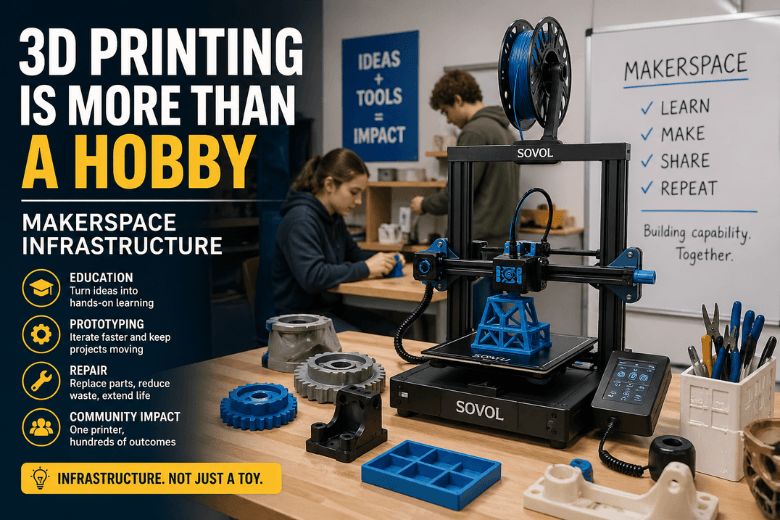
If you run a makerspace, mentor a student group, or lead an online maker community, you’ve probably heard some version of this: “3D printing is fun… but it’s mostly for little plastic trinkets.”
Here’s the thesis: in a community setting, 3D printing isn’t a pastime — it’s infrastructure.
Not because it’s flashy, but because it changes what your members can do:
-
prototype ideas fast enough to keep workshops moving
-
replace small broken parts instead of binning whole projects
-
teach practical design skills with immediate feedback
-
make jigs, fixtures, and teaching aids that don’t exist off-the-shelf
The trick is to stop treating the printer like a novelty and start treating it like a shared tool with a workflow.
3D printing is manufacturing — just on a smaller scale
Most desktop machines in the UK maker scene use FFF 3D printing (also called FDM): melted thermoplastic is pushed through a nozzle and built up layer by layer. UltiMaker puts it plainly in its explainer on what FFF 3D printing is: it’s an additive manufacturing process that’s become accessible because the hardware and running costs are relatively low.
That single shift — manufacturing you can run on a workbench — is why the “just a hobby” framing breaks down.
In a community setting, you’re not chasing Instagram prints. You’re building capability: making it easier for people to move from “idea” to “thing that works.”
The makerspace multiplier: one printer, hundreds of outcomes
A personal printer is often judged by what one person makes.
A makerspace printer should be judged by what it unlocks for everyone:
-
throughput: how many people can finish a project in a session?
-
uptime: how often is it actually available?
-
teachability: can a newcomer get a win without three weeks of tuning?
-
repeatability: can you run the same workshop next month without reinventing the settings?
That’s why “3D printing is more than a hobby” is really shorthand for:
Key Takeaway: The value of 3D printing scales with the community — but only if you run it like a system, not a toy.
Where 3D printing stops being a toy (and starts paying rent)
1) Education: it turns abstract ideas into objects people can learn from
“3D printing in education” isn’t a buzz phrase — it’s already normal for printers to show up in libraries, dormitories, laboratories, and makerspaces, according to a study on 3D printers in educational settings and makerspaces.
The obvious win is engagement: students care more when something becomes tangible.
The less obvious win is skill-building. When learners model, slice, print, and iterate, they’re practising a real workflow used in engineering and product development: design → test → revise. That’s not arts-and-crafts. It’s how modern prototypes get built.
2) Prototyping: it keeps momentum in workshops and community projects
Community leaders know the bottleneck: you can teach CAD and electronics all day, but people lose momentum when they have to wait weeks for a part.
Desktop 3D printing keeps projects alive because it makes iteration cheap:
-
a bracket doesn’t fit? tweak it and reprint
-
an enclosure needs another hole? revise and rerun
-
a jig would make the next build easier? print one for the tool wall
This is where a printer becomes a facilitator. It reduces friction — which increases participation.
3) Repair: it supports right-to-repair culture (with real caveats)
“3D printing for repair” is one of the strongest arguments for makerspaces — and also the one that needs the most honesty.
iFixit nails the balance in its take on 3D-printed spare parts (and why it’s not a silver bullet): printing a spare can be incredibly convenient, but the real work is tolerances, material choice, and iteration.
In other words: repair prints succeed when you treat them like engineering, not magic.
If you want a simple rule your mentors can teach:
-
Good candidates: parts that need decent fit, aren’t under heavy stress, and don’t live near high heat.
-
Bad candidates: safety-critical parts, high-load gears, anything where failure could cause injury or expensive damage.
That nuance is exactly why makerspaces are a perfect home for repair printing: you have the people to teach the judgement, not just the machine to make plastic.
The counterargument: “3D printing is unreliable and messy in shared spaces”
This complaint isn’t wrong. A printer that works fine for one careful hobbyist can become a chaos machine when 50 people touch it.
Most of the “3D printing is just a hobby” narrative is really “3D printing is too high-maintenance.”
So let’s be blunt: your community doesn’t need more printers — it needs a more reliable printing service.
That’s a leadership and process problem as much as a hardware problem.
Treat it like a service: a simple operating model
If you want 3D printing to deliver value beyond hobbies, standardise three things:
-
A baseline workflow
-
one slicer profile per printer for beginner use
-
one test print that mentors recognise (first-layer + bridging + overhangs)
-
clear “definition of done” for common prints
-
-
Roles and permissions
-
one or two people own nozzle swaps, firmware changes, and deep tuning
-
newcomers can load filament and start known-good jobs
-
-
A maintenance rhythm
-
scheduled cleaning and checks
-
a small spares kit (nozzles, PTFE where relevant, build surface care)
-
If you do nothing else, do this: reduce variability. Variability is what turns printers into time sinks.
Safety is part of “more than a hobby”
In community environments, the most grown-up thing you can do is acknowledge safety without drama.
The peer-reviewed paper on educational makerspaces notes that many environments are designed for comfort, not contaminant control, and discusses the need for controls and procedures in spaces where printers run regularly (see that same study for detail).
You don’t need to turn your makerspace into a lab — but you do need basic standards:
-
consider enclosures or placing printers in a separated area
-
think about ventilation if you run printers for long periods
-
document a simple SOP for what materials are allowed, and when
This is another reason 3D printing is more than a hobby: you’re responsible for other people’s exposure and safety. That’s not a casual relationship with a tool.
What community leaders should look for in a printer (without getting lost in specs)
Awareness-stage advice should be simple, not a shopping list.
If your aim is community reliability, prioritise:
-
maintainability: can mentors service it quickly?
-
repeatability: can you get the same result across different users?
-
open-source friendliness: does it align with your community’s ethos and ability to tinker responsibly?
-
support + spares access: downtime kills workshop schedules
-
noise + footprint: shared spaces have limits
If you want a concrete example of a brand that positions itself around open-source collaboration and UK support, Sovol is one to look at — start with the broader Sovol SV08 ecosystem and evaluate it against the criteria above.
(Notice what we’re not doing here: claiming “best,” quoting speed numbers, or pretending one model fits every makerspace. That’s decision-stage content — and this post isn’t that.)
So what changes when you stop calling it a hobby?
When 3D printing becomes “infrastructure,” you make different choices:
-
you measure success by uptime and successful first prints, not by novelty
-
you teach people to choose the right tool — and to recognise when printing is the wrong answer
-
you invest in repeatable workflows so workshops don’t turn into troubleshooting clinics
That’s the difference between a printer gathering dust in the corner and a printer that becomes part of your community’s identity.
Key takeaways
-
3D printing is accessible manufacturing — especially via FFF 3D printing — not inherently “toy making.”
-
In a makerspace, the value multiplies when you run printing as a service (profiles, roles, maintenance rhythm).
-
The biggest unlocks for communities are education, prototyping, and repair — but repair needs realistic expectations.
-
Safety and SOPs are part of maturity, especially when printers run regularly in shared environments.
-
When you evaluate printers for a community, look for repeatability, maintainability, open-source friendliness, and local support.
Next steps (low-commitment)
If you lead a makerspace, try this small experiment: pick one workshop you run often, and design a standard print kit for it (one slicer profile, one test print, one starter model). Then track how many attendees finish successfully.
You’ll learn quickly whether 3D printing in your community is “a hobby”… or a capability you can build on.
Share:
How 3D Printing Works: From Design to Finished Product
The New Era of Personal Manufacturing: A Buyer’s Guide for Makerspaces