
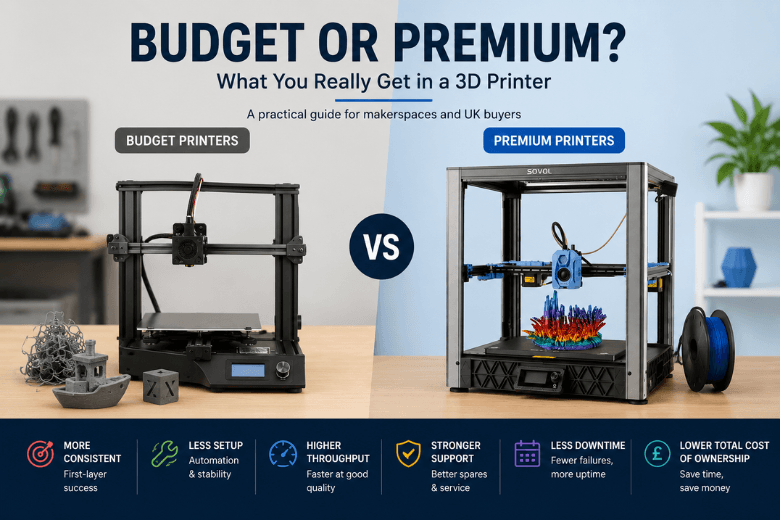
If you run a makerspace, school lab, or you’re just the unofficial “printer person” in a UK community, you’ve probably seen both sides of the 3D printer market.
And if you’ve ever tried to pick the best 3D printer for makerspace use, you’ll know the hard part isn’t finding models—it’s working out what you actually gain when you move from “budget” to “premium.”
-
A £200–£400 machine that can produce genuinely impressive parts… but sometimes only after a week of tuning and a few sacrificial spools. (That’s the heart of the budget 3D printer vs expensive 3D printer debate: what you pay in money vs what you pay in time.)
-
A pricier printer that feels almost boring in the best way: it just starts prints, finishes prints, and doesn’t need you to babysit every job.
This guide breaks down what you actually get when you pay more—using practical criteria that matter in shared spaces: first-layer success, downtime, support, spare parts, and 3D printer total cost of ownership.
Key takeaways
-
“Premium” usually buys you repeatability and reduced setup effort, not magically better-looking parts.
-
In shared spaces, the expensive cost isn’t the printer—it’s failed prints + staff time + downtime waiting for parts.
-
Speed is only a benefit if the printer can stay stable at higher acceleration without quality falling apart.
-
UK buyers should weigh landed cost predictability, returns friction, and how fast you can get spares.
Budget vs premium 3D printers: a quick comparison
|
Criteria |
Budget printers (typical) |
Premium/prosumer printers (typical) |
What this means in practice |
|---|---|---|---|
|
First-print success |
More variable |
More consistent |
Less time spent “getting to good” |
|
Calibration burden |
More manual checks |
More automation + stability |
Fewer support requests from beginners |
|
Throughput |
Often slower at acceptable quality |
Faster and cleaner at speed |
More workshop capacity |
|
Materials |
Usually happiest with PLA/PETG |
Wider material comfort zone |
More options for functional parts |
|
Maintenance |
More frequent small fixes |
Fewer interruptions, easier recovery |
Higher uptime |
|
Support + spares |
Can be uneven |
Typically stronger |
Lower risk when something breaks |
|
Real cost |
Low upfront, higher time cost |
Higher upfront, lower time cost |
Depends how much you print |
Key Takeaway: If your priority is “as many successful prints as possible with the least human intervention,” premium features start paying for themselves faster than most people expect.
1) Print success rate and consistency
Most “budget vs premium” debates get stuck on print quality. In practice, the bigger gap is consistency.
A budget printer can absolutely produce a beautiful PLA model. The question is whether it produces the same result tomorrow, with a different operator, on a different spool.
Budget machines tend to be less forgiving when:
-
the bed surface is slightly dirty
-
someone bumped the bed or moved the printer
-
the room is colder/draftier than usual
-
the filament is a bit wet
Premium/prosumer machines don’t eliminate these problems—but they often reduce how quickly they turn into failed prints.
The makerspace reality
If you’re supporting lots of users, the winning printer is the one that doesn’t punish small mistakes. That’s what “premium” often buys: tolerance for variation.
2) Setup and calibration burden
Budget printers can be great if you have a confident operator who enjoys tuning. The moment you put that printer in front of beginners, the calibration burden becomes your workload.
Look for features that reduce the two most common time sinks:
-
first-layer failures
-
re-tuning after small changes (new filament, nozzle change, someone adjusted something “to help”)
High-impact features for shared spaces include:
-
auto bed leveling / bed probing
-
a build surface that releases parts easily (removable spring steel/PEI helps)
-
filament runout detection (saves long prints)
The key question isn’t “does it have auto leveling?” It’s “does it get you from ‘power on’ to a good first layer with minimal fuss?”
3) Speed vs quality: what higher price actually buys
Speed claims are easy to print on a spec sheet. The real difference is throughput at acceptable quality.
On many budget printers, you can raise speeds—but you’ll often see:
-
ringing/ghosting on edges
-
sloppy corners
-
inconsistent layers
-
more failures on taller prints
Premium/prosumer machines are more likely to stay stable at higher acceleration because of a combination of:
-
stiffer frames
-
better motion systems
-
more modern firmware features that compensate for vibration and extrusion dynamics
If you run workshops, throughput matters. But you should evaluate speed the same way you’d evaluate a car’s fuel economy: in your real conditions, not the best-case headline number.
4) Motion system and rigidity: why it matters
You don’t need to be an engineer to benefit from better motion design. The practical impact shows up as:
-
fewer artifacts at speed n- better dimensional consistency
-
less “mystery drift” over time
Many budget printers use simpler motion setups and lighter frames. That’s not automatically bad—it’s how they hit the price. But it can limit how fast you can push them without trading away quality.
More premium designs are often engineered to reduce vibration and keep motion consistent, which is a direct path to better high-speed printing and fewer mid-print surprises.
5) Materials and environment control
If your community prints mostly PLA (and some PETG), budget printers can be perfectly sensible.
Where premium starts to matter is when you want:
-
better reliability on larger parts
-
more consistent results in a drafty space
-
higher success with warp-prone materials
An enclosure (even a simple one) can make a bigger difference than people expect—particularly for materials like ABS/ASA that dislike drafts and temperature swings.
That said: in shared spaces, printing higher-temp materials also raises practical considerations (ventilation, odour, safety policies). Sometimes the “premium” choice is deciding not to push a makerspace printer into materials your space isn’t set up to handle.
6) Maintenance and spare parts: the hidden cost centre
The real cost of a printer isn’t just what you pay at checkout. It’s also the cost of:
-
failed prints and wasted filament
-
the time spent diagnosing issues
-
the days a printer sits idle waiting for a part
This is why total cost of ownership (TCO) matters. Formlabs has a good high-level explanation of thinking beyond purchase price in their guide to how to calculate 3D printer cost.
A practical rule for makerspaces:
-
If you print occasionally, budget can be the right call.
-
If you print constantly, reliability and repairability become more valuable than a low upfront price.
7) Support, warranty, and UK buying realities
In the UK, the buying experience can swing wildly depending on where the printer ships from.
Two practical points that affect “value”:
-
Landed cost surprises. VAT (and sometimes duty/fees) can be charged on the full package value including shipping. GOV.UK’s page on tax and duty for goods sent from abroad is the most reliable baseline reference.
-
Returns and warranty friction. If something arrives damaged or develops a fault early, returning a heavy printer internationally can be slow and expensive.
For community spaces, the risk isn’t just money—it’s downtime. A printer that’s cheap but hard to return is often a false economy.
Pro Tip: Before you buy, ask one question: “If this printer fails next week, what’s the fastest realistic path back to working?” The answer usually tells you whether you’re buying a tool—or adopting a project.
8) Software, firmware, and openness (especially for communities)
For maker communities, openness isn’t ideology—it’s practical.
What matters:
-
Can you use well-known slicers?
-
Are profiles and documentation easy to share?
-
Can you standardise settings across multiple machines?
-
Are replacement parts proprietary, or broadly available?
A big part of “premium” is having a workflow that multiple people can follow without reinventing the wheel every week.
Is a premium 3D printer worth it? Who should choose which?
Budget is usually right if…
-
you’re printing occasionally, and failed prints aren’t costly
-
you have a confident “owner” who enjoys tuning and maintenance
-
you mostly print PLA/PETG and smaller parts
-
you can tolerate learning time (and you’re buying the learning)
Premium/prosumer is usually right if…
-
the printer needs to be reliable for workshops/classes
-
multiple people will use it (especially beginners)
-
downtime is expensive or embarrassing
-
you want higher throughput without quality falling apart
-
you need better support, spares availability, and clearer documentation
Where Sovol tends to fit (and where it doesn’t)
Sovol’s UK store positioning leans toward open-source-friendly, performance-oriented printers with local UK dispatch/support.
For example, printers like the Sovol SV08 and Sovol SV08 Max are positioned around higher-throughput, feature-rich setups (CoreXY motion, automation features listed on-page, and UK shipping/warranty/returns details).
What’s useful about looking at these pages—even if you don’t buy them—is that they show the kind of feature set that tends to move a printer from “budget hobby machine” into “prosumer tool.”
If you’re evaluating any brand, a good credibility check is whether manuals, firmware, and downloads are easy to find—Sovol’s Firmware & STL & User Manual downloads page is a good example of what “support surface area” looks like.
Next steps: use a 10-minute checklist before you spend money
Before you buy, pick 2–3 candidate printers and run this quick check:
-
What’s your real weekly usage (hours printed, number of users)?
-
What’s the cost of one failed 12-hour print (time + filament + frustration)?
-
How quickly can you get common spares in the UK?
-
Is the support/warranty path clear in writing?
-
Do you have stable profiles you can standardise (or a community that has them)?
If you want a maintenance baseline to keep printers alive in shared spaces, this 3D printer maintenance checklist is a solid starting point.
Share:
CoreXY 3D Printers Explained: Why Speed and Stability Matter
How to Get Better 3D Print Quality from Your Printer Setup