
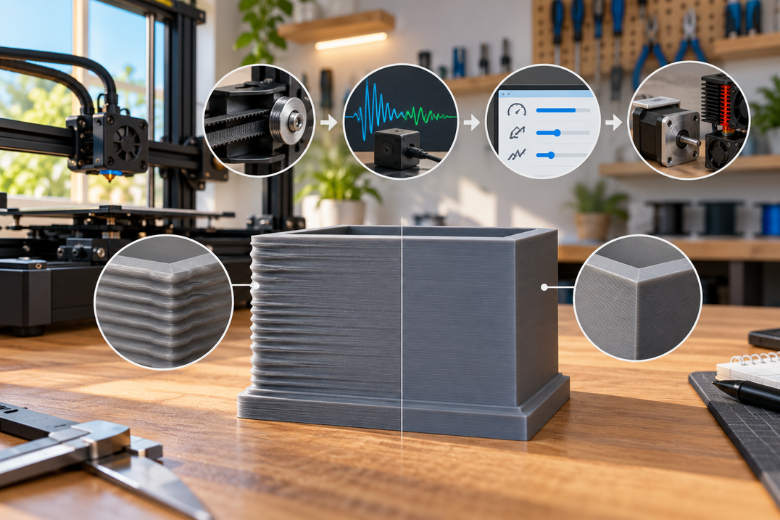
Clean walls at production speed on a shared machine come from fixing things in the right order, not from finding the one magic setting. Mechanics come before calibration, calibration before slicer limits, and slicer limits before hardware. Get that sequence wrong and you spend an evening tuning input shaping on a printer whose belts were the actual problem.
Ringing and ghosting are the same defect: a repeating echo on the surface, spaced at the frame's natural frequency, not a Z wobble and not a VFA band. Every step below carries a time cost, a money cost, and one more question: can another member repeat it without you standing there?
Key Takeaways
- Order matters more than any single setting: mechanics, then calibration, then slicer limits, then hardware.
- Free mechanical checks come first because input shaping cannot cancel a loose belt.
- Input shaping is a measurement, not a guess; copied values rarely fit a second machine.
- A fix only counts once the next member can repeat it from a written note.
How to Avoid Ringing and Ghosting in Fast 3D Prints: The Order That Works
Work through five stages in order, and stop at the first one that removes the echo. One provider's resonance compensation documentation defines ringing as edges repeating on a printed surface as a subtle echo, caused by mechanical vibration from quick direction changes, and it treats ringing, echoing, ghosting and rippling as one defect (one provider's resonance compensation documentation, retrieved 2026-10-22).
The same page is blunt about sequence: ringing usually has mechanical origins, including an insufficiently rigid frame, loose or springy belts, alignment problems and heavy moving mass, and we check and fix those first. Another provider's input shaping page adds that the frame itself flexes and springs back, which is why the ripple spacing matches the frame's natural frequency (another provider's input shaping page, read 2026-10-22).
|
Stage |
What it fixes |
Typical time |
Cost |
Who can repeat it |
|---|---|---|---|---|
|
1. Mechanical checks |
Loose belts, frame flex, alignment, drag |
One evening |
Free |
Any member with the checklist |
|
2. Input shaping calibration |
The echo at speed |
30 to 60 minutes |
Free, or an accelerometer |
Whoever runs the tool, then documents it |
|
3. Slicer limits |
Outer-wall artefacts at high acceleration |
20 minutes |
Free |
Any member |
|
4. Test and verify |
Whether the change worked |
One print |
Filament only |
Any member |
|
5. Hardware changes |
Resonance below the useful floor |
Days |
Parts cost |
Needs a decision, not a shift |
Free stages first, accelerometer last. Most shared machines never need stage five.
Why Does Printing Faster Make Ringing and Ghosting Worse?
Speed does not create the vibration; it exposes it. One provider's input shaping page describes the mechanism plainly: the frame flexes and springs back while the head moves, leaving the head out of alignment by a fraction of a millimetre, and the ripple spacing on the surface matches the frame's natural frequency (one provider's input shaping page, read 2026-10-22).
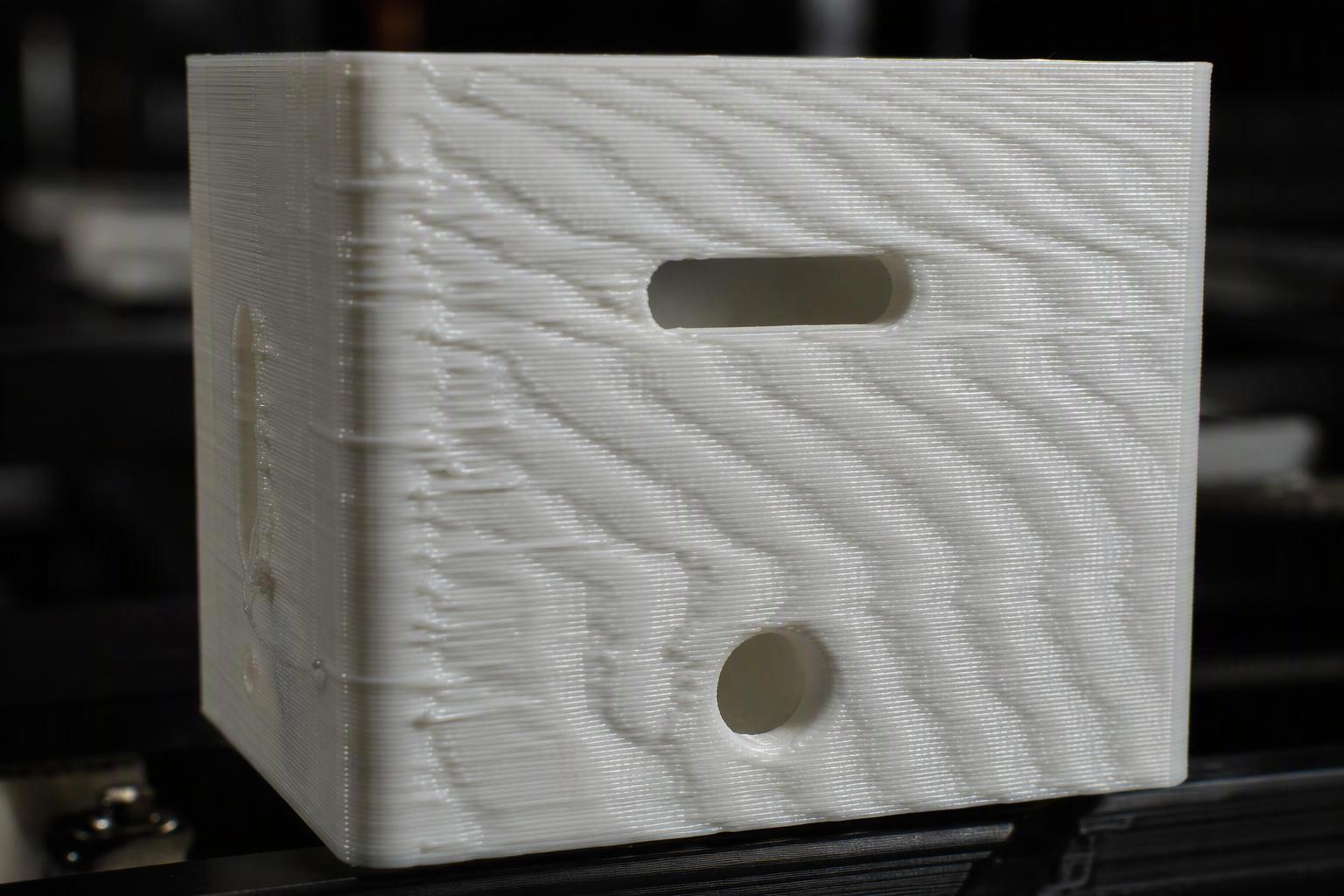
One provider puts the largest oscillations typically between 10 and 50 Hz, which is audible, so a machine with bad ringing also tends to be a noisy one. Another provider's causal list is the fuller one: frame rigidity, belt tension, alignment and moving mass all set the frequency you are fighting.
Real measurements show how far apart two machines can sit. One provider's own worked example measures a Y-axis resonance of 36.8 Hz with MZV recommended (one provider's guide to measuring resonances, retrieved 2026-10-22). A University of Oulu thesis on a modified bed-slinger measured 87.0 Hz on X with MZV and 38.4 Hz on Y with ZV, the heavy bed axis being the low one (a University of Oulu thesis on resonance compensation, 2024).
A 2025 study from Politehnica Bucharest found a secondary structural peak near 40 Hz on both axes, with smaller peaks at 70 to 75 Hz on X and 105 to 110 Hz on Y (a 2025 study from Politehnica Bucharest, collection October 2025). That is the practical reason a single shaper frequency sometimes leaves a faint echo: you are damping one peak and leaving another.
Which Mechanical Checks Come Before Any Setting?
Do the free checks first, because input shaping cannot fix a belt. One provider describes shaping as an open-loop technique that sends a command cancelling its own vibration; it does not sense what the machine is doing during a print (one provider's resonance compensation documentation, retrieved 2026-10-22). A loose belt therefore stays loose, and the shaper keeps working from a frequency that no longer matches reality.
These are the 3D printer ringing and ghosting fixes worth an evening: belt tension on both axes, pulley grub screws, eccentric nuts and V-wheel tension, linear rail lubrication, toolhead and bed mounting bolts, and frame squareness. Check for play by hand before you touch a config file.
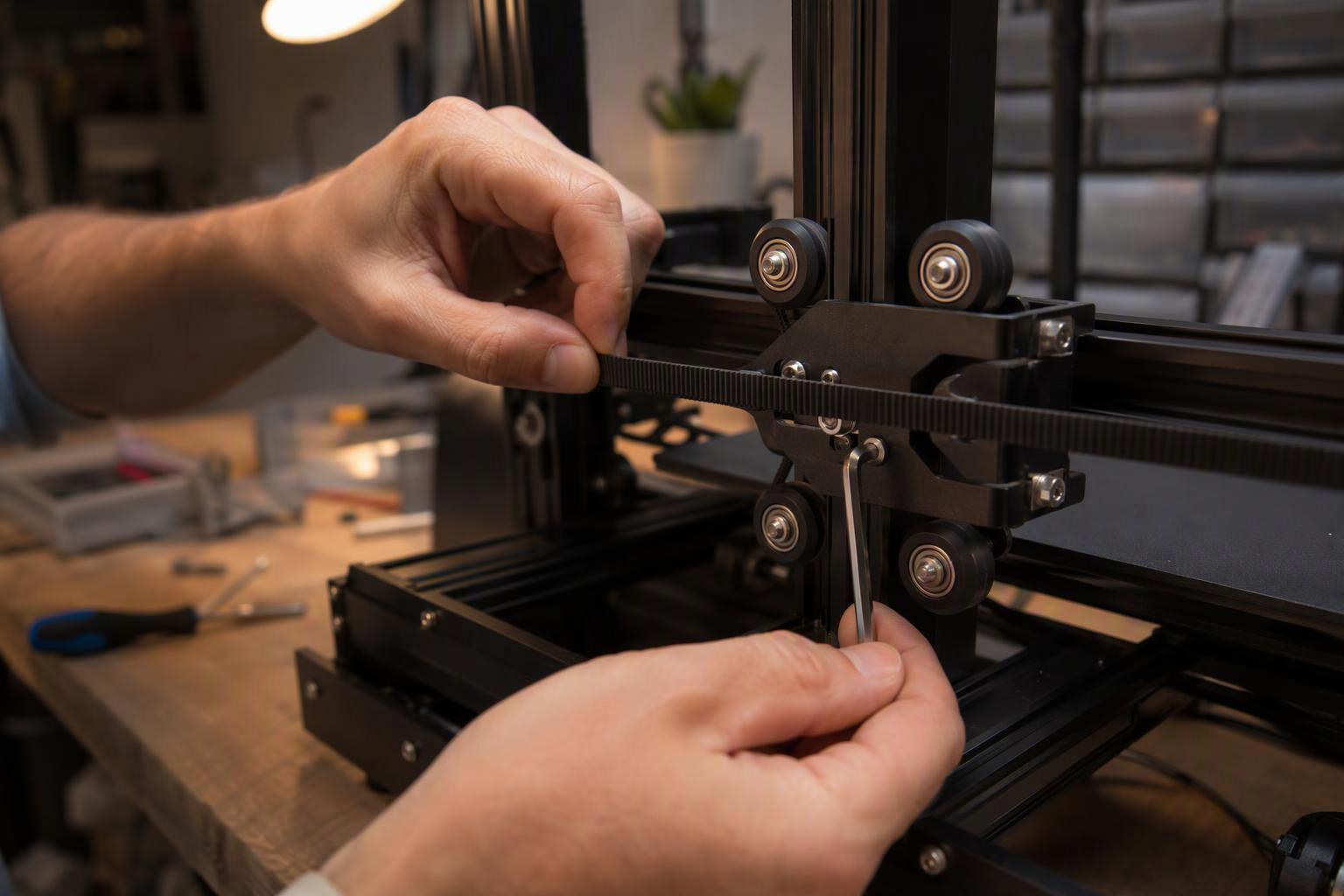
Re-measure after any of these triggers: a belt change, a toolhead or extruder swap, a new part-cooling duct, a bed surface change that alters mass, or simply months of belt stretch. One provider notes frequencies shift when moving mass or stiffness changes and that belts loosen over time, so the config needs updating.
One floor value matters. If a measured frequency comes in below roughly 20 to 25 Hz, stiffen the machine or reduce moving mass before tuning, or acceleration will be capped by smoothing rather than by ringing.
On spares, our per-model parts collections for the SV08 Max, SV08, Sovol Zero and SV06 Plus ACE exist because a toolhead swap changes moving mass, and the Complete Extruder Assembly Kit for the SV08 MAX is the kind of part that puts the machine back to a known state rather than a modified one.
How Does Input Shaping Work, and How Do I Calibrate It?
Calibrate by measuring, then apply the result, and never paste a value from another machine. Input shaping works by shaping the command signal so the machine's own vibration cancels itself, which is why the frequency has to be measured rather than estimated (one provider's resonance compensation documentation, retrieved 2026-10-22).
The two firmware routes reach the same shaper family by different paths.
|
|
Klipper |
Marlin |
|---|---|---|
|
Measurement |
TEST_RESONANCES or SHAPER_CALIBRATE with an accelerometer |
Ringing tower or frequency-sweep pattern; M495 sweep with an external USB accelerometer |
|
--- |
--- |
--- |
|
Apply |
[input_shaper] in printer.cfg, then SAVE_CONFIG |
M593 for ZV, M493 for Fixed-Time Motion shapers |
|
Shapers |
ZV, MZV, ZVD, EI, 2HUMP_EI, 3HUMP_EI |
ZV since 2.1.2; Fixed-Time Motion in 2.1.3 adds ZV, ZVD, EI, 2HEI, 3HEI, MZV |
|
Disable |
Remove the section |
M593 F0 |
One provider's M593 documentation states plainly that it does not provide accelerometer-based tuning and that the easiest route is a ringing tower, with M593 X F18.4 setting a frequency and M593 F0 disabling shaping (one provider's M593 documentation, page dated 2026-08-24). Its accelerometer sweep, when you use the external tester, runs 5 to 100 Hz in about three minutes.
Without an accelerometer, the tower method still works. One provider's worked example reads 49.4 Hz on X from six oscillations over 12.14 mm at 100 mm/s, using frequency equals speed times count divided by distance.
Then we choose the shaper on tolerance, not on reputation. With a 5% vibration tolerance, MZV holds within plus or minus 4% of the set frequency, ZVD within 15%, EI within 20%, and the hump variants far wider at the cost of smoothing. One provider recommends MZV or EI for most printers and notes EI suits bed-slingers because the bed's mass grows as filament is deposited, dragging the frequency down.
Warning: Accelerometer results belong to one machine on one day. Copying a frequency from a forum thread, or from a second printer of the same model, is the most common reason shaping appears to do nothing.
Do not re-run auto-calibration daily. One provider warns that running SHAPER_CALIBRATE before every print creates intense vibration near resonance, may increase wear, and can loosen parts, and that results vary slightly run to run, so confirm with a test print (one provider's guide to measuring resonances, retrieved 2026-10-22).
Which Slicer Settings Keep Speed High While Removing the Echo?
Protect the outer wall and let everything else run fast. One slicer exposes per-feature outer_wall_acceleration and outer_wall_jerk, and its own note is that outer-wall acceleration is usually set lower than normal printing to ensure better quality (one slicer's acceleration settings, retrieved 2026-10-22).
That is the whole trick for reduce acceleration and jerk for cleaner walls without losing throughput: the visible surface gets the conservative numbers, infill and inner walls keep the speed. One slicer's jerk and junction-deviation settings page gives the relationship as junction deviation equals 0.4 times jerk squared divided by acceleration, and notes that another firmware's equivalent is square corner velocity (one slicer's jerk and junction-deviation settings, retrieved 2026-10-22).
|
Setting |
Starting point to test |
Why |
|---|---|---|
|
Outer wall acceleration |
Noticeably below your general acceleration |
Visible surface, lowest tolerance |
|
Outer wall jerk or square corner velocity |
Lower than inner wall |
Corners are where the echo starts |
|
Inner wall and infill acceleration |
Keep at general value |
Not visible, protects speed |
|
Travel acceleration |
Keep high |
No extrusion, no surface |
|
Shaper frequency |
From your own measurement |
Everything else depends on it |
These are starting points to test, not specifications. The published numbers show what shaping unlocks rather than what it guarantees: a 2025 study from Politehnica Bucharest raised acceleration from a stock 1000 mm/s² to 2500 mm/s², above the 1900 mm/s² the EI shaper recommended, and removed visible ghosting (a 2025 study from Politehnica Bucharest, collection October 2025).
The same study doubled speed from 50 to 100 mm/s and cut print time by about 33% on a calibration cube and about 55% on a speaker ring and an articulated dragon, an average of 47.6%. The cube lagged because slicer minimum layer time capped it, which is the honest limit on any speed claim.
How Do I Test Whether a Change Actually Worked?
Change one variable, print one test, and read the result against a known reference. A single print that looks better proves very little; a print at a known acceleration ramp tells you where the echo starts.
One provider's ringing tower procedure gives you that ramp. The command TUNING_TOWER COMMAND=SET_VELOCITY_LIMIT PARAMETER=ACCEL START=1500 STEP_DELTA=500 STEP_HEIGHT=5 raises acceleration from 1500 to 7000 mm/s² in 500 mm/s² steps every 5 mm of height (one provider's resonance compensation documentation, retrieved 2026-10-22). The band where the echo first appears is your ceiling, and the band below it is your working acceleration.
Slice the tower with one or two perimeters, no infill, external perimeter speed around 80 to 100 mm/s, minimum layer time at most 3 seconds, and any dynamic acceleration control in the slicer switched off. Otherwise the slicer fights the ramp.
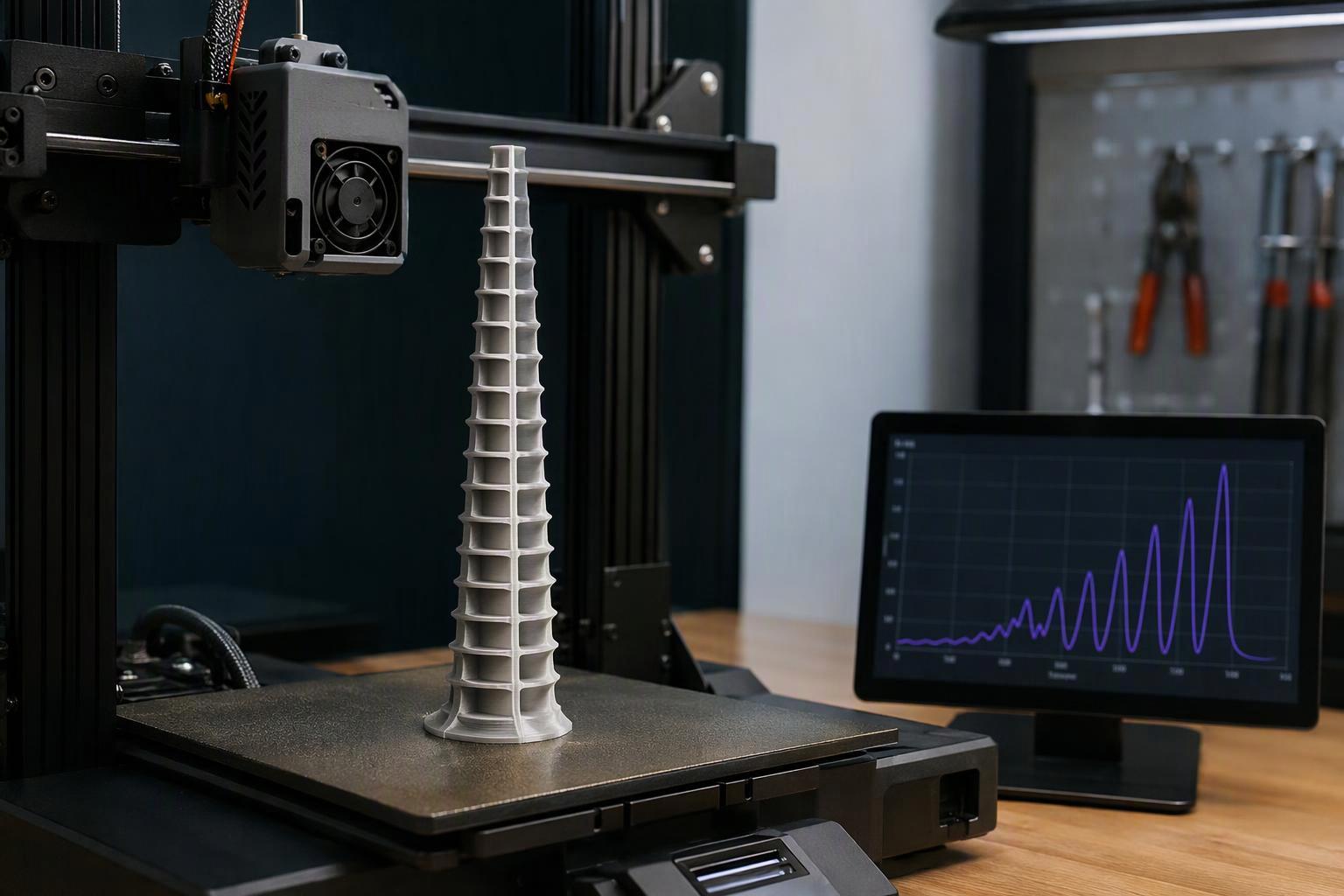
For the shaper itself, one provider's tutorial uses a max_accel example of 3000 mm/s² to avoid over-smoothing, keeps the damping ratio at the default 0.1, and recommends leaving square_corner_velocity at 5 mm/s rather than raising it. Raising corner velocity smooths parts more than raising acceleration does.
Pro Tip: If the echo is gone but the wall looks rounded or rough, the shaper frequency was wrong, not the shaper. Re-measure before you change shaper type.
How Do I Keep This Reproducible Across Many Users on a Shared Printer?
Write the result down, because a fix that lives in one person's memory is not a fix. When twenty members use a machine in a week, the only thing that survives is a note on the wall and a config that matches it.
The handover note needs seven fields and nothing else.
|
Field |
Example format |
Why it matters |
|---|---|---|
|
Axis |
X / Y |
Frequencies differ per axis |
|
Measured frequency |
38.4 Hz |
The number everything else derives from |
|
Shaper type |
ZV / MZV / EI |
Sets the tolerance window |
|
Max acceleration |
3000 mm/s² |
The tested ceiling |
|
Outer wall acceleration |
Lower than general |
Protects the visible surface |
|
Date and who measured |
Name, date |
Tells the next person if it is stale |
|
Trigger list |
Belt, toolhead, bed change |
Says when to re-measure |
Re-measure on those triggers rather than on a calendar. One provider's guidance is that frequencies change with moving mass or stiffness and that belts loosen over time, so the config should be updated after hardware changes rather than on a schedule (one provider's resonance compensation documentation, retrieved 2026-10-22).
Before the next member intake, run the free mechanical checks as a group and have the newest member write the note. That single habit does more for uptime than any tuning session, and it makes the machine teachable rather than personal.
Frequently Asked Questions
Can input shaping calibration fix ringing caused by a loose belt?
No. One provider describes shaping as open-loop, sending a command that cancels its own vibration without sensing the machine during a print, so a loose belt keeps moving and the shaper keeps working from a stale frequency (one provider's resonance compensation documentation, retrieved 2026-10-22). Tighten and align first, then measure.
Can I copy input shaping values from another printer of the same model?
Not usefully. One provider warns that results vary slightly between calibration runs on the same machine, and that is before accounting for a different toolhead, duct or bed surface (one provider's guide to measuring resonances, retrieved 2026-10-22). Use another machine's numbers only as a sanity check on your own measurement.
What if my measured frequency is very low?
Below roughly 20 to 25 Hz, stiffen the printer or reduce moving mass before tuning the shaper, or acceleration will be limited by smoothing rather than by ringing. On a shared machine that is a hardware decision, not a shift task.
Is slowing down still a valid fix?
Yes, and one provider says so directly: ringing can be reduced by reducing print speed, which is exactly what input shaping avoids (one provider's input shaping page, read 2026-10-22). On a deadline print, dropping outer-wall speed is a legitimate stopgap while you schedule the real fix.
Conclusion
The order is the answer: mechanics, then calibration, then slicer limits, then hardware, with a written note at the end so the next member inherits a working machine rather than a mystery. Ringing is a mechanical vibration echoing at the frame's natural frequency, and every stage above either removes the vibration or stops the slicer from provoking it.
Start tonight with the free checks and the first line of the handover note. If you are choosing hardware for a shared space and want the machine to stay tunable by whoever is on shift, our team is happy to talk through which Sovol model and parts support fit your setup.
Share:
Why Your 3D Printed Parts Crack Under Pressure: A Step-by-Step Diagnosis and Fix Guide
15 Best Halloween 3D Printing Ideas for 2026