
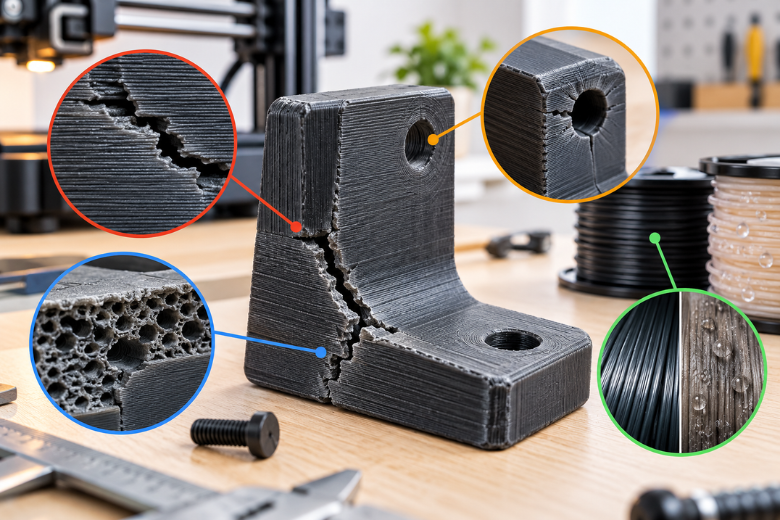
Your 3D printed part split along its layer lines, and the print itself looked clean. That combination is the frustrating part: nothing in the slicer preview or the finished surface warned you, and the bracket, clip or jig only failed once it was carrying load. When you are running a shared makerspace, that failure costs more than filament. It costs a member's afternoon and your confidence in the machine.
Guessing at the fix is the expensive route. Changing three settings at once, buying a new filament, or cranking infill to 100% all feel like progress and none of them tells you what actually went wrong. The routine below does: name the failure mode, change one variable, re-print the same coupon, compare.
Why 3D printed parts crack under pressure comes down to four failure modes: layer-line splitting from weak interlayer bonding, a design problem where stress concentrates at a corner, hole or boss, a process problem in temperature, cooling or extrusion, and moisture or aged filament. Every mechanical claim here is tied to a named source, and the test routine is a relative in-shop comparison, not a lab measurement.
Key Takeaways
Most functional-part failures fall into four modes: layer-line splitting, design stress concentration, process settings, and wet or aged filament.
Change one variable per test and re-print the same coupon, or you cannot tell which change worked.
Perimeters buy more strength per gram than infill: moving from 40% infill with one wall to 15% infill with four walls raised specific strength by roughly 41% in flexure and 43% in tension.
Verify every fix by re-printing the identical coupon and comparing the break, not by eye on a new part.
Why your 3D printed parts crack under pressure: the four failure modes
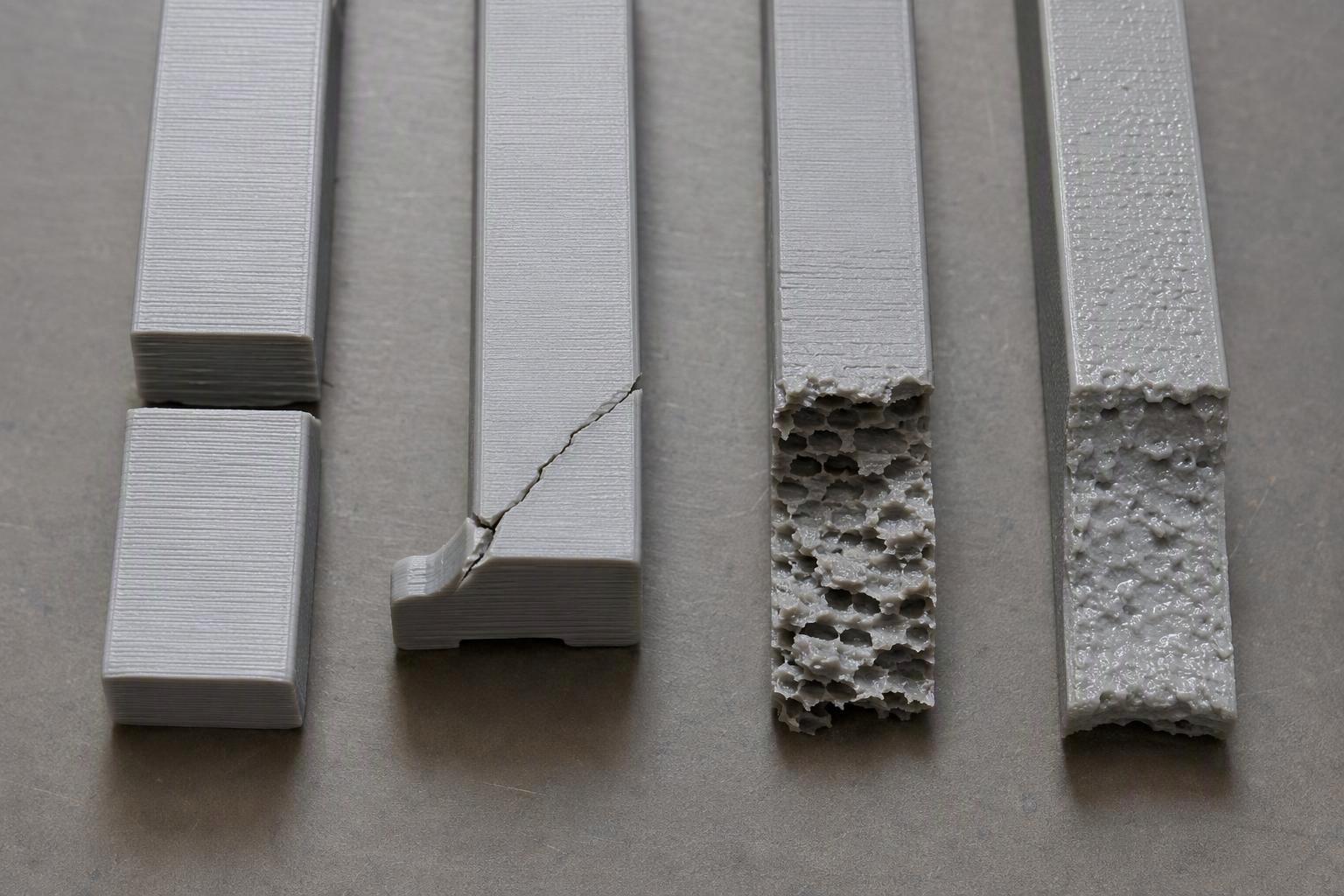
Most cracked functional parts are diagnosed in under a minute by looking at the fracture face, because the break pattern points to one of four modes. The first is layer-line splitting, where the part separates between deposited layers. The second is a design problem, where the crack starts at a sharp internal corner, a hole edge or a screw boss. The third is a process problem in temperature, cooling or extrusion consistency. The fourth is wet or aged filament.
|
What the break looks like |
Most likely mode |
First thing to change |
|---|---|---|
|
Clean split following layer lines, flat and smooth faces |
Layer-line splitting |
Raise nozzle temperature slightly, reduce part cooling |
|
Crack starts at a corner, hole or boss and runs outward |
Design stress concentration |
Add a fillet, re-orient, or move the feature |
|
Ragged, porous break through the wall with visible gaps |
Process or extrusion |
Check flow, layer height and nozzle-to-layer ratio |
|
Bubbling, popping, poor surface before it failed |
Wet or aged filament |
Dry the spool and re-test |
The scale of the layer-line problem is well documented. A published ASTM D638 comparison of PLA printed at 0° and 90° found 38.1 MPa when the load ran parallel to the layers against 11.9 MPa across them, so the across-layer direction carried roughly 31% of the in-plane strength (Lim et al., Materials, 2021). Kuznetsov and colleagues go further, noting that strength across layers can be lower than along the threads "sometimes by an order of magnitude" (Polymers, 2018).
Why did my part split along the layer lines instead of snapping across them?
A split along the layer lines means the bond between layers failed before the filament itself did, so the fix belongs in layer adhesion, not in a new spool. 3D print layer adhesion is the strength of the weld between one deposited thread and the next, and it is almost always the weakest plane in an FDM part.
The ASTM D638 comparison cited above shows how large that gap is, and a separate bending study puts numbers on it. The Moscow-based PLA bending study tested upright tubular specimens in three-point bending and found interlayer flexural strength of 38.7 to 67.8 MPa across a 0.06 to 0.3 mm layer range, against bulk PLA flexural strength of 83 to 108 MPa (Kuznetsov et al., Polymers, 2018). The authors are careful about their own numbers: because voids shrink the effective cross-section, they describe the calculated stress as "a virtual measure solely for comparison purposes."
That caveat matters for how you read any strength figure, including the standards. ASTM D638 governs the material, not the printed part, and it says so: tensile properties vary with specimen preparation and data "cannot be considered valid for applications involving load-time scales or environments widely different" from the test (ASTM D638). The encouraging finding is that the best parameter combinations in the bending study brought interlayer cohesion close to bulk PLA, which makes much of the weakness a settings problem rather than a material limit.
How do I work out whether my failure is a design problem or a printer/process problem?
You separate the two by re-printing the identical part with one variable changed, then comparing where the new crack starts. If the crack moves to a new location, you changed the process. If it returns to the same corner or hole, the geometry is driving it.
-
Inspect the fracture face under good light and photograph it. Note whether the break follows layer lines or runs across them.
-
Measure the wall thickness at the break with calipers and compare it to the slicer setting. A thin wall from a low flow rate fails like a design flaw.
-
Weigh the failed part and compare it with the slicer's predicted mass. A light part points to under-extrusion.
-
Re-print one coupon with a single change, then repeat the same load or bend by hand.
-
Verify by checking whether the break location or break type changed. That is your result.
The method has limits worth stating plainly. It is a relative comparison, so it tells you which version is better, not what the part's strength is in MPa. It cannot separate two variables changed at once. And one coupon is not an assembly, so a pass on the bench does not guarantee a pass in service.
Key Takeaway: Change one variable per test, and record three measurements every time: wall thickness against the slicer setting, part mass against the predicted mass, and the exact fracture location.
Do more perimeters or more infill make a part stronger?
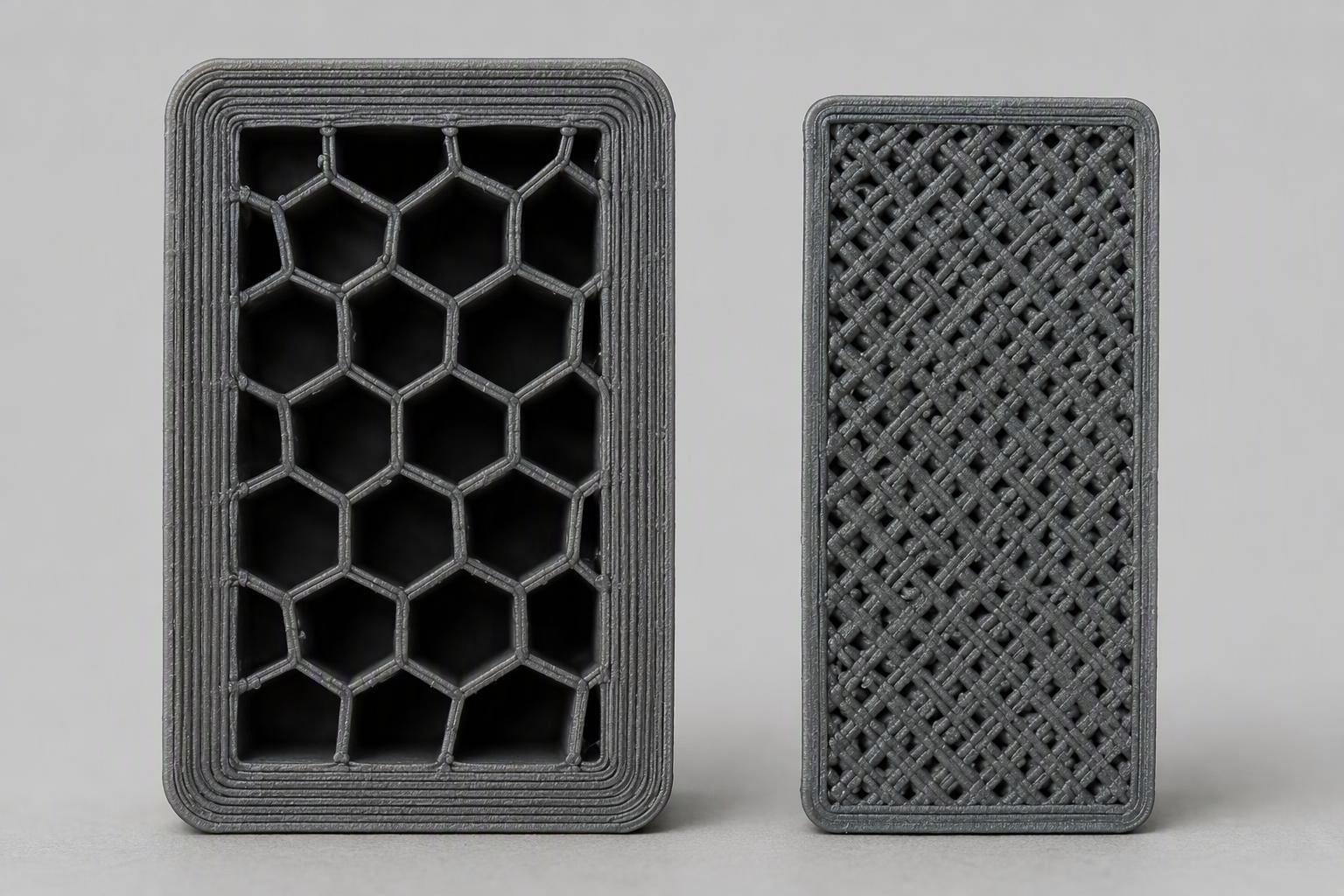
Perimeters make a part stronger per gram than infill, so for a load-bearing bracket we recommend starting at four or five walls and dropping infill rather than raising it. The intuition that 100% infill equals maximum strength is the most expensive wrong answer in the workshop: it adds mass and print time without adding much strength where the part actually carries load.
A 2024 PLA study by Swanepoel, Botha and Bright compared 40% infill with one perimeter against 15% infill with four perimeters and found specific flexural strength rose about 41.09% and specific tensile strength about 42.58%, from 1.19 to 2.02 kg/g and 10.14 to 17.66 kg/g (MATEC Web of Conferences, 2024). Less infill, more wall, stronger part for its weight.
A separate 2023 PLA modulus study found a more modest and less predictable picture: going from one to three wall perimeters raised Young's modulus by 28.5%, from 626.14 to 804.29 MPa, while infill from 20% to 100% raised modulus 54.2% but not monotonically, with 40% measuring below 20% (Mazlan et al., Materials, 2023). The two studies used different specimen geometry and measured different properties, so treat the ratios as direction, not as a single number to quote.
Why do sharp corners, holes and screw bosses always start the crack?
Sharp corners, holes and screw bosses start cracks because they concentrate stress, and the sharper the feature the higher the local stress above the nominal load. 3D printing stress concentration follows the same mechanics as any other material: the geometry raises local stress at the discontinuity, and the crack starts there.
Peterson's charts give Kt ≈ 3 for a small circular hole in a wide plate under tension and up to 3.5 to 4.0 for a square hole with sharp corners, while a rounded oval window drops to about 1.5 (Roark Table 6-1 values, via MechSimulator). Those are chart values for isotropic elastic solids, not measured FDM values, so use them as a design principle rather than a prediction for your print.
The definition behind them is simple: K is the local stress divided by the nominal remote stress, so a groove with K = 2.0 fails at half the load of an unnotched specimen (University of Washington ME354A notes). The same notes name the usual culprits, including internal holes or voids, excessively sharp corners or fillets at shoulders, and punch or stamp marks, and they add the point that matters most for printed parts: any groove at all is dangerous if the load fluctuates, because fatigue starts at surfaces.
Does wet or old filament really weaken parts, and how do I dry it?
Wet filament can weaken layer adhesion, and the first sign is usually a poor surface rather than a failed part. One provider's guidance on drying filament states that high water content "can cause low layer adhesion, blobs on the prints, and bubbling and smoke during extrusion," and that the general first signal is poor model surface quality.
Drying is a controlled step, not a guess. One provider's table gives PLA at 45 °C for 6 hours, PETG at 55 °C for 6 hours and PA11 Carbon Fiber at 90 °C for 6 hours, with a warning not to exceed the listed temperatures or the filament softens and sticks together. Polyamide absorbs moisture far more readily than PLA, so if your makerspace stocks nylon, dry it before every print rather than only when a part fails.
For a shared space, we recommend a dedicated dryer, since it supports a repeatable drying step that any member can follow, and one option among several is the Sovol SH03 filament dryer, with the SH02 as the second model in the range. Whatever you use, check its maximum temperature against the material before you load a spool.
Which temperature and cooling settings actually improve layer bonding?
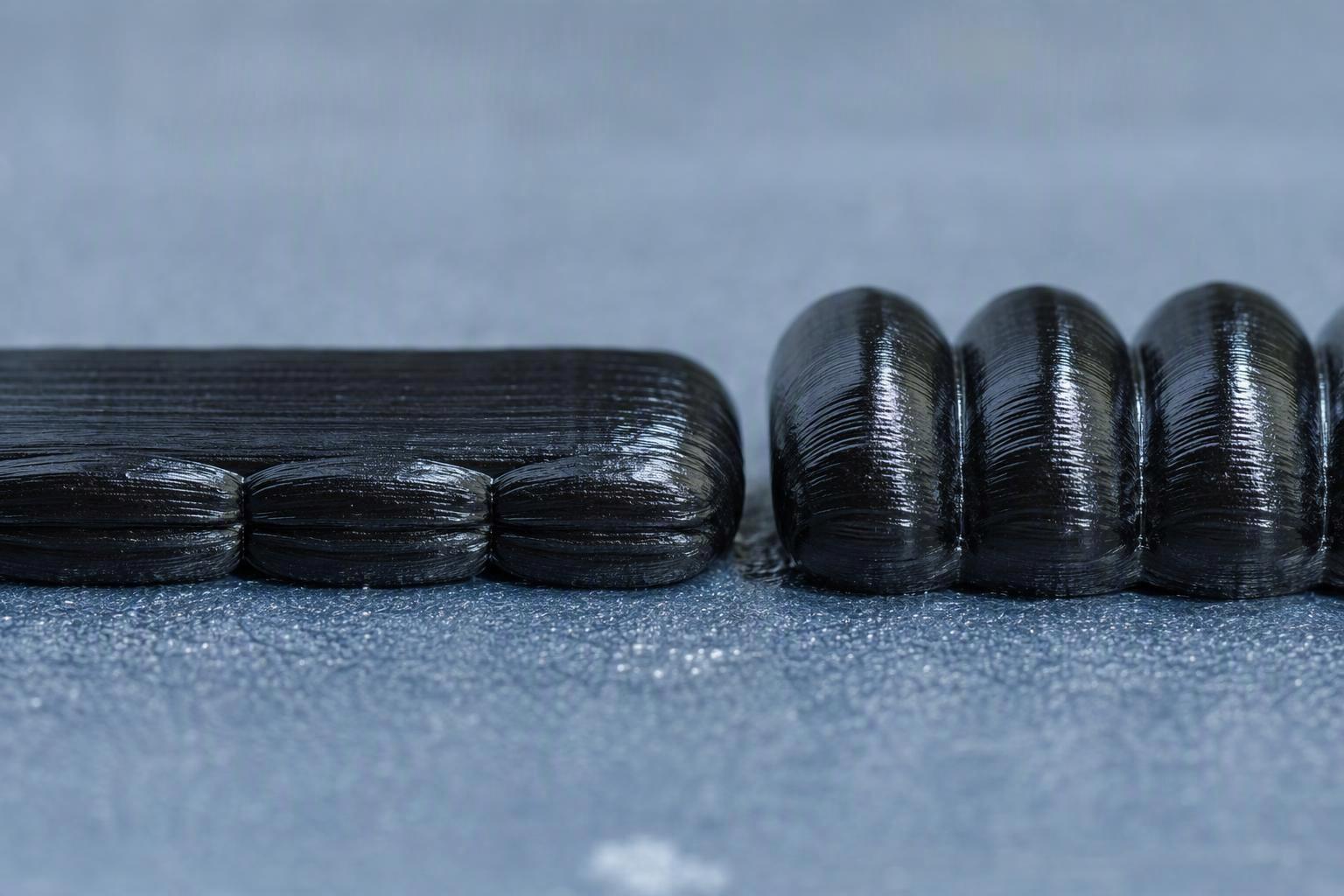
Turning part cooling down improves layer bonding measurably, and raising nozzle temperature within a sensible range helps, but the biggest single lever is the ratio of nozzle diameter to layer height. Start with cooling, because it is the change with a published number attached.
The follow-up PLA process-tuning paper found tensile strength rose from 29.0 to 32.4 MPa at 210 °C and from 32.4 to 36.7 MPa at 230 °C when part cooling was switched off, gains of 11.7% and 13.3% (Kuznetsov et al., Materials, 2019). The same work showed a staged retune lifting a specimen's bending load from 1026 N to 2139 N, more than double, for 8% more mass.
Layer height is the larger effect. In the bending study, reducing layer height from maximum to minimum raised strength by about 3.5 times, and a larger nozzle at constant layer height also increased strength (Kuznetsov et al., Polymers, 2018). The authors explain it through thread shape: the higher the nozzle-to-layer ratio, the more each deposited thread resembles a round bead with good contact, and they advise against ratios between 1 and 2 for anything load-bearing. A 0.4 mm nozzle at 0.2 mm layers sits at 2.0, right at the edge; 0.4 mm at 0.1 mm gives 4.0 and much better contact.
How can our makerspace test and document a fix without lab equipment?
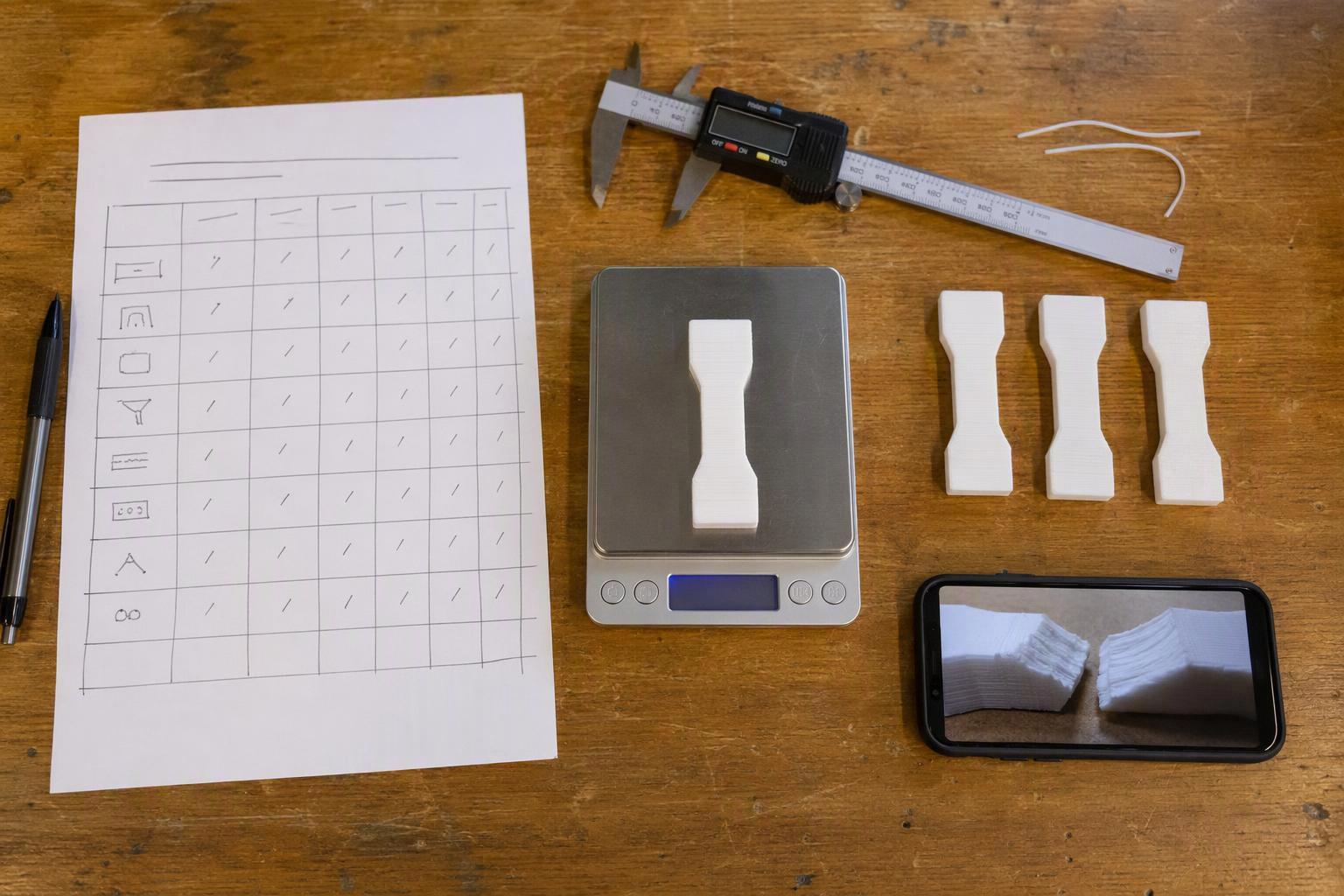
You can test a fix with calipers, a kitchen scale and the failed part itself, and document it in a shared log so the next member does not repeat the work. The goal is a comparison between two versions of the same coupon, not an absolute strength figure.
Set up a simple test log with one row per trial: date, member, printer, material and spool batch, the single variable changed, the coupon mass, the predicted mass, the fracture location and a photo reference. Keep the coupon geometry identical across trials, because ASTM D638's own warning is that where comparative results are wanted, preparation factors must be carefully controlled (ASTM D638). If you want a formal route later, ISO 527-2, in its 2025 edition, sets the current tensile test conditions for plastics, and ASTM D790 covers flexural properties.
For a 12-printer makerspace, the discipline is what saves time. One variable per trial, one coupon per trial, and a photo of every fracture face means a member can pick up the log and see which change moved the break. It also gives whoever maintains the printers a record of what was tried, which is the part most shared spaces lose.
|
Log field |
What to record |
|---|---|
|
Trial ID and date |
Sequential number, member name |
|
Printer and material |
Machine, filament brand, colour, spool batch |
|
Single variable changed |
The one setting or design edit under test |
|
Mass |
Measured coupon mass vs slicer prediction |
|
Fracture |
Location, type, photo reference |
|
Verdict |
Better, worse or unchanged, and why |
Common mistakes to avoid
The most common mistake is changing several settings at once, which makes the result unreadable and wastes filament. The second is judging a fix by eye on a new part instead of re-printing the identical coupon, so there is nothing to compare against.
A third is reaching for 100% infill when the part is failing at a corner, which adds mass without addressing the stress raiser. A fourth is trusting a single strength figure without its test geometry, orientation and calculation basis; the bending study's own authors call their stress values a virtual measure for comparison only. A fifth is drying filament at a temperature above the material's limit, which softens the spool and ruins it.
Finally, avoid treating a printer specification as a strength guarantee. The evidence points the other way: geometry and process settings dominate, and the best parameter combinations brought interlayer cohesion close to bulk PLA.
Results: what a fixed part looks like
A fixed part fails differently, not just later. When you have found the right change, the fracture face stops following the layer lines cleanly and starts showing a rougher, more mixed break, or the failure moves to a new location entirely.
Expect the improvement to show up as a relative change in your log rather than a number on a datasheet. A coupon that survived three bend cycles instead of one at the same load is a real result, and it is the kind of result a shared space can reproduce. If the break returns to the same corner after a process change, you have confirmed a design problem and should fillet the corner or re-orient the part.
Document the winning combination on the machine or in the log so the next member starts from a known-good profile. That single habit turns a one-off fix into a makerspace standard.
Frequently asked questions
Why do 3D printed parts crack along layer lines rather than across them?
The bond between deposited layers is weaker than the filament itself, so the part separates at that interface first. A published ASTM D638 comparison of PLA found 38.11 MPa parallel to layers against 11.9 MPa across them, and the bending study found interlayer strength well below bulk PLA.
Is a stronger filament the answer to cracked parts?
Usually not. Geometry and process settings dominate printed-part strength, and the bending study found the best parameter combinations brought interlayer cohesion close to bulk PLA using ordinary filament. Change the settings and the design before changing the spool.
How many perimeters should a load-bearing part have?
Four or five is a sensible starting point. A 2024 study found moving from 40% infill with one perimeter to 15% infill with four perimeters raised specific flexural strength by about 41% and specific tensile strength by about 43%, so walls buy more strength per gram than infill.
Do I need a laboratory to test whether a fix worked?
No. Calipers, a scale and the failed part are enough for a relative comparison. Re-print the identical coupon with one change, compare the mass against the slicer prediction, and check whether the fracture location or type changed.
What temperature should I dry PLA at?
One provider's drying table gives PLA at 45 °C for 6 hours, and warns not to exceed the listed temperature or the filament softens and sticks together. Nylon-type materials need higher temperatures and dry far more readily, so check the material before loading a spool.
Conclusion
The parts that crack under pressure are rarely telling you the printer is bad. They are telling you which of four things went wrong, and the fracture face usually says which. Layer-line splitting points to bonding, a crack from a corner points to geometry, a porous break points to process, and a poor surface before failure points to moisture.
The routine that works is deliberately dull: name the mode, change one variable, re-print the same coupon, compare the break and log it. Perimeters before infill, cooling and layer height before a new filament, and a fillet before a redesign. Every figure in this guide carries its source and its test method, so you can check the reasoning rather than take it on trust.
Start with the failure-mode table and the test log, then work through the settings that match the mode you found. If your makerspace is choosing machines, materials or drying equipment to support that routine, our team is happy to talk through your requirements.
Share:
How to Fix 3D Print Ghosting and Ringing: A Step-by-Step Guide
How to Avoid Ringing and Ghosting in Fast 3D Prints