
A four-colour job comes off the plate, and the purge bin is heavier than the part. That is the moment a makerspace lead stops judging a multi-colour printer by its colour count and starts judging it by what leaves the nozzle without ending up in the model. On a single-nozzle filament changer, every colour change means flushing the shared melt zone, and on transition-heavy work that flush can outweigh the finished print.
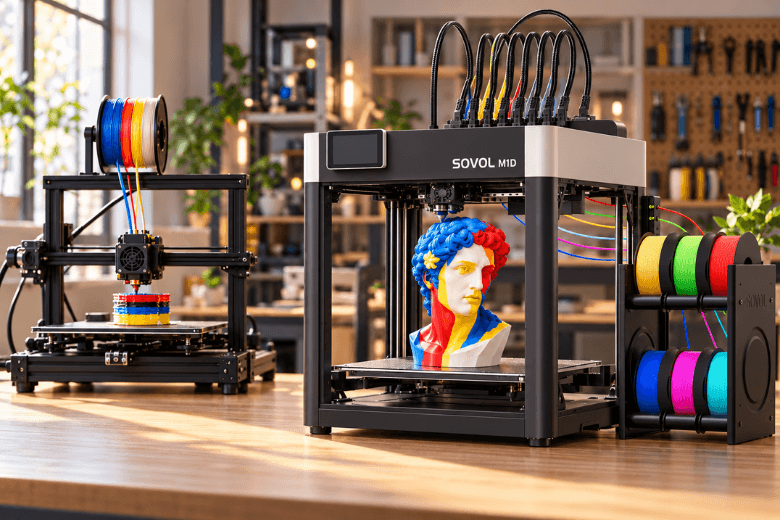
The Sovol M1D answers that with architecture rather than a slicer profile. It pairs an independent dual-extruder (IDEX) motion system with a six-slot dock: one fixed toolhead on the first carriage, six swappable heads on the second, giving up to seven dedicated melt paths. Colours and materials stay on their own hotends instead of queueing through one.
That is a real mechanical difference, and it is also where the caution belongs. Sovol's headline savings figure is a manufacturer claim tied to an illustrative scenario, not an independently measured result on a delivered M1D. This piece separates what the machine changes mechanically from what a workshop still has to validate on its own files, at its own throughput, before it standardises a shared space on a first-generation platform.
What Actually Gets Thrown Away on a Single-Nozzle Multi-Colour Print
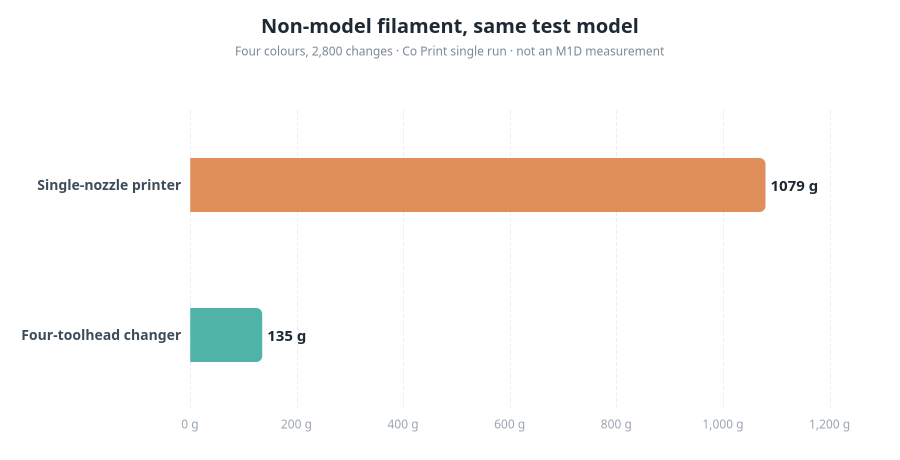
To judge a tool changer you need a baseline, and the cleanest published one comes from Co Print, which sliced the same four-colour model ("Moai Head", PLA, 0.4 mm nozzle, 0.4 mm layers) with 2,800 colour changes on both a single-nozzle printer and its own four-toolhead Quadro. The single-nozzle machine used 1,079 g of filament outside the model; the Quadro used 135 g. Same model, colour count and change count, though the two runs used different slicer settings — default flush settings on the single-nozzle printer and CoPrintSlicer defaults on the Quadro.
Vendor-run single test: the same four-colour Moai Head model (PLA, 0.4 mm nozzle, 0.4 mm layers, 2,800 colour changes) sliced on a single-nozzle printer and on Co Print's four-toolhead Quadro. The model was chosen for its high change count, where purge grows fastest; results vary with model, change count and slicer settings. This is not a category average and does not measure the Sovol M1D.
At the $20/kg example price Co Print applies to that test, the difference is about $18.88 per print. Convert to sterling at your own filament price rather than importing a dollar figure: a UK 10 kg PLA bundle from Sovol's UK store works out at roughly £8/kg, while a single 1 kg spool of a speciality colour such as glow-in-the-dark PLA is listed at £14.99. The arithmetic is the same either way: waste in grams ÷ 1,000 × price per kilogram.
Two properties of that number matter more than the total.
Two properties of that number matter more than the total.
First, waste scales with transition count, not part size. A small, finely striped model can waste more than a large two-colour one. Co Print deliberately chose a model with plenty of colour changes because that is where purge grows fastest, and it states plainly that results depend on the model, the change count and the slicer settings.
Second, the slicer already tells you your own figure. Subtract the model's mass from the slicer's total filament estimate; the remainder is what leaves the machine without becoming part. Do that on one representative workshop file before reading any vendor percentage, and you have a baseline the rest of this article can be measured against.
One caveat on the comparison: 1,079 g is a measured result on one model with one set of default flush settings, not a category average for every single-nozzle printer. A well-tuned profile with a reduced flush multiplier and flush-into-infill can cut single-nozzle waste substantially — one published worked example reports a 38–42% reduction from a 0.70 multiplier plus long retraction. The gap narrows; it does not close, because the shared melt zone still has to be cleared on every change.
Seven Toolheads, One Shared Question: What Does "7 Materials" Actually Mean?
Seven is a toolhead count, not a promise that any seven materials will run in one job. The configuration, per Sovol's specification, is one fixed extruder on Carriage 1 plus six swappable heads docked at the rear, with a six-channel automatic loading and monitoring system feeding the swappable tools. The fixed head is the seventh path.
The fixed head is the seventh path.
Three separate things get collapsed into the headline:
-
Toolheads installed. Up to seven melt paths can be physically present.
-
Loaded working set. How many of those heads actually carry filament for a given job — you can run three colours on a seven-head machine.
-
Sliced job. What the file asks for, including which materials appear on the same layer and how often the slicer calls a swap.
Seven simultaneous materials in a single job is the design intent. The practical working set is whatever you load and slice, and the transition count that follows from it is what determines both time and residual waste.
Seven colours and seven material classes are also different questions. Colour work is mostly about purge volume and bleed between similar polymers. Material work is where isolated hotends earn their keep: Sovol's own framing is that pushing flexible TPU at around 220 °C through a melt chamber that just ran PETG invites jams and thermal cross-contamination, and that a soluble support such as PVA behaves better on a dedicated path at its own temperature. The machine is rated primarily for PLA, PETG, TPU, PVA, ABS, ASA, PA and PC, with a 300 °C nozzle and 100 °C bed. Sovol states the standard machine is not rated for PPS or PPS-CF, and that a 350 °C hotend kit is a planned future upgrade rather than a current capability — so do not plan a workshop around it.
For a makerspace, the useful planning unit is a material-to-tool map: which head holds which polymer, which heads are reserved for soluble support, and which stay empty. That map, not the number seven, is what you teach.
Where the Waste Goes on a Tool-Changing Printer
A tool changer does not reach zero, and any vendor table that implies it should be read carefully. What changes is the kind of loss.
On a single-nozzle machine the dominant loss is flush: old filament pushed out of a shared melt zone to guarantee a clean colour. On a tool changer that loss largely disappears, because the next colour was never in the same hotend. What remains is smaller and different in nature:
-
Priming after a dock. A tool that has been parked needs a short extrusion to restore pressure before it starts a perimeter. Co Print's own description of its tool-changer result is exactly this: the large flush is removed, "a small priming extrusion remains" — which is the 135 g in its test, not nothing.
-
Ooze from hot idle melt chambers. A docked hotend that stays heated can sit above its normal printing temperature, which encourages stringing. Hackaday's account of a multi-tool build describes firmware compensating with a more extensive purge after a tool has been idle longer — and reports a three-colour, 830-change print completed with as little as six grams of purge waste. That is a good outcome on one model, not a universal floor.
-
Calibration and alignment prints. Multi-head machines consume filament proving that heads agree with each other. That material is a setup cost, not a per-part cost, but a shared space pays it repeatedly after service or a collision.
-
Failed transitions. A mis-docked tool or a clogged path scraps a plate. On a long seven-material job, one failure can cost more material than a month of purge.
"Near-zero purge" is therefore the accurate description, and it is the phrase Sovol itself uses alongside the seven-toolhead claim. Zero waste is not accurate. The honest comparison for a workshop is between a large, predictable, per-change loss and a small per-change loss plus a set of setup and failure costs that a single-nozzle machine does not carry in the same form.
The 90–95% Figure: Manufacturer Claim or Measured Result?
Sovol publishes a reduction of up to 95% in filament waste, and elsewhere frames the same headline as a 60–80% cut in print time. Both are manufacturer figures. In the material reviewed for this article, no independent measurement of purge or prime waste on a delivered Sovol M1D exists.
What the claim rests on is arithmetic, not a weighed part. Sovol's published example models a single-nozzle job at 1,200 swaps × 0.2 g average purge = 240 g of waste, then applies a near-zero-purge tool changer to that figure. The 0.2 g per swap is an assumption, and the swap count belongs to an illustrative job rather than a named benchmark model. The same page's cost illustration assumes 150 g of purge across 200 prints a year — 30 kg at an estimated £22/kg. Those are scenario inputs chosen to demonstrate the mechanism, and they should be read as such.
That does not make the claim dishonest; the mechanism is real and independently observed on other architectures. In a same-model test reported by Domechy, non-model material came to 349 g on a Bambu Lab H2D against 41 g on an H2C hotend changer and 37 g on a Prusa XL. The same source is careful that this is one model in one test and that the machines differ in speed, toolhead design and price, so it shows the general effect of purging rather than ranking printers. Co Print's 1,079 g versus 135 g shows the same direction. None of it measures an M1D.
So validate it yourself, on your files, before it goes in a funding paper:
-
Pick a representative job — a real workshop part with its actual colour count and change count, not a vendor sample.
-
Slice it twice, once on your current single-nozzle profile and once on the M1D profile, with flush settings left at default on both so you are comparing architectures rather than tuning skill.
-
Record four numbers: model mass, purge/prime mass, transition count, and total print time.
-
Price the difference at your own £/kg and multiply by your realistic annual throughput of that job type.
-
Add the failure term — the material cost of one scrapped seven-material plate, times your expected failure rate.
If the annual saving does not clear the capital gap plus the failure term, the case for the machine has to rest on material diversity and parallel modes instead. That is a legitimate case; it is just a different one.
Build Volume, Modes and the Space a Shared Workshop Actually Has
The headline envelope is 300 × 300 × 350 mm, and it applies to single-head mode. When all seven heads have to reach the same model, the common area narrows to 240 × 300 × 350 mm — the full X width is not available to a seven-material part. Copy and Mirror modes divide the bed further: roughly 178 mm and 140 mm of X per part respectively, each at 300 × 350 mm.
For a workshop, the practical question is not which number is biggest but which of your recurring parts still fit in the mode you intend to run.
-
Under 240 mm in X and 300 mm in Y: unaffected in multi-material mode. Most enclosures, brackets, jigs and prototype housings sit here.
-
Between 240 and 300 mm in X: fine in single-material mode, needs re-orienting or re-slicing for a seven-material job. Check the sliced footprint including brims, prime structures and tool clearance, not just the bounding box.
-
Copy and Mirror work: genuinely useful for mirrored pairs — left and right brackets, fixtures, drone arms — but the per-part X envelope is reduced and both parts share one bed. It is not a universal doubling of throughput, and one fault still interrupts the job.
Two physical planning points follow. The IDEX design needs extra room for independent carriage movement, so measure the bench, not just the machine. And an enclosed, actively heated 60 °C chamber is the Advanced configuration only; the Essential is open. If your material plan includes ABS, ASA or PC, that difference changes both the material fit and the ventilation plan, and the two versions should not be treated as thermally equivalent when you cost them.
Setup, Calibration and Drying: The Overhead Seven Heads Add
Seven heads buy waste reduction with operating time, and a shared space should budget that time explicitly.
Alignment. Every active toolhead has to agree with the others in X, Y and Z. Sovol's published routine includes an automated contact alignment pass that checks the vertical Z offset of all active toolheads against Carriage 1 before a multi-tool job. XY offsets are handled by a rear camera, with two toolhead-mounted cameras calibrating extrusion accuracy on the left and right nozzles; Sovol claims calibration completes up to 2.5× faster than conventional methods. That is a manufacturer figure, but the direction is credible: camera-assisted offset measurement replaces a manual, iterative routine that is genuinely painful on multi-head machines.
What automation does not remove is the decision layer. Someone still has to run the routine after a collision or a service, record the result, and decide whether the machine is fit to start a long job. In a makerspace that is staff time and a documented procedure, not a button.
Drying. This is the burden most often underestimated. Prusa's own knowledge base is unusually direct about it: on printers where filament loads directly into toolheads, the unused tools stay heated (70 °C idle by default), moisture is released into the tool, and stringing follows — enough that even PLA can absorb sufficient moisture to cause problems, and drying before printing is recommended. A seven-path machine multiplies that exposure. PVA is the acute case: Sovol recommends storing moisture-sensitive PVA in a dedicated dryer before pre-loading it onto the rear rack, and the same logic applies to any hygroscopic engineering polymer on the rack.
Seven paths mean seven chances for a wet spool to spoil a job, and a wet spool on a long multi-material print wastes the whole plate, not one colour. Budget a dryer per active moisture-sensitive material, a drying log, and a rule that spools go on the rack dry. That is where the automation genuinely helps — monitoring catches runout, clogs and tangles — and where it only moves the work, because somebody still has to dry, label and rotate the stock.
Who Should Choose Seven Toolheads Over a Single-Nozzle AMS
The decision is not "tool changer versus AMS" in the abstract.
The decision is not "tool changer versus AMS" in the abstract.
It is whether your transition count and material mix are high enough that the per-change saving compounds faster than the added complexity costs you.
A tool changer is the better fit when:
-
Your representative jobs carry high transition counts — hundreds to thousands of colour changes — so purge dominates non-model material.
-
You routinely combine different material classes in one part: rigid plus flexible, or a structural polymer with soluble PVA support. Isolated hotends remove the thermal cross-contamination problem rather than managing it.
-
You run repeated palettes, so a material-to-tool map stays stable and heads are not constantly re-loaded and re-aligned.
-
Annual throughput is high enough that the per-print saving, multiplied out, is a real line in the budget.
-
You need Copy or Mirror output for mirrored pairs or small-batch duplicates and can live with the reduced per-part envelope.
-
Open-source firmware and slicer workflow matter to your community — Sovol commits to opening software and firmware, and OrcaSlicer is the supported workflow, though a production buyer should verify what source files and stable profiles are actually published at delivery.
Staying with a single-nozzle AMS system is the better fit when:
-
Most work is one or two colours, where the purge penalty is small and a tuned profile closes much of the gap.
-
Budget is tight and the platform is already proven in your space, with spares and staff familiarity behind it.
-
You can tolerate purge waste and the mess that comes with it.
-
You value a mature installed base over a first-generation architecture.
The honest counterpoint deserves stating plainly: filament is cheap relative to capital cost. A tool changer that saves 900 g per print at £8–£15/kg saves single-digit pounds per job. At a few hundred such jobs a year the material saving is meaningful but rarely transformative on its own. The stronger arguments are the ones that do not appear on a filament invoice — faster swaps, fewer failed multi-material plates, and the ability to attempt parts a single-nozzle machine cannot do cleanly at all.
Finally, availability. The M1D is a pre-order product, with Sovol's product page estimating shipment between late December 2026 and early January 2027; specifications and timing can change. For anyone whose name goes on a shared-space recommendation, that argues for a validation period on one machine before standardising: run the same-file benchmark, keep a calibration-stability log, plan a spare-toolhead strategy, and confirm UK price, stock and warranty terms directly. The M1D product page lists free UK shipping, a one-year warranty and a pre-order price of £1,100 — check those against your own procurement rules rather than treating them as settled.
Key takeaways
-
Purge waste scales with colour changes, not part size, so the case for a tool changer grows with transition-heavy work.
-
The M1D's seven toolheads are one fixed plus six docked, with a narrowed 240 × 300 × 350 mm common build area in multi-head mode.
-
"Near-zero purge" is accurate; zero waste is not — priming, ooze and calibration remain.
-
The 90–95% reduction is a manufacturer figure tied to an illustrative scenario and should be validated on your own files.
-
Seven material paths add drying, alignment and training overhead that a shared space must budget for.
Reader questions
How much filament does a multi-colour print actually waste, and what does that cost over a year?
On a transition-heavy four-colour test with 2,800 changes, a single-nozzle printer used 1,079 g outside the model against 135 g on a four-toolhead machine — a 944 g difference on one print. To get your own figure, subtract model mass from the slicer's total estimate, then multiply by your £/kg. At £8/kg, 944 g is about £7.55 per print; at 200 such prints a year, roughly £1,510. Substitute your own change count, price and throughput — and remember that a tuned single-nozzle profile can cut its own waste by a reported 38–42%, which shrinks the gap.
Can the M1D print all seven materials in one job?
Up to seven dedicated melt paths can be present, and seven simultaneous materials in one job is the design intent. What actually runs is the loaded working set and what the slicer asks for: you can load three heads and print three materials. The machine is rated primarily for PLA, PETG, TPU, PVA, ABS, ASA, PA and PC; it is not rated for PPS or PPS-CF, and the 350 °C hotend is a planned upgrade, not a current capability.
Is the 90–95% waste reduction independently verified?
No. It is Sovol's own published claim, built from an illustrative scenario of swap count multiplied by an assumed purge mass per swap. Independent same-model testing exists for other architectures and shows the same direction — 349 g versus 41 g and 37 g in one three-machine comparison — but none of it measures an M1D. Verification would require slicing one representative file on both architectures and comparing model mass, purge/prime mass, transition count and total time.
Does build volume shrink when using multiple toolheads?
Yes. Single-head mode gives 300 × 300 × 350 mm; the seven-head common area is 240 × 300 × 350 mm. Copy and Mirror modes reduce the per-part X envelope further, to roughly 178 mm and 140 mm. Parts wider than 240 mm in X need re-orienting for a multi-material job; parts under that are unaffected.
What does running seven toolheads cost in setup and maintenance time?
More than a single-nozzle machine, in three places: alignment across active toolheads (automated via camera-assisted XY offsets and a contact Z routine, but still a procedure someone must run and record after service), drying for every moisture-sensitive material on the rack, and training so operators load the right material to the right head. Automation compresses the calibration step; it does not remove the drying or the decision-making.
Who is a tool changer actually for?
Workshops with high transition counts, mixed material classes and repeated palettes, running enough volume that per-print savings compound — and that can absorb the added calibration and drying load. If most of your work is one or two colours on a tight budget with a proven platform in place, an AMS system remains the sensible choice, and the material saving alone rarely justifies the capital gap. Given pre-order status, even the right profile should validate on one machine before standardising.
Share:
15 Best Halloween 3D Printing Ideas for 2026
Sovol M1D Copy, Mirror, Multi and Single Modes Explained