
Key takeaways
-
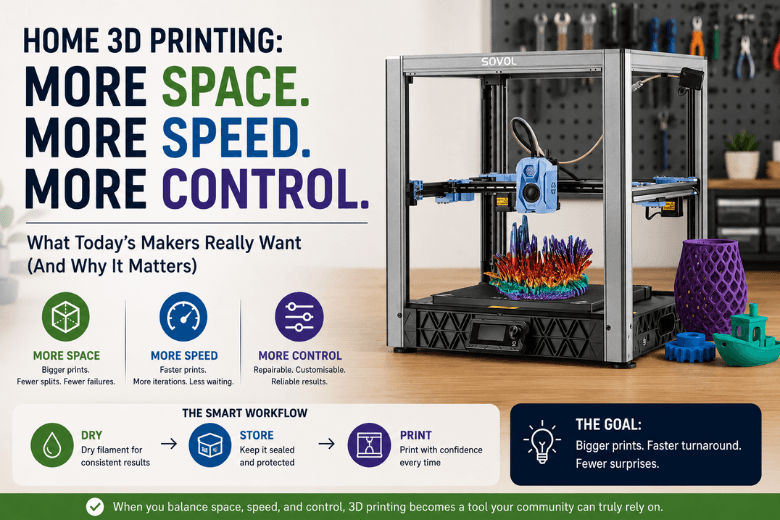
Home 3D printing is being pulled forward by one simple expectation shift: people want to print bigger things faster without babysitting the machine.
-
The three pressures behind most upgrade requests are space, speed, and control—and they’re tightly linked (bigger prints create space + speed + reliability problems).
-
Faster motion systems and modern firmware can cut print times, but throughput only counts when quality stays predictable.
-
“Control” usually means repairability, profiles you can standardise, and an ecosystem that doesn’t block you from improving the workflow.
-
For UK community leaders, the winning move is to choose machines and processes that reduce failure modes in shared spaces: noise, ventilation, humidity, and downtime.
|
What makers ask for |
What they often mean |
What to look for |
Trade-offs to be honest about |
|---|---|---|---|
|
More space |
Fewer splits, fewer joints, fewer failed big prints |
Build volume and stable motion/frame; room for enclosure |
Bigger footprint, more power draw, longer heat-up, more material at risk per failure |
|
More speed |
More workshop throughput, faster iterations |
Stiff frame + motion system, tuned profiles, reliable extrusion |
Noise, tuning time, “fast” claims that don’t hold at quality |
|
More control |
Fewer dead-ends; fixable, teachable setups |
Accessible firmware/settings, spares availability, reproducible profiles |
Steeper learning curve; more responsibility for calibration and maintenance |
Home 3D printing is rising, but the details matter
If you run a makerspace, a school lab, or a large online community, you’ve likely felt it: more members want access to a printer, and they want it to behave less like a fragile project and more like a dependable tool.
There is evidence that the entry-level segment has momentum. In a Q1 2025 market update, CONTEXT reported entry-level 3D printer shipments rose 15% year-over-year and exceeded one million units in the quarter. The important caveat is in the same piece: part of that spike was driven by tariff-related pull-forward buying.
For your community, the more useful conclusion is still clear: the baseline expectation of what a “normal” home printer can do has moved. The question is why the pressure keeps landing on space, speed, and control—and what that means for your recommendations.
Why “more space” is really about fewer failure points
“Can we get a bigger build volume?” is rarely about bragging rights. It’s usually about avoiding the hidden tax of printing large objects on small machines:
-
splitting models into parts
-
adding alignment pins
-
gluing and sanding seams
-
discovering a fit issue only after hours of printing
For community leaders, bigger prints also change the risk profile. A failed 12-hour print wastes a bit of time; a failed 48-hour print wastes a weekend slot, a lot of filament, and someone’s confidence.
The space constraint people forget: the workflow, not just the footprint
A larger printer tends to demand more around it: spool storage, tools, post-processing, and sometimes an enclosure or filtration setup. In a UK home or a shared space, that “around it” space is often the real bottleneck.
If you’re teaching beginners, the right question isn’t “What’s the biggest build volume we can afford?” It’s:
Key Takeaway: What’s the biggest build volume we can run predictably in the space we actually have?
That predictability brings us to speed.
Why “more speed” is really about throughput you can trust
Speed sells, but speed without control is just faster failure.
When your members ask for speed, they’re usually asking for one of these outcomes (especially when a large build volume 3D printer turns every job into an overnight commitment):
-
more prints per session
-
shorter iteration loops for prototyping
-
fewer “overnight prints” that fail unattended
CoreXY vs bed slinger (in plain language)
Most communities already know the two archetypes:
-
Bed slinger: the bed moves back and forth in Y while the toolhead moves in X (common, affordable, easy to understand).
-
CoreXY: motors stay fixed; belts move a lighter toolhead around a cube-style frame (common in newer high-speed machines).
CoreXY gets attention because it’s often paired with a stiffer frame and less moving mass, which can help maintain quality as speed goes up.
If you need a refresher you can share with newcomers, Sovol has a simple explainer: How CoreXY 3D printer technology works for beginners.
If your community is also asking about “firmware control” and tuning, it’s worth understanding why Klipper is popular in fast desktop printers (and why it can add complexity). A readable overview is “What is Klipper firmware? and why?” (P3D, 2024).
That’s the practical meaning of the keyword Klipper firmware 3D printer: you’re trading some simplicity for more tuning headroom and modern motion tools.
The trade-offs to teach (so nobody feels misled)
High-speed printing tends to surface trade-offs your community will feel immediately:
-
Noise: faster motion and aggressive cooling can be loud—especially in a shared space.
-
Tuning time: the “fast profile” that looks good on YouTube may not survive a classroom environment.
-
Maintenance discipline: belts, fasteners, and rails need checks; a sloppy machine at high speed becomes a machine that fails.
If you link out to brand-owned “CoreXY is faster” pieces, keep them in the right role: background reading, not proof. For example, Sovol’s CoreXY kinematics overview is useful for describing the concept, but any universal performance numbers should be treated carefully unless backed by reproducible tests.
Why “more control” is the real signal of a maturing maker community
In earlier waves of desktop printing, many buyers wanted something “plug and play.” That still matters—but advanced communities increasingly want control because control lowers total cost of ownership.
In practice, “control” usually means:
-
repairability (you can fix it without waiting months for a proprietary part)
-
standardisation (profiles that behave similarly across machines)
-
ecosystem freedom (you can change slicers, tune settings, and upgrade parts without fighting the platform)
That matches what we see in wider adoption research. A UK government report on 3D printing adoption notes that uptake is shaped not only by potential productivity gains, but also by barriers like skills gaps, cost, and quality/operational limits—alongside concerns such as IP and process control. See GOV.UK’s report on factors affecting adoption of 3D printing by SMEs (Greater Manchester case study).
For community leaders, the takeaway isn’t “become a firmware expert.” It’s to choose platforms and workflows that don’t trap you when you inevitably need to improve reliability.
A UK-specific “control” angle: support and spares
Control is also logistical. If your printers are downtime-sensitive—workshops, class timetables, public open nights—then the availability of spares and support can matter more than peak print speed.
This is one reason UK buyers often weigh local dispatch and support heavily when choosing a makerspace 3D printer. (If you already have a preferred support policy page you want people to land on, tell me and I’ll point the CTA there.)
Space + speed + control collide in three home realities
1) Noise and shared-space etiquette
A fast printer that’s technically capable but socially unusable (too loud in a flat, too disruptive in a classroom) creates friction you’ll end up managing.
Practical mitigations include enclosure strategies, scheduling noisy prints outside teaching hours, and making “quiet profiles” part of your standard setup.
2) Ventilation and odour
Even if you mostly print PLA, your community will eventually try materials that smell more or need higher temps. Ventilation choices aren’t glamorous, but they’re part of responsible recommendation.
For a pragmatic overview of indoor ventilation approaches (natural ventilation vs targeted/spot ventilation), see Flashforge’s guide on 3D printing smells.
3) Humidity and filament handling
In UK conditions, “mystery failures” are often just moisture. Wet filament can show up as stringing, rough surfaces, brittle parts, and inconsistent extrusion.
If you need a single resource to point members at, Sovol’s overview of dryer use and wet filament symptoms is a decent starting point: What makes the Sovol SH03 dryer unique for 3D printing enthusiasts. For a simple navigation destination, you can also reference the Sovol UK filament dryer collection.
A practical framework for makerspace leaders: what to standardise first
If you want fewer support tickets and more successful prints, standardisation beats heroics.
Start with these three “community defaults”
-
A baseline quality profile (known-good speed, known-good temperatures, conservative acceleration)
-
A filament policy (what lives in sealed storage, what gets dried, what gets binned)
-
A failure-response checklist (first layer, extrusion, bed mesh, slicer assumptions)
When members push for “more space, speed, and control,” you can then respond with a calm, criteria-led process instead of a brand debate.
Pro Tip: If you trial a faster machine, judge it on repeatability under real users—not the best-case benchy.
Next steps
If you’re evaluating your next round of printers for a UK makerspace or community, use the space/speed/control table above as a scoring sheet—and then sanity-check the real-world constraints (noise, ventilation, humidity, spares).
To help newer members understand the mechanics behind many modern high-speed machines, you can also share Sovol’s CoreXY resources as optional background reading—either the beginner-friendly explainer above, or the CoreXY kinematics deep dive.
Share:
Is a Filament Dryer Worth It for PLA and PETG?
Why Sovol 3D printers make messy prints at high speed (and how to fix it)