
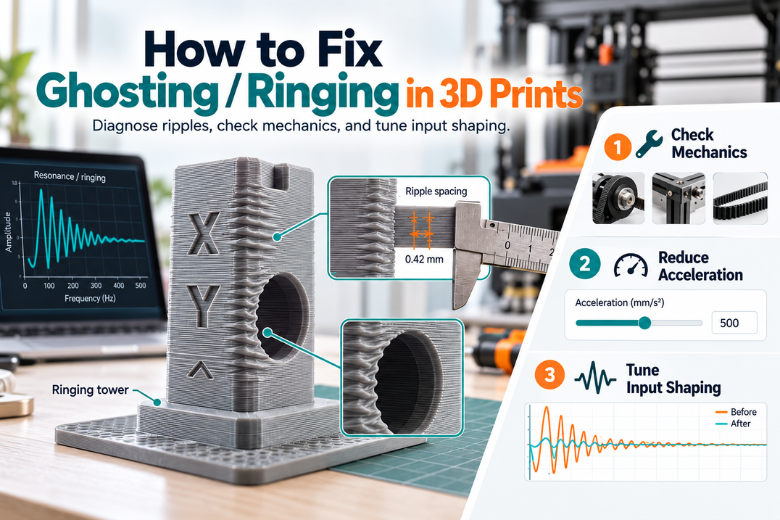
Those faint ripples standing beside every corner and hole on a finished part are ghosting, also called ringing: a surface defect where edges repeat across the printed surface as a subtle echo, caused by mechanical vibration from quick changes of printing direction (Klipper's resonance compensation documentation). Prusa describes the same defect as "several waves that follow after a sharp edge of a model", and notes the waves grow with print speed (Prusa's ghosting troubleshooting article). This is a motion-and-rigidity problem, not a filament problem, so a new spool will not remove it. What follows is an ordered path: free mechanical checks first, then acceleration, then firmware compensation, with a way to verify each change before you make the next one. Work one variable at a time, because two changes at once tell you nothing about which one worked.
What do ghosting and ringing actually look like on a finished 3D print?
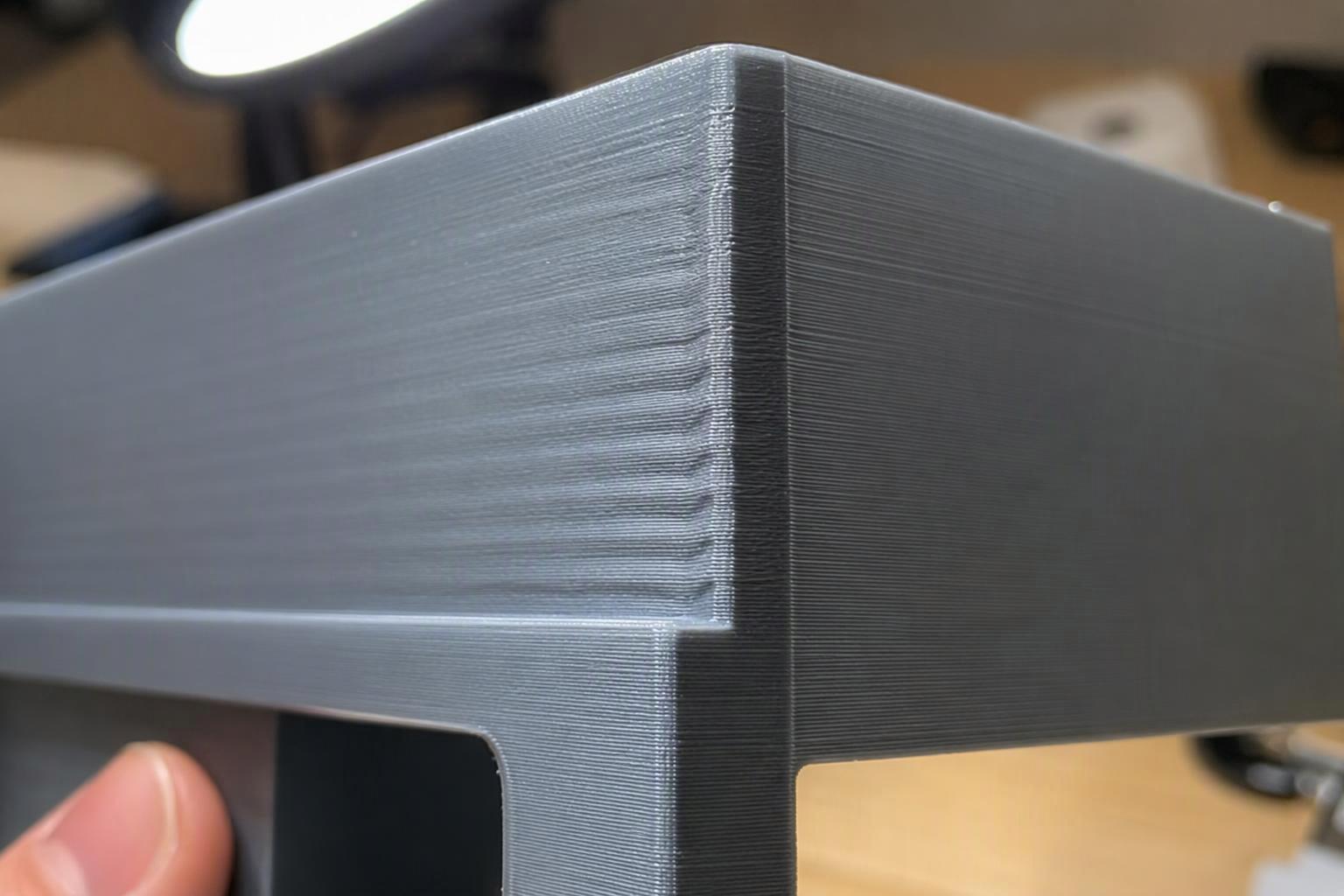
Ghosting, ringing, echoing and rippling are four names for one defect: a repeating surface echo that sits beside a sharp feature rather than on it. The ripples are a surface artifact, not a dimensional error, so the part can measure correctly and still look wrong. The tell is placement. The pattern starts at the corner or hole edge and fades as the toolhead moves away from it, and it appears on the vertical walls that face the direction of the direction change. Hold the part at an angle to a light and look beside a corner: if you see a row of shallow waves rather than a single sharp line, you are looking at ringing.
Pro Tip: The one-line test is to hold the part at an angle to a light and look beside a corner. Waves that fade with distance are ringing; a step that continues up the wall is something else.
Why does the ripple repeat at a regular spacing after corners and holes?
The spacing is set by the machine, not the model. When the toolhead stops and reverses at a corner, the frame, belts and moving mass keep moving for a moment and spring back, and that oscillation prints itself onto the wall at a fixed interval. Klipper's guidance is blunt about the cause: ringing usually has mechanical origins, including an insufficiently rigid printer frame, non-tight or too springy belts, alignment issues in mechanical parts and heavy moving mass, and those should be checked and fixed first (Klipper's resonance compensation documentation). A measured ringing frequency below roughly 20-25 Hz signals a structure flexible enough that stiffening the printer or reducing moving mass deserves attention before further input-shaper tuning, on the same page.
The spacing itself is arithmetic. Klipper's worked example puts a 50 Hz resonance at 100 mm/s into ripples spaced 2 mm apart, because the wavelength equals the print speed divided by the frequency (Klipper's resonance measurement guide). That relationship explains the counter-intuitive result makers hit when they slow a print down: the ripples do not vanish, they spread further apart and become more visible.
Is this ghosting, or is it Z-banding, layer shift or an extrusion problem?
Run a three-question triage before you touch a single setting. Does the pattern decay as it moves away from the corner? Does it appear on faces that have no corners at all? Is the feature a wave or a step? Ringing decays, sits beside corners, and is a wave. Z-banding repeats at a consistent height interval across the whole part regardless of geometry, layer shift is a single offset step that stays offset, and extrusion problems show as gaps, blobs or inconsistent line width rather than a decaying echo.
Klipper's documentation draws the line clearly: a defect that persists after the mechanical causes are addressed is not ringing and has a different origin (Klipper's resonance compensation documentation). Prusa's ghosting article distinguishes ghosting from other surface defects and sends the reader to belt tension, pulley set-screws and the smoothness of the linear bearings before any slicer setting is changed (Prusa's ghosting troubleshooting article). Both point the same way: confirm the defect class first, because tuning input shaping against a Z-banding problem wastes filament and teaches you nothing.
Key Takeaway: Three questions decide it. Does it decay with distance? Does it appear on corner-free faces? Is it a step or a wave? Ringing decays, lives beside corners, and is a wave.
Which mechanical faults cause ringing and how do I check belts, pulleys and rails?
This is the free section, and it is where most machines are actually fixed. Start with belt tension, because it is the fault every vendor names first. Prusa's method is to pluck the belt like a guitar string and listen for a deep bass tone, with Belt Status values between 240 and 300 being fine on the printers that report them, where a lower value means more tension (Prusa's ghosting troubleshooting article). Bambu Lab's X1 procedure is semi-automatic: power the printer off, loosen the four belt-tensioner screws without removing them, move the toolhead back and forth several times, move it to the rear, then retighten, with an explicit warning not to overtighten (Bambu Lab's X1 belt-tension procedure).
Two things are worth knowing before you chase a number. Bambu Lab's wiki publishes no target belt frequency in Hz or tension value, and does not list ringing or ghosting among the defects caused by wrong belt tension, naming oval circles and dimensional error instead, on the same page.
If you want to measure rather than listen, the belt manufacturer's method is frequency-based. Gates' sonic tension meter derives span tension from the plucked fundamental frequency with T = 4 x M x W x S² x f² x 10⁻⁹, where T is span tension in newtons, M the belt mass constant in g/m, W the belt width in mm, S the span in mm and f the natural frequency in Hz, and the meter is fed mass, width and span and applies the formula itself (Gates' sonic tension meter manual). Gates' PowerGrip GT2 drive design manual tabulates minimum recommended static installation tension per belt section and width, for example 5M at 9 mm = 8.4 lb (about 37 N), 15 mm = 14.1 lb (about 63 N) and 25 mm = 23.4 lb (about 104 N) (Gates' PowerGrip GT2 drive design manual). Those are industrial drive tensions for the named belt sections, not printer-belt targets, so treat them as the manufacturer's reference point rather than a number to dial into a desktop machine.
After belts, check the parts that hold the belt path together. Prusa lists pulley set-screws and linear-bearing play alongside belt tension as the mechanical contributors to visible ripples after corners (Prusa's ghosting troubleshooting article). Check that every pulley grub screw is tight against its flat, that the toolhead and bed carriages have no rock when you push them by hand, and that the rails or wheels run clean. Belt pitch and tooth profile are standardised under ISO 5296, so a replacement belt must match the specified profile and pitch or the pulley mesh and tension behaviour change (ISO 5296).
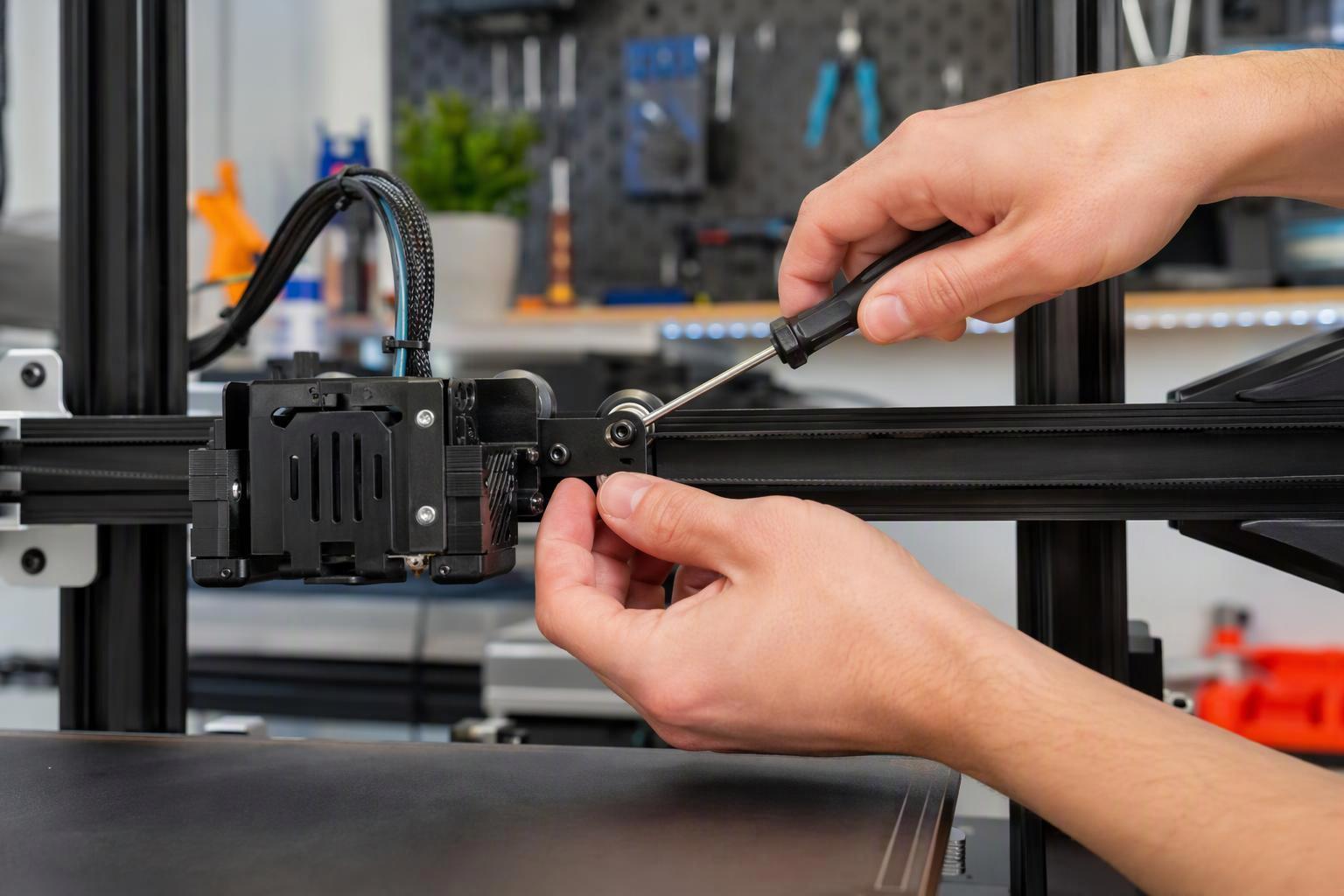
Verify checkpoint: reprint the same test part after the mechanical work and compare it against the original. If the ripple spacing has changed, the resonance frequency has moved and the mechanical change did something. If the pattern is identical, the fault is elsewhere.
Can firmware fix it — what is input shaping and resonance compensation?
Input shaping is an open-loop technique that replaces a commanded acceleration with a timed sequence of impulses so residual vibration is minimised while final position and velocity stay correct, and it does not sense vibration during printing (Klipper's resonance compensation documentation). It descends from command shaping, which alters the desired system input so the move completes without residual vibration at a time penalty on the order of one period of the first vibration mode, and which is robust to uncertainty in the system parameters (the original command-shaping work by Singer and Seering).
The shaper you choose trades smoothing against robustness. Klipper documents the smoothing order from lowest to highest as ZV < MZV < ZVD ≈ EI < 2HUMP_EI < 3HUMP_EI, recommends MZV or EI for most printers, and notes that 2HUMP_EI and 3HUMP_EI should usually not be set to the resonance frequency (Klipper's resonance compensation documentation). Marlin implements the same class of compensation as Input Shaping with selectable shaper types (ZVD, ZV, EI, 2HUMP_EI, 3HUMP_EI) and a configurable frequency and damping (Marlin's Input Shaping feature documentation).
Support varies by machine, so check before you plan around it. Prusa's Input Shaper is supported on CORE One/+, CORE One L/+, MK4/S, MK3.9/S, MK3.5/S, XL and MINI/+, with MK4 from firmware 5.0.0 and XL and MINI/+ from 5.1.0, and the benefit is stated qualitatively as reduced ghosting with faster travel and acceleration, with no percentage published (Prusa's Input Shaper support page). On that page, CORE One L and XL carry integrated accelerometers and are factory-calibrated. No vendor read here publishes a quantified percentage reduction in ringing amplitude after input shaping, so treat any specific figure you see quoted as unverified.
How do I test and tune it without wasting filament?
Print the ringing tower, because it is the canonical test model and it costs one small part. Klipper's slicing instructions are specific: print it unrotated with the X and Y faces at the back, 0.2-0.25 mm layers, 1-2 perimeters or vase mode, no infill or top layers, at a fixed external-perimeter speed of roughly 80-100 mm/s, and the X-marked face diagnoses the X axis while the Y-marked face diagnoses the Y axis (Klipper's resonance compensation documentation).
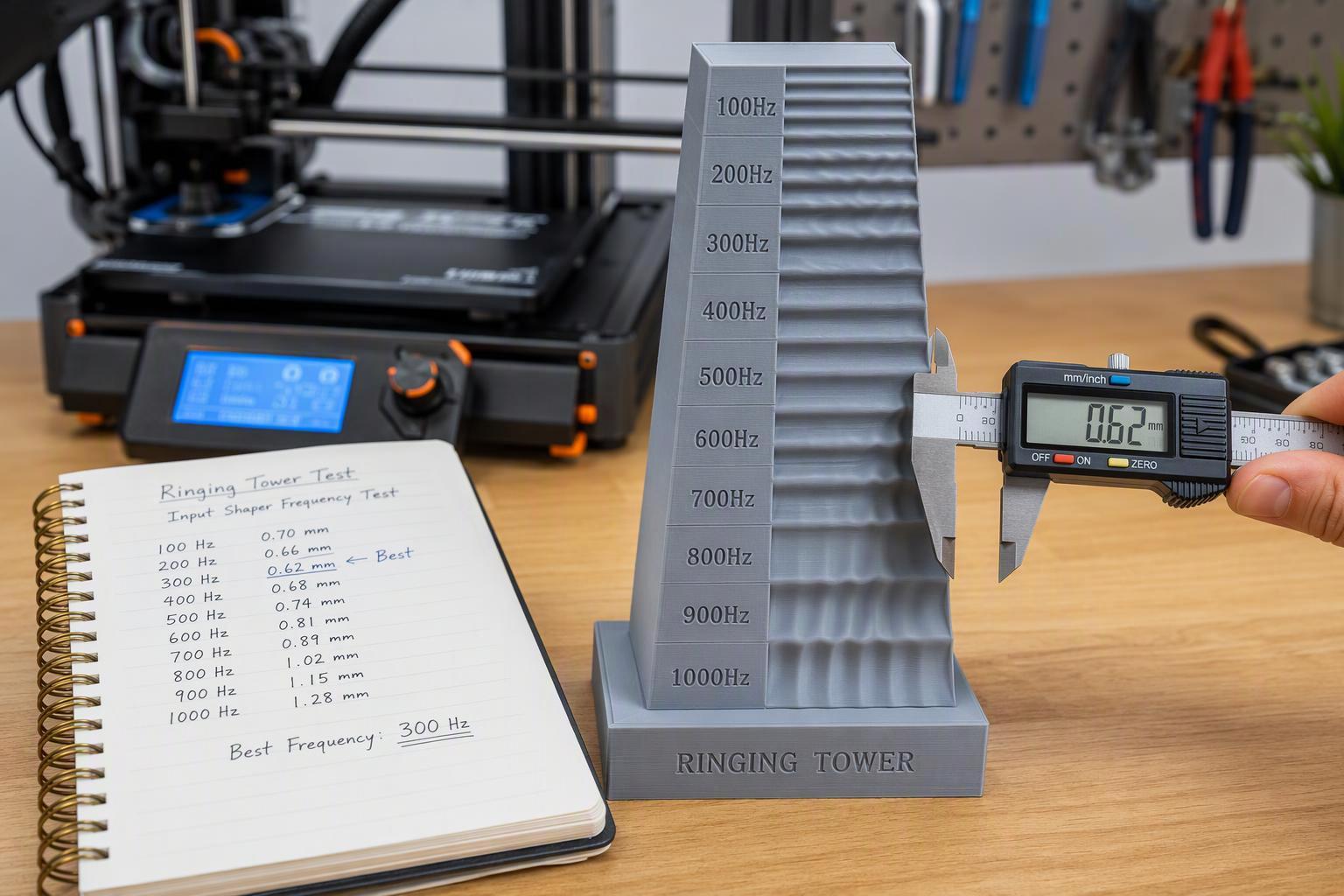
Then calculate rather than guess. The resonance frequency from a ringing tower is f = V x N / D, where V is the external-perimeter speed in mm/s, N the number of oscillations measured and D the distance they span in mm, and a smaller ripple spacing means a higher resonant frequency at the same speed, on the same page. Measure the same feature on both marked faces, because X and Y rarely resonate at the same frequency. This is also the sensorless route: the same page notes that tuning can be done without an accelerometer by printing the test model and measuring ripple spacing, which matters if you do not want to buy and wire a sensor.
If you do want instrumented measurement, Klipper supports an ADXL345, MPU-9250, LIS2DW or LIS3DH accelerometer mounted on the toolhead, plus a second mount on the bed for a bed-slinger, with TEST_RESONANCES AXIS=X disabling input shaping and writing CSV files and MEASURE_AXES_NOISE expected to read roughly 1-100 (Klipper's resonance measurement guide). One safety detail on that page is easy to miss and expensive to learn: the mount must keep the sensor and its screws electrically isolated from the printer frame, because a ground loop can damage electronics.
Order of operations matters more than any single value. That workflow places input shaping as step 5 of its baseline profile, after pressure advance and before targeted slowdowns, on the same page.
Pro Tip: Change one variable, reprint the tower, and log the ripple spacing in mm beside the setting you changed. A shared machine gets re-tensioned by whoever is on shift, so the log is the only way to know what the machine was doing last week.
How do I tell whether my printer's mechanics or its firmware is the limiting factor?
The evidence points to one order of operations, stated three times from three sources. Klipper says ringing usually has mechanical origins that should be checked and fixed first (Klipper's resonance compensation documentation). Marlin documents that input shaping is a firmware-side compensation and does not correct mechanical faults such as a loose pulley or a worn bearing, which must be fixed first (Marlin's Input Shaping feature documentation). Sovol UK's high-speed quality guidance names high acceleration and inertia as the primary root cause and states that input shaping "cannot fix mechanical slop", so belt tension and gantry squareness must be verified before resonance auto-tuning (Sovol UK's high-speed print quality guide).
The practical test is a before-and-after comparison at the same settings. Fix the mechanics, reprint the tower, and measure the ripple spacing. If the spacing moved and the amplitude dropped, mechanics were your limit and you are now tuning a healthier machine. If the pattern is unchanged after belts, pulleys and rails are verified, the remaining limit is the structure itself, and that is where firmware compensation earns its place. A measured frequency below roughly 20-25 Hz is the signal that stiffening or reducing moving mass is the more productive direction (Klipper's resonance compensation documentation).
Shared spaces add two variables that a single-user machine does not have. Record the belt state and the bench setup in the same log as your settings, so the next person inherits a known baseline rather than a mystery.
Common mistakes to avoid
Buying filament first is the most expensive mistake, because ghosting is a motion-and-rigidity problem and the spool does not touch it. Slowing the whole print down is the second: it widens the ripple spacing rather than removing the cause, since wavelength equals speed divided by frequency (Klipper's resonance measurement guide). Reduce acceleration before overall speed instead (Sovol UK's makerspace print-quality workflow).
Expecting input shaping to cover mechanical play is the third, and it is the one the sources repeat most. Tuning a shaper against a loose pulley produces a number that fits a broken machine.
Two smaller traps are worth naming. Copying a shaper frequency from another printer fails because the frequency belongs to your moving mass and stiffness: Marlin documents that the frequency must be measured for the specific machine rather than copied from another printer (Marlin's Input Shaping feature documentation). And assuming you need an accelerometer keeps people from starting: the ringing tower and the f = V x N / D calculation are enough to get a working frequency (Klipper's resonance compensation documentation).
Frequently asked questions
How long does the whole process take?
Most of the work is a single afternoon. Belt tension, pulley grub screws and rail play take about 30 minutes to check on a machine you already know, and the ringing tower that follows prints in roughly 40 to 60 minutes. The variable is how many passes you need: one tower is often enough to find a usable frequency, but a machine with a loose carriage or a worn belt can take two or three rounds before the ripples settle. Budget two hours for the first attempt and treat anything beyond that as a mechanical problem rather than a tuning problem.
Do I need an accelerometer, or is a ringing tower enough?
A ringing tower is enough. Marlin's input shaping documentation is explicit that the shaper frequency must be measured for the specific machine rather than copied from another printer, and a tower gives you that measurement with nothing but filament (Marlin's input shaping feature page). An accelerometer only shortens the measurement step and adds resolution; it does not change what you do with the number.
Does input shaping work on an older 8-bit printer?
Often, yes. Marlin's ZV shaper runs on AVR hardware, so an 8-bit board can apply input shaping without new electronics (Marlin's input shaping feature page). Check your firmware version first, because the feature has to be compiled in, and expect the older board to limit how fast you can print once shaping is active.
What should I do if the ripples get worse after tuning?
Undo the last change and re-measure before touching anything else. A worse result usually means the frequency was entered for the wrong axis, or that the shaper is masking a mechanical fault rather than correcting a resonance. Prusa's Input Shaper support page notes that the resonance measurement pass has to run before shaping is applied, and that the calibration is stored per machine, so a profile copied from another printer will not transfer (Prusa's Input Shaper support page). If a correct measurement still makes things worse, go back to the belts and pulleys.
Can I fit any replacement belt?
No. Belt pitch and tooth profile are standardised by ISO 5296, which specifies the dimensions of synchronous belt drives, including belt pitch, tooth profile and pulley geometry. A belt that does not match the specified profile and pitch changes how it meshes with the pulley and how it behaves under tension, so buy the profile your printer's pulleys were cut for rather than the nearest available size.
Conclusion
Ghosting and ringing are a motion-and-rigidity problem, and the fix order is settled by the sources rather than by preference: verify belts, pulleys and rails first, reduce acceleration before overall speed, then apply input shaping, and reprint the ringing tower after each change so you can measure what moved. Klipper, Marlin and Sovol UK all state that firmware compensation cannot correct mechanical faults, which is why the free checks come first (Klipper's resonance compensation documentation, Marlin's Input Shaping feature documentation, Sovol UK's high-speed print quality guide).
The one thing worth doing before your next purchase is checking whether the machine already supports input shaping, and whether its firmware exposes a shaper frequency and damping you can set. If it does, a ringing tower and a ruler will get you a working value this week. If it does not, the mechanical checks still pay off, because a tighter machine prints better with or without firmware compensation.
About the publisher. Sovol is a 3D printing brand that develops high-speed, high-precision printers and accessories, sold in the UK with local support and shipping. It has a commercial interest in this topic, so weigh its perspective accordingly; the guidance above does not depend on its products.
Share:
Why Your 3D Prints Have Ghosting or Ringing
Why Your 3D Printed Parts Crack Under Pressure: A Step-by-Step Diagnosis and Fix Guide