
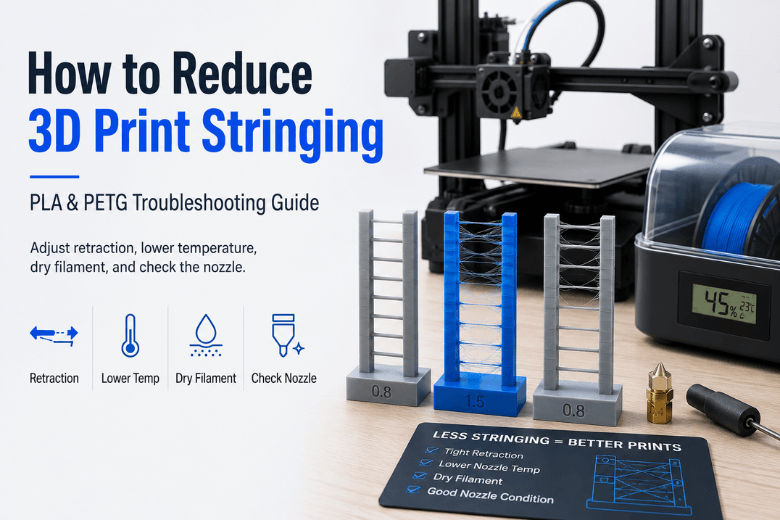
Stringing (those fine “hairs” between features) looks like a surface-finish problem. In practice, 3D print stringing is usually a movement problem: molten plastic oozes during travel moves, then gets stretched into threads.
The frustrating bit is that you can tune one setting forever and still get worse results if a hidden variable is off (damp filament, a worn nozzle tip, inconsistent extrusion). This guide is written for decision-stage readers — the people who are done with endless micro-tuning and want a reliable answer to: what should I change first, and what’s actually worth buying to reduce 3D print stringing on PLA and PETG?
Key takeaways
-
3D print stringing is “oozing during travel.” Retraction, temperature, and travel planning are the core levers (see Simplify3D’s “Stringing or Oozing” troubleshooting guide).
-
Don’t tune on unknown filament. Wet filament stringing symptoms can masquerade as bad retraction. If you suspect wet filament stringing, dry the spool and retest before changing profiles.
-
PETG is naturally more prone to stringing than PLA. The goal is often “no webs, minimal wisps,” not perfection at any cost.
-
Nozzle condition matters more than most people think. Nozzle wear and tip geometry can change how cleanly plastic breaks off (explained well in CNC Kitchen’s nozzle-wear testing on abrasive materials).
Quick diagnosis: what your strings are trying to tell you
Use this table to stop guessing.
|
What you see |
Most likely cause |
First thing to do (in order) |
|---|---|---|
|
Fine hairs that “wipe off” easily |
Travel ooze (normal stringing) |
Tune retraction + lower nozzle temp 5°C + increase travel speed |
|
Thick strings / blobs at the start/end of moves |
Too hot, too much pressure in nozzle |
Lower temp + enable wipe/coast + check retraction speed |
|
Stringing suddenly got worse on a spool that used to behave |
Moisture or nozzle wear |
Do a wet-filament check, then inspect/replace nozzle if needed |
|
PETG leaves webs no matter what |
PETG viscosity + too hot + travel crossing gaps |
Lower temp, avoid crossing perimeters, tune retraction for PETG |
|
Random wisps + inconsistent extrusion marks |
Partial clog / extruder slip / worn nozzle |
Clean hotend path, check tension, consider nozzle replacement |
If you’re running a shared printer (makerspace, school, or community lab), your best “sanity test” is simple: print the same small travel-heavy test with a known-dry spool. If it cleans up immediately, you just avoided a week of settings-chasing.
How to stop 3D print stringing: the fix order that saves time
Most articles give you a list. What you actually need is an order of operations that reduces variables.
If you came here via the exact query how to stop stringing 3D printing, this section is the shortest path: get retraction and temperature in-range, then fix travel behaviour, then eliminate hidden variables (moisture and nozzle condition).
Step 1: Confirm your retraction settings for stringing are in the right ballpark
Stringing happens because plastic oozes during travel; retraction is the core countermeasure (pull filament back before travel, then re-prime when extrusion resumes). Simplify3D’s guide lays out the mechanism and the primary levers: retraction distance, retraction speed, temperature, and travel behavior.
Practical starting points (use these as a range, not gospel):
-
Direct drive typically needs shorter retraction than Bowden.
-
Increase retraction distance in small steps and watch for the downside (clogs, under-extrusion, grinding).
If you want a simple way to avoid over-tuning: adjust one variable at a time, run a small stringing test, and stop when you move from “webs” to “light wisps.” Past that, you’re often trading one defect for another.
Step 2: Drop nozzle temperature in small steps
If retraction is enabled and 3D print stringing persists, the next lever is temperature. Hotter plastic is runnier — it oozes more during travel.
-
Reduce by 5°C at a time.
-
If layer bonding starts to suffer, bump back up slightly.
Step 3: Make travel moves less “string-friendly”
Even with good retraction and temperature, you can sabotage yourself with travel planning:
-
Avoid long travels over open air.
-
Increase travel speed (within what your printer can handle cleanly).
-
Enable slicer features that reduce crossing gaps (Simplify3D calls out “avoid crossing outline” style settings).
Step 4: Check the hidden variables: moisture and nozzle condition
If your tuning changes feel random, you likely have a hidden variable.
-
Moisture makes extrusion less predictable and can show up as stringing (especially when the spool has been left out). Run a quick wet check first using Sovol UK’s guide on how to tell if filament is wet.
-
Nozzle condition affects flow and can increase stringing. CNC Kitchen’s testing on abrasive filaments explains why nozzle wear isn’t only “a bigger hole” — tip shape and edge sharpness matter too.
PLA stringing settings: what usually works
PLA is generally the easiest place to get clean travel moves — as long as it’s dry and you’re not running overly hot.
Priorities for PLA:
-
Keep nozzle temperature in a stable, reasonable range (lower if strings appear).
-
Use enough part cooling to solidify filament quickly.
-
Tune retraction, but don’t chase extreme values that introduce clogs.
If you’re deciding whether PLA is the right default material for community printing (vs PETG), this overview helps frame the trade-offs: Sovol UK: PLA filament explained (pros, cons, best use cases).
PETG stringing settings: why it’s harder and what to change
PETG tends to ooze more than PLA. In practice, PETG stringing is often a combination of:
-
slightly too-high temperature,
-
travel moves crossing open gaps,
-
and filament that isn’t as dry as you think.
Priorities for PETG:
-
Start at the lower end of the temperature range that still gives good layer adhesion.
-
Increase travel speed and reduce pointless travel.
-
Retraction often needs more attention than PLA, but don’t use extreme values that cause jams.
One practical makerspace reality: PETG can behave “fine” for a while, then turn into webs when it’s been sitting out. That’s a workflow issue more than a profile issue.
Hardware causes that look like “settings problems”
If you’ve tuned PLA successfully in the past and now everything strings more, consider hardware.
Worn nozzle tip (and why that can increase stringing)
Nozzle wear isn’t only about diameter. Tip geometry affects how cleanly filament breaks off during travel, and abrasive pigments can accelerate wear. CNC Kitchen’s testing is a solid, evidence-led explanation of how abrasive materials change nozzle shape over time and how that shows up in print quality: CNC Kitchen: abrasive filaments and nozzle wear.
If you need a symptom-led checklist for replacement timing, use this internal reference: Sovol UK: when to replace a 3D printer nozzle.
Partial clogs and inconsistent extrusion
A partial clog can cause pressure fluctuations: sometimes the nozzle drips, sometimes it doesn’t. Before you rewrite profiles:
-
do a simple cold pull (if your hotend supports it)
-
check for debris buildup
-
make sure your extruder isn’t slipping or grinding
What upgrades/accessories are actually worth buying to reduce stringing?
This is the decision-stage part: if you’re spending money, spend it where it removes variables.
1) Filament drying and airtight storage (high ROI in shared spaces)
If you print PETG regularly — or you can’t enforce “spools go away after each session” — drying and storage are often the single biggest reliability upgrade.
Standardise:
-
airtight storage + desiccant + a simple “opened on” label
-
dry suspect spools before tuning profiles
2) A wear-resistant nozzle (situational, but often sensible)
If you mostly print plain PLA/PETG, brass nozzles can be fine.
If you print abrasive materials (carbon-fibre filled, glow pigments, metal-fill, etc.), a wear-resistant nozzle becomes the “reduce surprises” choice. The key point is operational: once the nozzle changes, you’re no longer tuning the same system.
3) Better travel control from your slicer (free, but requires discipline)
If you’re deciding whether to change slicers or profiles, prioritise features that:
-
minimise travel crossing gaps
-
allow wipe/coast control
-
make retraction tests easy to run
4) Direct drive vs Bowden (only if you have a specific pain)
Direct drive can make retraction behaviour more responsive, which can help on some printers and materials.
But it’s not a guaranteed “3D print stringing fix.” If moisture and nozzle wear are your real issues, a new extruder won’t fix your workflow.
Glow-in-the-dark PLA: a quick reality check
Glow filaments can be a little different because the glow pigment can behave like a fine abrasive.
Two practical takeaways:
-
Treat glow filament as potentially abrasive, monitor nozzle wear, and don’t be surprised if you need nozzle changes more often.
-
Don’t assume a “perfect profile” will stay perfect if the nozzle is slowly changing.
If you want an example of the kind of material we’re talking about, here’s one product page for reference: Sovol glow-in-the-dark PLA filament (1 kg). The page itself doesn’t claim special settings — so use it as a material example, not a tuning authority.
FAQ
Can wet filament really cause stringing on PLA and PETG?
Yes. Moisture makes extrusion less predictable, and that can show up as oozing/stringing that doesn’t respond cleanly to retraction changes.
Why does PETG string even when PLA prints cleanly?
PETG tends to ooze more. The same travel move that leaves nothing on PLA can leave wisps on PETG. Your goal is usually to eliminate webs and reduce wisps, not chase perfection at the cost of adhesion.
Should I just crank retraction until the strings disappear?
Not usually. Too much retraction can introduce clogs, inconsistent extrusion, or grinding — especially on some hotend designs. Use small changes and confirm temperature/travel behaviour first.
When should I replace the nozzle?
When stringing and surface defects persist despite normal tuning and cleaning — especially if the printer used to produce clean results with the same material.
Next steps
If you’re trying to reduce 3D print stringing across multiple printers, the simplest “high uptime” approach is:
-
standardise dry storage (and dry suspect spools),
-
keep one known-good PLA profile and one PETG profile,
-
treat nozzles as consumables and replace on symptoms — not on a calendar.
Share:
How to Stop Stringing in PLA, PETG and TPU Prints