
You may wonder which large build volume 3d printer suits your UK home best. Models such as the Prusa XL, Ender 3 V3 SE, and Ultimaker S5 stand out for their impressive maximum build area and reliable performance. You should consider build volume, print quality, and ease of use when choosing a printer. Matching these features to your available space, budget, and project requirements ensures a rewarding printing experience.
Key Takeaways
-
Assess your available space before choosing a large 3D printer. Ensure it fits comfortably and allows for maintenance access.
-
Prioritise safety by selecting printers with UKCA/CE marking and features like emergency shut-off and proper ventilation.
-
Regular maintenance is essential for optimal performance. Clean the print bed, lubricate moving parts, and calibrate monthly.
-
Choose a printer that matches your project goals. Larger build volumes suit big projects, while smaller models work for prototypes.
-
Consider user-friendly features and community support when selecting a printer, especially if you are a beginner.
Key Considerations for UK Homes
Space and Placement
You should assess your available space before selecting a large build volume 3d printer. Measure the area where you plan to install the machine. Large printers often require a dedicated table or workbench. You must also consider access for maintenance and filament changes. Avoid placing the printer near sources of dust or moisture. Choose a location with a stable surface to prevent vibrations that can affect print quality.
Noise and Home Environment
Noise can become a concern, especially in shared living spaces. You can reduce operational noise by following these best practices:
-
Tune NEMA 17 stepper motors to lower motor whine and improve reliability.
-
Select silent drivers such as TMC2208, TMC2209, or TMC5160 to decrease noise levels.
-
Use rubber vibration dampers or rotational dampers to minimise mechanical vibrations and noise transmission.
These steps help maintain a quieter environment, making it easier to use your printer without disturbing others.
Power and Safety
Safety should always remain a priority. You must ensure your chosen model meets essential safety standards for UK homes. The table below outlines key requirements:
|
Safety Standard/Recommendation |
Description |
|---|---|
|
UKCA/CE Marking |
Printers should be marked to indicate compliance with UK safety standards. |
|
Emergency Shut Off |
Printers must have an emergency shut off feature for safety. |
|
Enclosures |
Printers should be fully enclosed to reduce exposure to fumes and particulates. |
|
Ventilation |
Filters should be included to manage chemical emissions. |
|
Clearance Time |
A recommended time before opening the enclosure after printing to ensure safety. |
Ventilation Needs
Proper ventilation is crucial when operating a large build volume printer. Local Exhaust Ventilation (LEV) systems help control emissions and maintain indoor air quality. The Health and Safety Executive recommends using enclosed fume cabinets as part of your LEV system. This approach removes harmful fumes and particles produced during printing and ensures compliance with health regulations.
Inadequate ventilation can lead to hazardous fumes and ultrafine particles. These emissions may reduce indoor air quality and trigger inflammation in the airway and lungs. Long-term exposure increases the risk of lung and cardiovascular diseases. Some filament materials release chemicals such as styrene and isocyanates, which pose additional health risks.
Essential Features for Large Build Volume Printers
Build Volume and Print Size
You must consider build volume as one of the most important features when selecting a large build volume 3d printer. The size of the build volume determines the maximum dimensions of your printed objects. Larger build volumes allow you to create bigger models or multiple parts in a single print. The table below shows typical build volumes for leading printers:
|
Printer Model |
Build Volume (mm) |
|---|---|
|
Builder Extreme 1500 PRO |
1100 x 500 x 820 |
|
Builder Extreme 3000 PRO |
1100 x 1100 x 820 |
|
Anycubic Kobra 3 Max |
450 x 450 x 500 |
|
Raise3D Pro3 |
300 x 300 x 300 (single) |
|
|
255 x 300 x 300 (dual) |
|
Zaxe Z3S |
400 x 300 x 350 |
|
Original Prusa XL |
360 x 360 x 360 |
You can see how build volume affects project capabilities in the following table:
|
Printer Model |
Build Volume (mm) |
Volume (cm³) |
Project Capabilities |
|---|---|---|---|
|
Elegoo Neptune 3 Max |
420 x 420 x 500 |
88,200 |
Prints large items in one go or multiple smaller items simultaneously. |
|
300 x 300 x 330 |
29,700 |
Suitable for large functional parts, architectural models, and full-size cosplay helmets. |
|
|
225 x 255 x 280 |
16,065 |
Limited to smaller items, requiring multiple prints for larger projects. |
Print Quality
Print quality remains crucial for any large build volume 3d printer. You should look for high accuracy and consistent results. Metrics such as overhang tests, geometric panel evaluations, and 3D Benchy measurements help you assess print quality. The Kickstarter-Autodesk test measures dimensional accuracy, filament flow control, overhangs, bridging, and Z-Axis alignment. You can use printed models like Owl, Baby Yoda, and Eiffel Tower to check print quality visually.
Connectivity and Software
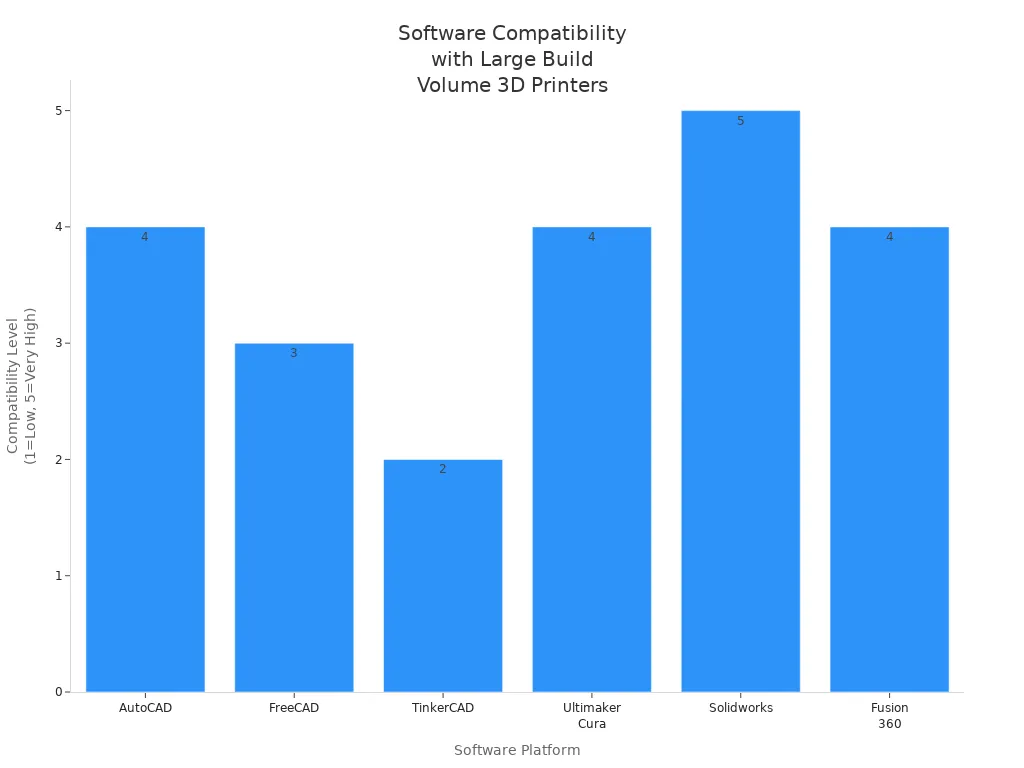
You need reliable connectivity and compatible software to manage your large build volume 3d printer efficiently. The table below lists popular platforms:
|
Software |
Description |
Compatibility with Large Build Volume Printers |
|---|---|---|
|
AutoCAD |
Versatile software for generating 3D models. |
High |
|
FreeCAD |
Free program accessible via web browser or application. |
Moderate |
|
TinkerCAD |
User-friendly, free software for beginners. |
Low |
|
Ultimaker Cura |
Open-source tool with smooth integration to 3D printers. |
High |
|
Solidworks |
High-end solution for serious professionals, managing the entire process. |
Very High |
|
Fusion 360 |
Allows cutting models without converting to STL format. |
High |
User Interface
You benefit from a user-friendly interface. Features such as a 4.3-inch colour touchscreen, responsive controls, and clear instructions for levelling make operation easier. Energy-saving sleep mode, silent operation, cable chain, and dual spool holders improve usability. Integrated camera and LED lighting allow remote monitoring.
Maintenance
You must maintain your large build volume 3d printer regularly to ensure long-term print quality and accuracy. Use a stable platform, such as a grade 00 marble base, to minimise print failures. High precision calibration systems and intelligent software support operational efficiency and consistent print quality.
Tip: Regular maintenance and calibration keep your printer running smoothly and help you achieve the best print quality for every project.
Top Large Build Volume Printers
Choosing the right 3d printer for your home can feel overwhelming. You want a machine that balances size, performance, and reliability. Below, you will find a shortlist of the best large build volume printers for UK homes, based on recent reviews and buyer’s guides.
Best Overall
The Prusa XL stands out as the best overall 3d printer for home use. You get a generous 360 x 360 x 360 mm build area, which supports most large projects. The Prusa XL offers advanced features such as multi-nozzle capability and a heated bed with four independent high-temperature platforms. These features ensure fast, even heating and consistent print quality. The printer supports up to four nozzles on the X-axis, so you can print multiple models or use different colours at once. The double-gear extrusion and titanium alloy heat pipe improve extrusion precision. You will also benefit from dual-sided cooling fans and PID auto-calibration for precise temperature control.
Note: The Prusa XL achieves print speeds up to 300mm/s, but you should use 150mm/s for the best results.
Pros:
-
Excellent print quality and speed
-
Advanced temperature control and calibration
-
Multi-nozzle support for creative projects
Cons:
-
Premium price point
-
Large footprint requires dedicated space
Best Budget Option
If you want a reliable 3d printer without breaking the bank, the Ender 3 V3 SE is a strong contender. This model offers a medium build area suitable for most home projects and comes with user-friendly features. The table below highlights what makes a budget printer ideal for home use:
|
Feature |
Description |
|---|---|
|
Usability |
FDM printers are simple to use, ideal for beginners. |
|
Print Quality |
Modern low-cost printers balance speed and quality for detailed prints. |
|
Build Volume |
Medium build volume (200–300 mm cubed) fits most home needs. |
|
Cost |
Entry-level FDM printers cost between £200 and £500. |
|
Material Compatibility |
Supports PLA, ABS, PETG; heated beds are standard. |
|
User-Friendliness |
Automated bed levelling reduces setup errors. |
|
Community Support |
Large online community and responsive customer service. |
You will find the Ender 3 V3 SE easy to set up and maintain. It supports a range of materials and offers automated bed levelling, which helps you avoid common printing errors.
Best for Versatility
For maximum versatility, you should consider the Builder Extreme 1500 PRO. This 3d printer features a massive build area of 1100 x 500 x 820 mm. It supports a wide range of materials, including ASA and ABS, and offers versatile nozzle options. The actively heated chamber and superior adhesion minimise warping, so you can print large, complex parts with confidence. The table below compares the top versatile models:
|
Printer Model |
Build Volume (mm) |
Notable Features |
|---|---|---|
|
Builder Extreme 1500 PRO |
1100 x 500 x 820 |
Versatile nozzles, heated chamber, supports many materials |
|
Builder Extreme 3000 PRO |
1100 x 1100 x 820 |
Superior adhesion, minimises warping, adaptable for large parts |
|
Anycubic Kobra 2 Max |
740 x 880 x 640 |
Extended print bed, user-friendly, high-speed printing |
You can use the Builder Extreme series for architectural models, cosplay props, or functional prototypes. The adaptability and reliability make it a favourite among advanced users.
Best for Print Quality
If you prioritise print quality above all, the Ultimaker S5 delivers outstanding results. This printer includes a heated bed that reaches 90°C in just 17 minutes, ensuring even heating. The high-temperature nozzle, capable of 300°C, uses a double-gear extrusion system and a titanium alloy heat pipe for precise extrusion. The dual-sided cooling fans maintain sharpness and detail, while PID auto-calibration ensures stable temperature control. You can achieve professional-grade results with minimal effort.
Key Specifications for Superior Print Quality:
-
Heated bed with fast, even heating
-
Multi-nozzle capability for complex prints
-
High-temperature nozzle for advanced materials
-
Dual-sided cooling fans for sharp details
-
PID auto-calibration for temperature stability
Tip: For the best print quality, use recommended speeds and calibrate your printer regularly.
Other Highly Rated Models:
-
Creality CR-M4: Massive build area, dual Y-axis rails for stability, but higher price.
-
Elegoo Neptune 3 Max: Direct extrusion, simple controls, integrated LED lighting, but very large for most desktops.
You should match your choice to your available space, budget, and project needs. Each of these printers offers unique strengths, so you can find the perfect fit for your home workshop.
Choosing the Right Printer
Project Types and Goals
You should start by identifying your main project types and goals. If you plan to create large architectural models or cosplay props, you need a 3d machine with a substantial build volume. For smaller prototypes or household items, a compact model may suffice. Define your expectations for print quality and performance before you invest. This approach helps you avoid disappointment and ensures your new equipment matches your ambitions.
Budget Planning
You must set a realistic budget early in your search. Prices for large build volume 3d machines vary widely. Entry-level models offer basic features at a lower cost, while advanced units with premium components demand a higher investment. Factor in ongoing expenses such as filament, maintenance, and possible upgrades. A clear budget prevents overspending and helps you focus on options that deliver the best value for your needs.
Experience Level
You should consider your experience with 3d technology. Beginners benefit from user-friendly machines with automated features and strong community support. Experienced users may prefer advanced models that allow for customisation and fine-tuning. Assess your comfort with assembly, calibration, and troubleshooting. Choose the right 3d printer that matches your skill level to ensure a smooth start and continued satisfaction.
Balancing Features
You can balance features and budget by focusing on what matters most for your projects. Consider the following strategies:
-
Match the purpose of your 3d equipment to its material compatibility.
-
Prioritise features such as auto bed levelling and heated print beds for consistent quality.
-
Select a sturdy metal frame to enhance stability and extend the lifespan of your device.
-
Ensure connectivity options like WiFi or USB for convenient operation.
Tip: You do not need every advanced feature. Focus on the essentials that improve your workflow and print results.
By following these steps, you can make an informed decision and enjoy reliable performance from your new 3d solution.
Setup and Use in UK Homes
Installation Tips
You should begin by placing your 3d printer on a stable, flat surface. This step reduces vibrations and improves print quality. Position the machine away from direct sunlight and sources of dust. Connect all cables securely and check that the power supply matches UK standards. Before your first print, perform auto leveling using the built-in system. Manual leveling may also be necessary for some models. Always follow the manufacturer's instructions for assembly and calibration.
Maintenance Routine
You must clean the print bed after every use to prevent residue build-up. Inspect the nozzle regularly for blockages, as this maintains consistent speed and extrusion. Lubricate moving parts monthly to ensure smooth operation. Check the belts and pulleys for wear and adjust tension if needed. Run the printer's self-test features to verify that all systems function correctly. Schedule a full calibration, including bed leveling, at least once a month to maintain high print quality.
Troubleshooting
You may encounter issues such as uneven layers or poor adhesion. First, check the bed leveling and re-run the auto leveling process if necessary. Slow down the print speed for complex models to improve accuracy. If prints fail to stick, clean the bed and adjust the initial layer height. For filament jams, heat the nozzle and carefully remove obstructions. Consult the user manual or online forums for model-specific advice.
Tip: Keep a log of recurring issues and solutions. This habit helps you identify patterns and resolve problems faster.
Safety Advice
You should never leave your printer unattended during operation. Install smoke detectors in the room for added safety. Use the enclosure and ventilation system to manage fumes, especially when printing with ABS or other high-temperature materials. Always unplug the machine before performing maintenance. Store filaments in sealed containers to prevent moisture absorption, which can affect print speed and quality.
When you select a large build volume 3D printer for your UK home, focus on these essentials:
-
Assess your available space and ventilation.
-
Match printer features to your project goals and budget.
-
Consider models like the Prusa XL for all-round performance, Ender 3 V3 SE for value, or Ultimaker S5 for premium quality.
You unlock new creative possibilities with the right machine. Choose wisely and enjoy the innovation that home 3D printing brings.
FAQ
What materials can you use with large build volume 3d printers?
You can use a wide range of materials, including PLA, ABS, PETG, and flexible filaments. Some advanced models support engineering-grade materials. Always check your printer’s specifications before starting a new printing project.
How do you achieve high-quality prints with large 3d printers?
You should calibrate your printer regularly and use recommended settings for each material. Maintain a clean print bed and ensure proper bed levelling. Quality filament and optimal temperature settings help you achieve high-quality prints and superior print quality.
Is 3d printing technology safe for home use?
You can safely use 3d printing technology at home by following safety guidelines. Use proper ventilation, enclosures, and smoke detectors. Store filaments in sealed containers. Never leave your printer unattended during printing.
How do you improve your 3d printing experience at home?
You can improve your 3d printing experience by choosing user-friendly software, maintaining your printer, and joining online communities. Regular maintenance and troubleshooting help you avoid common issues and enjoy a smoother printing experience.
Why does print quality vary between different 3d printers?
Print quality depends on the printer’s build, calibration, and material compatibility. Advanced features, such as auto bed levelling and dual extrusion, contribute to high-quality prints. Consistent maintenance ensures your printer delivers reliable results with every printing session.
Share:
Up to 700mm/s 3D printers compared for easy choice
SV08 3D Printer review – Hands-on experience for beginners