
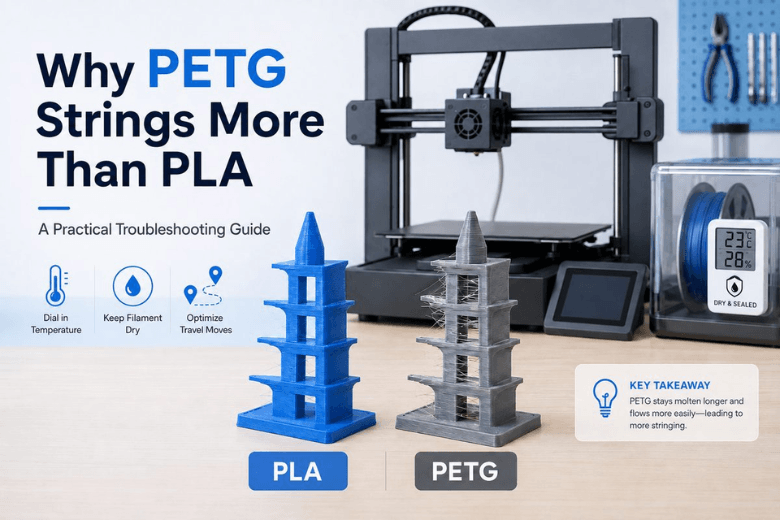
If you run a shared printer (or you’re the person everyone pings when a print goes hairy), you’ll notice a pattern: PLA can usually be dialled in once and forgotten, while PETG keeps producing thin webs between features unless the whole setup is behaving.
That’s not because PETG is “bad”. It’s because PETG’s melt stays sticky and mobile for longer, it’s often printed hotter, and the settings that make PETG strong can be the same settings that make it ooze.
Here’s a practical way to explain it to your members, and a troubleshooting order that cuts guesswork.
|
What you’re seeing |
More common with |
Why it happens |
First thing to change |
|---|---|---|---|
|
Fine hair-like strings between towers |
PETG |
Hot, tacky melt oozes during travel moves |
Dry the spool, then drop nozzle temp 5–10°C |
|
A few “wisps”, mostly clean walls |
PLA |
Usually just slightly too hot or retraction slightly off |
Drop temp 5°C, then tune retraction |
|
Strings + popping/crackling + tiny bubbles |
PETG (and other hygroscopic filaments) |
Moisture flashes to steam in the hotend, pushing plastic out |
Dry the spool and print from dry storage |
|
Thick blobs at start/end of lines |
Both |
Pressure not controlled (retraction/pressure advance/flow) |
Check flow, wipe while retracting, clean nozzle |
What stringing actually is (and why travel moves matter)
Stringing (also called oozing) is simple: the nozzle is moving, but plastic is still coming out.
Most slicers fight this with retraction: pull filament back to drop pressure, travel, then push it forward again. If the melt is very fluid, pressure takes longer to decay, or the travel move takes a long time, the nozzle leaves a thread behind.
The clearest plain-English explanation is in Simplify3D’s “Stringing or Oozing” troubleshooting guide and Prusa’s own help article, “Stringing and oozing”. Both boil it down to the same set of levers: temperature, retraction, and travel behaviour.
-
Simplify3D: “Stringing or Oozing” (updated 2026)
-
Prusa Knowledge Base: “Stringing and oozing” (updated 2026)
Why PETG strings more than PLA
1) PETG is usually printed hotter, which makes ooze easier
PETG commonly runs in the 220–250°C nozzle range, while PLA is often printed around 190–220°C. Hotter plastic flows more easily, which means it’s more willing to leak during non-printing moves.
For reference ranges, see Wevolver’s engineering overview of PETG temperature behaviour in “PETG Temperature Resistance” (2025) and Rapid Protos’ PLA thermal summary in “PLA Melting Point: Thermal Properties & Engineering Limits” (2026).
So what: if PETG is stringing, assume “slightly too hot” sooner than you would with PLA.
2) PETG’s melt is tackier, so it forms threads instead of snapping cleanly
PLA tends to break away cleanly when the nozzle leaves a feature, especially with good part cooling. PETG is more “stringy” in the literal sense: it likes to stretch.
Even when your retraction is technically correct, PETG can keep pulling a hair-thin thread as the nozzle accelerates away. That’s why PETG often needs a combination of retraction + travel speed + path planning, not just “more retraction”.
So what: chasing stringing with retraction alone can make PETG worse (clogs, grinding, zits) without eliminating the hairs.
3) PETG’s cooling trade-off keeps it soft for longer
PLA generally likes strong part cooling. PETG often prints better with more moderate cooling so layers bond well and parts stay tough.
That means PETG can stay soft and sticky for longer after extrusion. When the nozzle travels, those soft edges are still ready to form strings.
So what: with PETG you often have to balance two goals that don’t perfectly align:
-
less stringing (more cooling, lower temp, faster travels)
-
stronger layer bonding (moderate cooling, not too cold)
4) Moisture makes PETG stringing look “impossible” to tune out
If you hear crackling or you see tiny bubbles, don’t waste an hour “retraction tower-ing” the problem. Dry the spool.
Sovol’s guide, “How to Tell if Filament Is Wet (and What to Do Next)”, gives a good diagnostic split:
-
moisture issues: popping/crackling + bubbles/foam + surface pitting
-
retraction/temperature issues: mostly stringing, surfaces otherwise clean
You can use it as a one-page diagnostic reference:
-
Sovol UK: How to tell if filament is wet
It also provides safe starting ranges for drying (for example, PETG around 55–65°C, PLA around 40–50°C), plus storage habits that actually hold up in shared spaces.
If you want a more research-oriented reference for the “humidity changes behaviour” point, there’s an open-access polymers study on the topic: an experimental humidity study on FFF polymers (2025).
So what: PETG doesn’t just benefit from drying. In a UK makerspace, it often depends on it.
Fix PETG stringing in the order that saves the most time
This order is designed for shared printers: you start with the changes most likely to help, and least likely to create new problems.
Step 1: Rule out wet filament in two minutes
Do this before any slicer changes:
-
Listen for popping/crackling during steady extrusion.
-
Watch for tiny bubbles, foamy lines, or pitted walls.
-
Check whether stringing persists even after obvious retraction changes.
If those signs are present, treat it as a filament problem first. The fastest play is to dry the spool, then print from dry storage.
Pro Tip: In a shared environment, keep one “known-dry PETG” spool sealed and labelled. It’s your control sample when someone swears the printer is broken.
Step 2: Drop nozzle temperature by 5–10°C (and keep everything else the same)
Both Simplify3D and Prusa recommend the same move: reduce nozzle temperature in small steps.
For PETG, that often means:
-
drop 5°C, run a quick stringing test
-
if layer bonding still looks fine, drop another 5°C
If you go too far you’ll see under-extrusion, poor layer bonding, or a rough, dragged surface. Stop there and go back one step.
Step 3: Make travel moves “fast and boring”
Stringing needs time. Travel moves give it time.
Practical levers:
-
increase travel speed (as long as your printer stays stable)
-
avoid long travels across open air
-
reduce the distance between separate models on the build plate when possible
Many slicers have some version of “don’t cross external perimeters during travel”. Prusa calls this out directly in their article (avoid crossing perimeters), and Bambu’s wiki recommends the equivalent (“Avoid crossing walls”).
-
Bambu Lab Wiki: “Stringing and oozing” troubleshooting
Step 4: Tune retraction for your extruder, not your mate’s
Retraction numbers are not universal. The most important distinction is direct drive vs Bowden.
As a starting point, Simplify3D suggests:
-
direct drive: roughly 0.5–2.0 mm
-
Bowden: much longer distances may be needed because the filament path is longer and more elastic
(Those ranges are in their stringing guide.)
What to watch for while tuning:
-
Too little retraction: strings everywhere, especially between separate towers.
-
Too much retraction: clicking, grinding, jams, or random under-extrusion after travels.
-
Too fast retraction: grinding or inconsistent restart.
-
Too slow retraction: it retracts, but ooze still happens because pressure had time to push material out.
Prusa also recommends enabling “wipe while retracting” and similar features because they reduce the blob that can form as retraction happens. Their slicer-specific checklist is worth skimming even if you don’t run Prusa printers, because the concepts map across slicers.
Step 5: Use slicer features that reduce pressure at the right moment
If you’re close but not perfect:
-
enable wipe while retracting
-
consider a small Z-hop only if you’re getting nozzle drag (Z-hop doesn’t eliminate ooze; it just avoids collisions)
-
consider pressure/linear advance if your firmware supports it
This is where “mentor mode” helps: teach people to change one variable, then re-test, instead of shotgun-tuning ten settings.
Step 6: Don’t ignore hardware and maintenance
Stringing isn’t always settings. Prusa notes PETG can leave residue in/around the nozzle, and a dirty nozzle can drag plastic into hairs. Their checklist includes nozzle cleaning and hotend cooling checks.
If you see stringing suddenly get worse across multiple materials, check:
-
nozzle wear (a worn nozzle can change flow and surface behaviour)
-
partial clogs
-
hotend cooling (heat creep can keep filament too soft above the melt zone)
⚠️ Warning: If you use a heat gun to clean strings, use brief passes and keep it moving. The goal is to melt the hairs, not soften the whole part.
Why “PLA fixes” don’t always work on PETG
PLA stringing is often a single-cause problem: slightly too hot, or retraction slightly off.
Sovol’s PLA overview notes the usual PLA stringing trio: temperature, retraction, or wet filament, with the first two being common and easy to tune. See “PLA Filament Explained: Pros, Cons & Best Use Cases”.
PETG stringing is more often multi-factor:
-
you reduce temperature and stringing improves, but layer bonding gets worse
-
you increase cooling and stringing improves, but corners start to lift or parts get brittle
-
you tune retraction perfectly, but damp filament keeps making “mystery hairs”
Understanding that trade-off is the difference between “tweak settings” and “run a stable makerspace”.
FAQ
Does PETG always string a bit?
It often strings more than PLA under the same conditions, but “always” is too strong. With a dry spool, a sane temperature, and sensible travel/retraction, you can get PETG very clean. If you’re consistently fighting it, start with filament moisture and nozzle temperature.
Is more retraction always the answer?
No. More retraction can reduce ooze, but it also increases the chance of jams and inconsistent restart, especially on direct-drive setups. Use retraction as one lever, not the only lever.
Will turning the fan to 100% fix PETG stringing?
It might reduce hairs, but it can also reduce layer bonding on PETG. Use cooling as a balance tool, not a panic button.
Why does PETG string more on multi-part prints?
Longer travel moves across open space give oozing more time to form a thread. Reduce spacing between parts when possible, or use travel path optimisation (avoid crossing perimeters/walls).
Key takeaways
Key Takeaway: PETG strings more than PLA mainly because it’s printed hotter, stays tacky for longer, and often needs a cooling/strength compromise.
Key Takeaway: In UK humidity, wet PETG can look like a tuning problem. If you hear popping or see bubbles, dry the spool before touching retraction.
Key Takeaway: The fastest troubleshooting order is: dry filament → drop nozzle temp 5–10°C → speed up/optimise travel → tune retraction by extruder type → check nozzle and hotend cooling.
Next steps
-
If you’re building a repeatable process for shared printers, start by standardising filament handling. Sovol’s guide on how to tell if filament is wet is a good poster/checklist for a print room.
-
For a broader, setup-first approach to reducing failures (not just stringing), see how to improve 3D print quality with a better setup.
Share:
PLA warping after cooling: why prints bend (and what to change)
How to Stop Stringing in PLA, PETG and TPU Prints