

You want the best 3d printer for effortless results. The Bambu Lab P2S leads as the best 3d printer for reliability and ease of use. UK support matters when you seek a seamless 3d printing experience. Choose the best 3d printer for peace of mind. Trust the Best 3D Printers for smooth results.
Key Takeaways
-
Choose the Bambu Lab P2S for reliability and versatility. It offers a generous build volume and strong community support, making it ideal for demanding users.
-
For budget-conscious buyers, the Bambu Lab A1 and Creality Ender 3 V3 SE provide excellent value with multi-colour printing and robust features at lower prices.
-
Beginners should consider the ANYCUBIC Kobra 3. Its easy assembly and user-friendly interface allow new users to start printing within minutes.
Best 3D Printers UK: Top Picks
Best Overall 3D Printer
You want the best 3d printer for reliability and versatility. The Bambu Lab P2S stands out as the best overall choice in the UK. This premium 3d printer handles a wide range of materials, including advanced engineering plastics. You get a generous build volume of 256mm cubed, which suits most home and automotive projects. The P2S delivers consistent first layers and precise temperature control. You benefit from strong community support and easy access to spare parts in the UK. These features make it the leader among the best 3d printers for demanding users.
Tip: Prioritise reliability and local support when choosing a premium 3d printer.
Best Value 3D Printer
If you seek the best 3d printer for value, the Bambu Lab A1 offers an impressive price-to-feature ratio. You pay between £259 and £369 and receive multi-colour printing and robust reliability. This budget 3d printer matches the build volume of more expensive models. You also find the Creality Ender 3 V3 SE a strong contender, with CoreXY technology at a lower price point. Both models rank among the best 3d printers for cost-conscious buyers.
|
Model |
Price Range |
Build Volume (mm³) |
Features |
|---|---|---|---|
|
Bambu Lab A1 |
£259–£369 |
256 × 256 × 256 |
Multi-colour, reliable |
|
Creality Ender 3 V3 SE |
£150–£200 |
N/A |
CoreXY, budget 3d printer |
Best for Beginners
You want a 3d printer that makes your first experience smooth. The ANYCUBIC Kobra 3 is the best 3d printer for beginners in the UK. This entry-level model arrives almost fully assembled. You get a user-friendly interface, resume printing, and a heated bed. Plug-and-print options let you start your first project within minutes. These features make the Kobra 3 one of the best 3d printers for new users.
-
Simple controls
-
Resume printing
-
Heated bed
-
Plug-and-print
Best for Speed
You need a fast and reliable 3d printer for rapid prototyping. The Creality SparkX i7 leads this category. This premium 3d printer achieves high print speeds without sacrificing quality. You can complete large projects quickly and efficiently. The SparkX i7 also supports advanced filaments and offers robust UK support. It stands out among the best 3d printers for professionals who value speed.
Note: For resin 3d printer enthusiasts, the Anycubic Photon Mono M7 Max delivers fast and detailed prints, making it a top choice for resin 3d printer users.
You find the best 3d printers in the UK by focusing on your needs—whether you want a budget 3d printer, a premium 3d printer, or a resin 3d printer for specialist tasks.
Best 3D Printers: Comparison Table
Ease of Use
You want a 3d printing technology that simplifies your workflow. The leading models in the UK offer user-friendly interfaces and robust build platforms. You see the Magforms P7, Phrozen Sonic Mini 8K S, and Anycubic Photon M3 MSLA as top choices. Each model supports different user levels, from hobbyists to professionals. You benefit from intuitive controls and compact designs that make 3d printing technology accessible.
|
Model |
Interface & Usability |
Design & Build Features |
User Level Suitability |
|---|---|---|---|
|
Magforms P7 |
User-friendly interface; compact design |
Monochrome LCD; sturdy build platform |
Hobbyists, artists, small businesses |
|
Phrozen Sonic Mini 8K S |
User-friendly interface; reliable performance |
8K monochrome LCD; large print area |
Professionals, enthusiasts |
|
Anycubic Photon M3 MSLA |
Intuitive interface; compact design |
Monochrome LCD; robust build platform |
Beginners to experienced resin printers |
You gain confidence with 3d printing technology that matches your skill level.
Price Range
You must consider the price when selecting a 3d printing technology. Entry-level models start at £100, while professional machines reach £50,000 or more. You find affordable options like the Creality Ender-3 V2 and mid-range choices such as the Bambu Lab P1P. The price reflects the features and build quality you receive.
|
Category |
Price Range |
Example Model |
|---|---|---|
|
Entry-Level |
£100–£300 |
Creality Ender-3 V2 (£100–£200) |
|
Mid-Range |
£300–£1,000 |
Bambu Lab P1P (£300–£750) |
|
Professional FDM |
£1,000–£5,000+ |
N/A |
|
Entry-Level SLA |
£200–£400 |
Anycubic Photon Mono 4 series (£150–£300) |
|
Mid-Range SLA |
£400–£1,500 |
N/A |
|
Professional SLA |
£1,500–£10,000+ |
N/A |
|
Professional SLS |
£10,000–£50,000 |
Formlabs Fuse 1+ 30W (£24,000–£30,000) |
|
Industrial SLS |
£50,000–£500,000+ |
N/A |
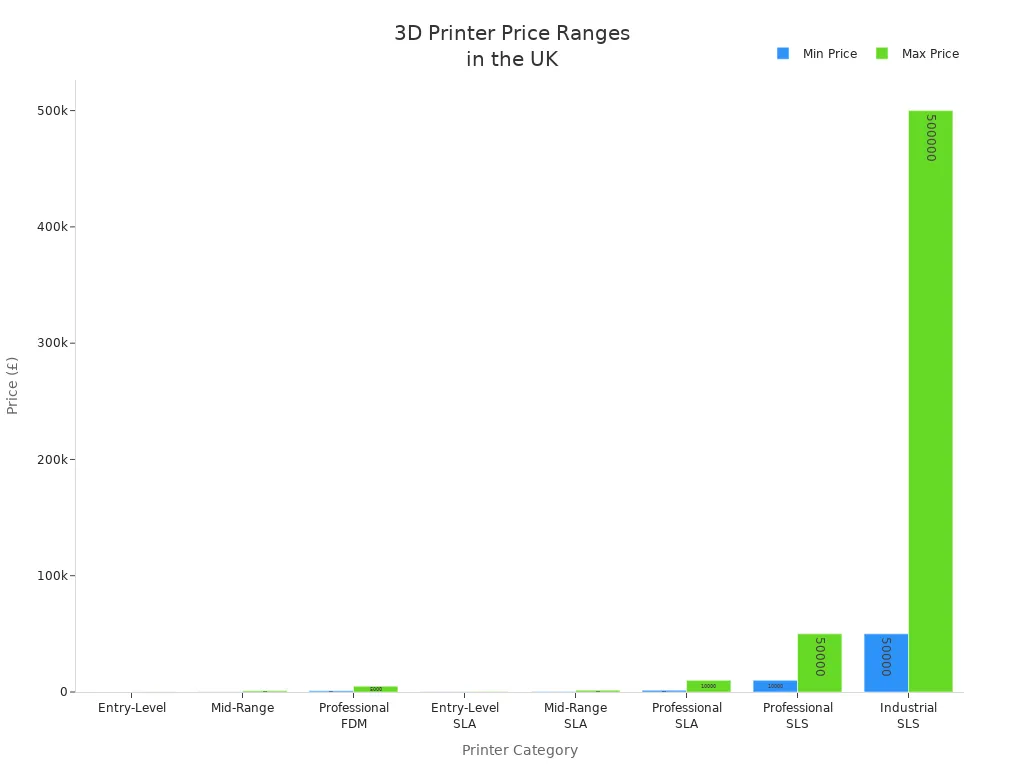
Key Features
You want 3d printing technology that delivers reliability and versatility. Look for auto-levelling, touchscreen controls, and strong UK support. You benefit from features that reduce setup time and improve print quality. You find that advanced 3d printing technology offers multi-material support and fast print speeds. You enjoy a seamless experience with 3d printing technology that adapts to your needs.
-
Auto-levelling for consistent results
-
Touchscreen controls for easy operation
-
UK support for peace of mind
-
Multi-material compatibility
-
Fast print speeds
Choose 3d printing technology with features that match your project requirements.
Best 3D Printers: Reviews
Bambu Lab P2S Review
You experience a streamlined setup with the Bambu Lab P2S. From unboxing to your first print, you spend about 17 minutes. The interface guides you through each step, making the process straightforward even if you are new to 3D printing.
-
Dimensional accuracy stays within 0.4mm, so your parts fit together as intended.
-
The surface finish appears clean, with minimal ringing or visible layer lines.
-
Uptime exceeds 99% over more than 100 hours of continuous operation, so you can trust this printer for long projects.
-
Built-in sensors monitor filament run-out and tangling, pausing the print automatically if an issue arises.
You benefit from strong UK availability, with local distributors and a responsive support network. The P2S includes a comprehensive warranty and easy access to spare parts. These features make it a reliable choice for both home and professional use.
Tip: You can rely on the Bambu Lab P2S for consistent results and minimal downtime, even during demanding print jobs.
Creality SparkX i7 Review
You find the Creality SparkX i7 excels in speed and versatility. The setup process is efficient, with clear instructions and modular components. You can start printing quickly, which is ideal if you value productivity.
Print quality remains high, even at faster speeds. The SparkX i7 supports a wide range of filaments, including engineering-grade materials. You notice crisp details and strong layer adhesion on finished parts.
Reliability stands out, with robust hardware and automatic error detection. UK buyers benefit from local stockists and a growing support community. Warranty coverage and after-sales service are available through official UK partners.
Note: You achieve rapid prototyping without sacrificing print quality, making the SparkX i7 a strong choice for professionals.
Anycubic Kobra X Review
You enjoy a safe and user-friendly experience with the Anycubic Kobra X. The enclosed design reduces exposure to fumes, which is important when you print with ABS. Maintenance is simple, thanks to easy access to key components and a helpful user manual.
|
Aspect |
|
|---|---|
|
Safety |
Enclosed design reduces exposure to fumes, especially important when printing with ABS, improving user safety. |
|
Maintenance |
Easy access to key components and a helpful user manual simplify routine maintenance. |
|
Build Quality |
Sturdy construction ensures durability, making it a long-term investment. |
|
Price and Value |
Competitively priced, offering professional-grade results comparable to more expensive models. |
|
Material Compatibility |
Supports a wide range of materials including PLA, PLA+, and ABS, with advanced multi-material capabilities. |
|
Print Performance |
Produces precise, detailed prints with consistent layer adhesion; stable results due to enclosed design. |
|
ABS Printing |
Enclosed chamber with carbon filter stabilises temperature, reduces warping and odours; heated bed and extruder handle ABS well. |
You receive professional-grade results at a competitive price. The Kobra X supports a wide range of materials and produces precise, detailed prints. UK buyers benefit from local availability, a solid warranty, and responsive after-sales support.
Construct 1 Review
You appreciate the robust build and straightforward setup of the Construct 1. The printer arrives with clear assembly instructions and pre-calibrated components. You can start your first print within half an hour.
Print quality impresses, with smooth surfaces and reliable layer adhesion. The Construct 1 handles both PLA and PETG with ease. You notice minimal maintenance requirements due to the sturdy frame and quality electronics.
UK buyers enjoy direct support from the manufacturer and a one-year warranty. Spare parts are readily available, and the support team responds quickly to queries. These factors make the Construct 1 a dependable option for schools, makerspaces, and home users.
Prusa MK4S Review
You benefit from the Prusa MK4S’s reputation for reliability and print quality. The setup process is beginner-friendly, with detailed guides and online resources. You can assemble the printer yourself or choose a pre-assembled version.
Prints display excellent detail and dimensional accuracy. The MK4S supports a wide range of filaments, including flexible and composite materials. You enjoy consistent results, even on complex projects.
UK buyers have access to official distributors and a strong online community. The MK4S comes with a comprehensive warranty and responsive after-sales service. You can source spare parts easily, ensuring long-term reliability.
Tip: The Prusa MK4S offers a balance of user-friendliness and advanced features, making it suitable for both beginners and experienced users.
Anycubic Photon Mono M7 Max Review
You achieve high-resolution resin prints with the Anycubic Photon Mono M7 Max. The setup process is straightforward, with automatic inspection and resin monitoring features that simplify operation.
|
Specification |
|
|---|---|
|
Maximum Print Speed |
63 mm/h |
|
Print Accuracy |
46 µm |
|
Price in the UK |
£498.00 (excluding VAT) |
|
Build Volume |
Suitable for larger models |
|
User-Friendly Features |
Automatic inspection, resin monitoring, etc. |
You can print larger models without sacrificing detail. The M7 Max delivers a print accuracy of 46 microns, ensuring crisp and precise results. UK buyers benefit from local stock, a clear warranty, and responsive support channels.
Bambu Lab H2D Review
You find the Bambu Lab H2D combines speed with advanced automation. The setup process is efficient, with auto-levelling and guided calibration. You can start printing quickly, even if you have limited experience.
Print quality remains consistent, with smooth surfaces and accurate dimensions. The H2D supports multi-material printing, expanding your creative options. Reliability is high, with built-in sensors that monitor print progress and detect errors.
UK buyers enjoy access to local distributors, a robust warranty, and dedicated after-sales support. The H2D stands out as a future-proof investment for both hobbyists and professionals.
Note: You gain peace of mind with the H2D’s advanced features and strong UK support network.
Features for Easy Printing
Auto-Levelling
You want consistent results with minimal effort. Auto-levelling technology calibrates the print bed automatically. This feature removes the need for manual adjustments. You save time and reduce the risk of failed prints. Most leading 3D printers in the UK now include auto-levelling as standard. You can start your project with confidence, knowing the first layer will adhere properly.
Tip: Choose a printer with reliable auto-levelling if you want to avoid troubleshooting and wasted material.
Touchscreen Controls
You benefit from intuitive touchscreen controls. These interfaces simplify navigation through menus and settings. You can adjust print parameters, select files, and monitor progress with a few taps. Touchscreens often display helpful prompts and error messages. This guidance reduces confusion, especially if you are new to 3D printing.
-
Quick access to print settings
-
Clear status updates during printing
-
Easy file selection from USB or SD card
Touchscreen controls help you manage your printer efficiently and reduce setup time.
UK Support
You need strong local support for a smooth experience. UK-based customer service teams provide faster responses and clear communication. You can access spare parts and warranty services without long delays. Many top brands offer dedicated UK helplines and online resources.
|
Benefit |
Why It Matters for You |
|---|---|
|
Fast warranty claims |
Less downtime for your printer |
|
Local spare parts |
Quick repairs and upgrades |
|
Expert advice |
Solutions tailored to UK users |
You gain peace of mind when you know help is available locally.
Buying Guide UK
Warranty & Service
You must check warranty terms before making a purchase. Most UK brands offer a warranty period ranging from 14 days for delivery damage up to 12 months for defects. Notify the seller within the specified timeframe if you find a fault. The warranty excludes consumables and damage caused by misuse. You must return goods in original packaging, and some companies require a return identification number. The claim process often involves direct contact with the manufacturer or after-sales service. Some brands provide replacements with refurbished or new items. Shipping costs may be your responsibility unless the fault lies with the seller.
|
Warranty Aspect |
Details |
|---|---|
|
Warranty Period |
14 days for delivery damage; up to 12 months for defects |
|
Notification Requirement |
Notify seller within specified timeframes |
|
Exclusions |
Consumables and misuse not covered |
|
Return Condition |
Original packaging required |
|
Replacement Policy |
Refurbished or new items possible |
|
Shipping Costs |
Customer pays unless seller at fault |
Always review the warranty policy for best buy recommendations and peace of mind.
Where to Buy
You find trusted retailers by searching for official distributors and established online shops. Look for UK-based sellers who offer local support and fast delivery. Many buyers choose Amazon, Technology Outlet, or 3D Printing Leeds for reliable service. You gain access to after-sales support and genuine spare parts when you buy from authorised sources. Avoid unknown sellers to reduce risk and ensure you receive best buy recommendations.
Value for Money
You maximise value by considering ongoing costs such as filament, maintenance, and upgrades. Choose a printer that matches your needs and budget. Entry-level models suit beginners, while mid-range options offer advanced features. You save money by selecting a machine with strong reliability and local support. Compare prices and features to ensure you get the best deal for your investment.
Consider total ownership costs, not just the initial price, when making your decision.
You see the Bambu Lab P2S as the top choice for easy 3D printing in the UK. Local support and user-friendly features matter most. Consider these key points:
-
Prioritise safety and maintenance.
-
Choose intuitive controls and strong community support.
|
Why Beginners Recommend |
Description |
|---|---|
|
Reliable, accessible models encourage exploration. |
|
|
Ease of Use |
Simple interfaces and guides help you start quickly. |
|
Educational Value |
3D printing inspires creativity and STEM learning. |
You start your 3D printing journey with confidence and minimal hassle.
FAQ
What is the best 3D printer for beginners in the UK?
You should consider the Anycubic Kobra 3. It offers easy setup, intuitive controls, and strong local support. Many UK users recommend it for first-time printing.
Do I need special software to start 3D printing?
You need slicing software to prepare your models. Most printers include free options like Ultimaker Cura or PrusaSlicer. These work well for both FDM and resin printers.
How do I get spare parts or support in the UK?
You can contact official UK distributors or the manufacturer’s support team. Many brands offer local spare parts, fast shipping, and dedicated helplines for UK customers.
Share:
3D Printing Growth in the UK: Market Insights
Why CoreXY Matters and What It Means for Your 3D Prints