
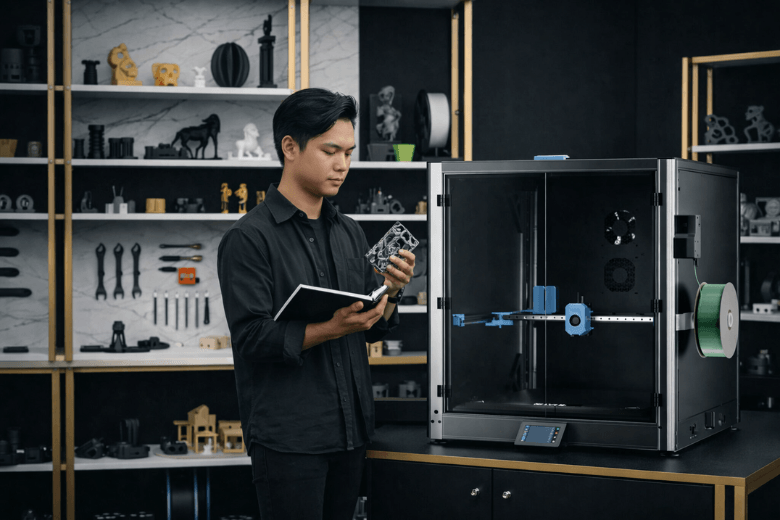
You need to consider several factors before purchasing a large format 3D printer. Matching the machine’s capabilities to your project requirements and budget ensures you make a sound investment. Large format 3D printers offer unique benefits for ambitious projects.
-
They produce multiple smaller parts in a single cycle, boosting efficiency.
-
They lower per-part costs, making large runs more economical.
-
They create full-scale prototypes in one build, eliminating assembly steps.
If you require a machine like the Sovol SV08 Max 3D Printer, understanding these advantages helps you make an informed decision.
Key Takeaways
-
Evaluate your project needs before purchasing a large format 3D printer. Consider build volume, material compatibility, and required features.
-
Select a printer with essential features like automatic bed leveling and dual extruders. These enhance print quality and expand your creative options.
-
Understand the trade-off between print speed and quality. Prioritise speed for prototypes and accuracy for end-use parts.
-
Regular maintenance is crucial for reliable performance. Clean the nozzle, calibrate the bed, and lubricate moving parts to prevent issues.
-
Set a realistic budget that includes both initial costs and ongoing expenses. This helps you choose a printer that meets your needs without overspending.
What Are Large Format 3D Printers?
Large format 3D printers stand out due to their substantial build volume. Industry experts define these machines by their ability to exceed the standard 15–20 cm dimensions of desktop models. You gain access to a build space that often measures around 30 cm in one direction and between 15–30 cm in the other two. Some advanced models reach sizes of 500 x 500 x 500 mm or even 1500 x 1500 x 2000 mm. This capacity allows you to create human-scale designs and produce multiple smaller parts in a single print cycle.
Key Features
You will notice several features that distinguish large format 3D printers from smaller models:
-
Significantly larger build volume enables the creation of bigger objects in one print.
-
Support for a wider range of materials, including engineering-grade filaments and specialty resins.
-
Auto bed leveling ensures consistent print quality and reduces manual calibration.
-
Dual extruders allow you to print with two materials or colours simultaneously.
-
Heated print beds improve adhesion and reduce warping during printing.
Tip: When you select a large format printer, prioritise features such as auto bed leveling and dual extruders. These features enhance reliability and expand your creative options.
Typical Uses
You can apply large format 3D printers across various industries. Their versatility makes them suitable for ambitious projects, from prototyping to end-use production. The table below highlights common applications:
|
Industry |
Application Description |
|---|---|
|
Manufacturing |
Lightweight aircraft components, batch production of jigs and fixtures, end-use parts on site. |
|
Automotive |
Full-scale prototypes, custom tooling, jigs, and fixtures for streamlined design and reduced lead times. |
|
Architecture |
Intricate facades, fabrication of building sections, reduced construction time and labour costs. |
|
Healthcare |
Anatomical models for surgical planning, personalised prosthetic devices for improved comfort and function. |
You can use these printers to produce furniture, test models, or car parts. Their ability to handle large builds and diverse materials makes them invaluable for professionals seeking efficiency and precision.
Printer Types and Technologies
FDM and Alternatives
You encounter several technologies when you explore large format 3D printing. Fused Deposition Modelling (FDM) remains the most common choice for large builds. You use FDM to create robust, functional parts at a lower cost. This technology extrudes thermoplastic filament layer by layer, forming objects with impressive strength and size. You benefit from straightforward operation and affordable materials.
However, you may require higher detail or specialised materials. Stereolithography (SLA) uses photopolymer resins and produces smooth, high-resolution prototypes. You achieve intricate surface finishes and complex geometries. Selective Absorption Fusion (SAF) and Selective Laser Sintering (SLS) offer industrial-grade thermoplastics and enable batch production. You stack parts vertically and horizontally, maximising throughput. PolyJet technology allows you to print multi-material and full-colour models, ideal for biomedical and design applications.
Note: You should match the technology to your project’s requirements. FDM suits large, functional parts. SLA excels at detailed prototypes. SLS and SAF deliver durable, high-volume production. PolyJet provides unmatched colour and material versatility.
You can compare the main technologies using the table below:
|
Technology |
Best For |
Build Volume Range |
Material Capabilities |
Batch Production Capabilities |
Large-Print Capabilities |
|---|---|---|---|---|---|
|
FDM (Fused Deposition Modelling) |
Low cost, large functional parts, tooling |
Up to 900 mm |
Thermoplastics, composites |
Side-by-side part placement for mid-to-large parts |
Best for single-piece components |
|
SLA (Stereolithography) |
Smooth, high-detail prototypes |
Photopolymer resins |
Multiple parts in a single resin vat |
Great for large, smooth-surfaced prototypes |
|
|
SAF (Selective Absorption Fusion) |
Durable, mass production printing |
Up to 400 mm |
Industrial-grade thermoplastics |
Vertically stacked parts for max throughput |
Less suited for massive parts, better for high-volume small/mid-size parts |
|
PolyJet |
Easy-to-use, simple operation, low maintenance. Unmatched multi-material and colour parts |
Up to 500 mm |
Rigid, flexible, full-colour resins, and materials for biomedical use |
Prints multiple detailed models with different colours/materials in one build |
Limited for large parts, excels at high-detail multi-material builds |
You notice that FDM offers the largest build volumes and excels at producing single-piece components. SLA provides smooth finishes and supports larger prototypes. SAF and SLS focus on throughput and material strength. PolyJet stands out for colour and material flexibility.
Pros and Cons
You must weigh the advantages and disadvantages of each technology before making your decision. FDM gives you cost-effective production for large parts and high throughput. You find it suitable for durable end-use items. However, you face limited material options and lower resolution compared to SLA.
SLA delivers high-resolution prints and supports a wide range of materials. You achieve complex designs and smooth surfaces. You pay higher costs and experience slower print speeds. SLS and SAF allow you to nest parts efficiently, optimising build volume. You access engineering-grade materials such as Nylon 12, which offer superior mechanical properties. You avoid support structures, increasing efficiency. However, you find these technologies less suited for massive parts and more expensive.
PolyJet provides unmatched multi-material and colour capabilities. You print detailed models with ease. You encounter limitations in build size and higher maintenance requirements.
You can review the following table for a concise comparison:
|
Technology |
Advantages |
Disadvantages |
|---|---|---|
|
FDM |
Cost-effective for large parts; High throughput with batch production; Suitable for durable end-use parts |
Limited material options compared to SLA; Lower resolution than SLA |
|
SLA |
High-resolution prints for complex designs; Wide range of material compatibility |
Generally higher costs; Slower print speeds compared to FDM |
|
SLS/SAF |
Efficient nesting for batch production; Superior mechanical properties; Wide material compatibility |
Less suited for massive parts; Higher equipment costs |
|
PolyJet |
Multi-material and colour printing; Easy operation; Detailed models |
Limited build size; Higher maintenance; Not ideal for large functional parts |
Tip: You should consider intended use, material compatibility, print speed, resolution, and machine durability. Connectivity options also affect ease of use and workflow integration.
You gain the most value when you align technology with your project goals. FDM suits large, functional parts and batch production. SLA and PolyJet excel at detailed prototypes and multi-material builds. SLS and SAF deliver industrial-grade strength and high-volume output. You make an informed choice by understanding these differences.
Build Volume and Size
Print Area Explained
You need to understand build volume before you select a large format 3D printer. Build volume refers to the maximum space available for printing objects. Manufacturers measure this in millimetres, showing the length, width, and height the printer can handle. Larger build volumes let you print substantial projects in one piece. This capability proves essential for industries such as aerospace, automotive, and architecture. You can create bigger objects, which enhances both design and functionality.
Consider the following table to see typical build volumes for large format printers:
|
Printer Model |
Build Volume (mm) |
|---|---|
|
Builder Extreme 1500 PRO |
1100 x 500 x 820 |
|
Builder Extreme 3000 PRO |
1100 x 1100 x 820 |
You also find printers with even greater maximum print sizes:
|
Printer Model |
Maximum Print Size (mm) |
|---|---|
|
LF3DP |
1120 x 1120 x 1100 |
|
G12 Pellet 3D Printer |
1200 x 1000 x 1000 |
|
G40 Pellet 3D Printer |
3725 x 2500 x 1330 |
Tip: Larger build volumes allow you to print full-scale prototypes, furniture, or architectural models without splitting them into smaller parts.
Choosing the Right Size
Selecting the right size of printer ensures you meet current needs and accommodate future growth. You must evaluate your business applications and workflow requirements. Consider the materials you plan to use and your turnover expectations. Assess whether you need dual print heads or support structures for complex builds. Material compatibility and sustainability also play a role.
Follow these steps to make an informed choice:
-
Determine if you need to handle large parts or scale production quickly.
-
Understand how build volume affects the size of components produced in a single print.
-
Look for printers that support modular setups or hybrid additive manufacturing systems for future expansion.
You gain flexibility and efficiency when you match printer size to your workspace and production goals. A well-chosen build volume lets you produce larger components in one cycle, which is vital for businesses aiming to scale rapidly.
Materials and Compatibility
Common Filaments and Resins
You must consider material compatibility when selecting a large format 3D printer. Most large format printers support a wide range of filaments and resins, each offering unique benefits for different industries. You will often use the following materials:
-
Nylon: Lightweight, strong, and flexible. You can use it for functional prototyping, especially when durability matters.
-
Nylon composites, Polypropylene (PP), and Flexible TPU: These materials suit SLS printing. You can apply them in projects that require flexibility or chemical resistance.
-
ABS-M30: This filament works well for conceptual modelling and functional prototypes. You gain reliable results for everyday engineering tasks.
-
ASA: You choose this material for outdoor applications. Its UV stability ensures long-lasting performance in sunlight.
-
Nylon 12, Ultem 1010, and similar high-performance polymers: These options provide high precision and withstand demanding environments.
You find these materials in industries such as aerospace, automotive, medical, and architecture. For example, you might print rocket parts, satellite brackets, custom tools, prosthetics, or architectural models. Each material supports specific use cases, so you should match your choice to your project’s requirements.
Tip: Always check your printer’s material compatibility list before purchasing new filaments or resins.
Speciality Materials
You can unlock advanced applications by using speciality materials. These materials offer enhanced properties, such as high temperature resistance, electrical insulation, or bio-compatibility. The table below highlights some popular speciality materials and their unique characteristics:
|
Material Type |
Special Properties |
Max Temp Resistance |
Application |
Tensile Strength |
|---|---|---|---|---|
|
Nylon PA |
Bio-compatible, durable, water/air-tight, UV-resistant, high chemical resistance |
175°C |
End-use, prototyping |
44 MPa |
|
Graphite |
Static-dissipative, water/air-tight, durable |
170°C |
End-use, prototyping |
58 MPa |
|
Zirconia ZrO2 |
Fine detail, electrical insulator, food-safe, high chemical resistance, UV-resistant |
1000°C |
End-use |
N/A |
|
Carbon Fibre |
Durable, large-format capability |
176°C |
End-use, prototyping |
76 MPa |
|
Silicone |
Clear, flexible, UV-resistant, electrical insulator |
180°C |
End-use, prototyping |
7 MPa |
|
Copper |
Conductive, UV-resistant, high chemical resistance |
200°C |
End-use, prototyping |
251 MPa |
|
Aluminium |
Durable, UV-resistant, water/air-tight |
300°C |
End-use, visualisation, prototyping |
410 MPa |
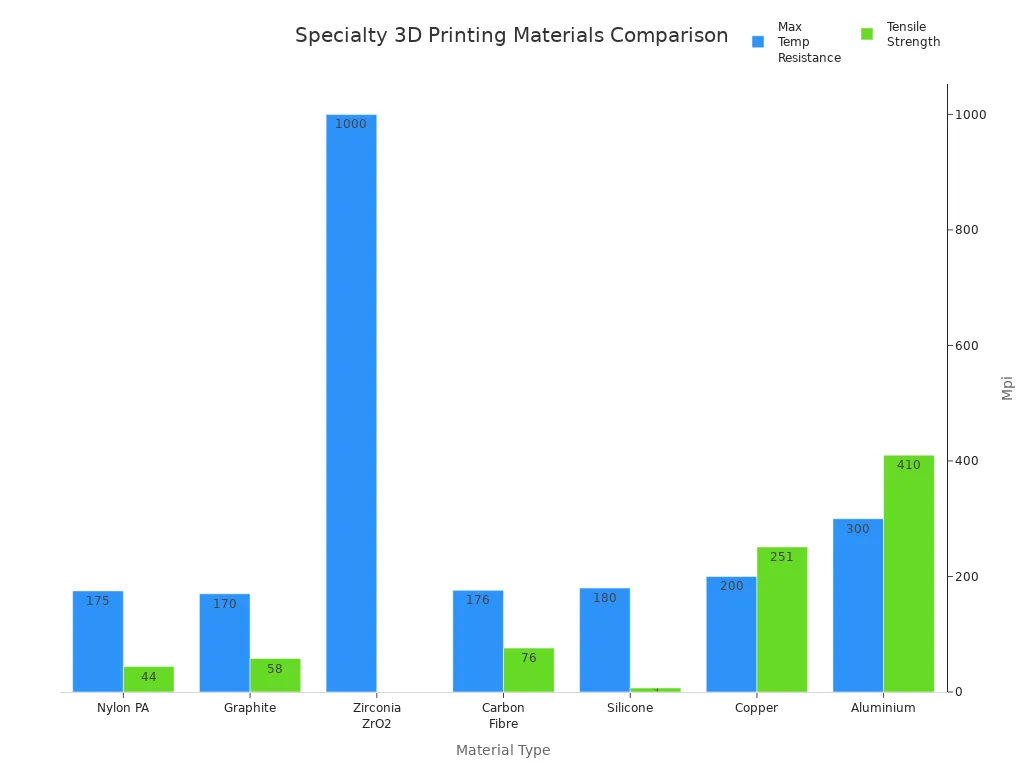
You can select these advanced materials to meet strict industry standards or achieve specific mechanical properties. For instance, you might choose carbon fibre for lightweight strength or zirconia for high-temperature insulation. Always match your material selection to your application’s demands for the best results.
Print Quality and Accuracy
Resolution and Layer Height
You must evaluate resolution and layer height when assessing print quality in large format 3D printers. Resolution determines the level of detail your printer can achieve. FDM technology, which dominates large format machines, generally produces lower resolution and accuracy than SLA or SLS methods. You notice this difference most when printing complex designs or intricate features. SLA printers excel in producing fine details, making them ideal for jewellery or dental models. FDM printers, on the other hand, suit robust, large parts but lack the same level of detail.
Print quality depends on the resolution in both XY (side-to-side) and Z (up-and-down) dimensions. Lower resolution numbers indicate better detail. SLA printers consistently deliver the smoothest and most detailed outputs, while FDM printers prioritise strength and size over precision. You should consider the recommended layer height for large format 3D printers, which is around 0.4mm. This specification optimises print jobs and maintains quality without sacrificing speed.
Tip: If your project demands intricate features, choose a printer with high resolution and a smaller layer height. For large, functional parts, prioritise strength and efficiency.
Dimensional Precision
You must maintain dimensional precision to ensure your prints meet exact specifications. Large format printers face greater challenges over extended builds. You can improve accuracy by following a regular maintenance routine:
-
Clean the print bed to prevent residue build-up.
-
Inspect the nozzle frequently to avoid blockages and ensure consistent extrusion.
-
Lubricate moving parts monthly for smooth operation.
-
Check and adjust belt and pulley tension to prevent wear.
-
Run self-test features to verify system functionality.
-
Perform full calibration, including bed leveling, every month.
You achieve reliable results by combining proper maintenance with careful calibration. Dimensional precision ensures your parts fit together and function as intended, especially in demanding industrial applications.
Speed, Reliability, and Maintenance
Print Speed vs Quality
You often face a trade-off between print speed and quality when working with large format 3D printers. High-speed FDM technology allows you to achieve impressive speeds, with some machines reaching up to 700mm/s. This capability helps you complete projects quickly and boosts productivity. However, you must monitor the process closely. Rapid printing can cause minor layer shifting, which affects the final appearance and structural integrity of your parts.
-
High-speed printing saves time on large builds.
-
You maintain quality by using advanced FDM systems.
-
Minor layer shifting may occur, especially during fast cycles.
Tip: You should balance speed and quality based on your project’s requirements. For prototypes, you may prioritise speed. For end-use parts, you must focus on accuracy and finish.
Uptime and Servicing
You rely on consistent uptime to maximise your investment in a large format 3D printer. Regular maintenance ensures reliability and prevents unexpected downtime. You should follow a routine that includes cleaning the nozzle and checking for filament debris. Lubricating moving parts and calibrating the bed frequently keeps your printer running smoothly. Inspecting belts and pulleys for wear helps you avoid mechanical failures.
-
Clean the nozzle regularly to prevent clogs.
-
Lubricate moving parts for smooth operation.
-
Calibrate the bed often to maintain print quality.
-
Inspect belts and pulleys for signs of wear.
You may encounter occasional nozzle clogs, especially when using high-performance materials. Regular calibration is essential to maintain accuracy and prevent defects. By following these steps, you ensure your printer delivers reliable results and maintains high uptime.
Note: Consistent maintenance not only extends the life of your printer but also safeguards the quality of your prints. You gain peace of mind knowing your machine is ready for every project.
Features and User Experience
Essential Features
You gain the most value from a large format 3D printer when you select models with user-friendly features. These features simplify operation and improve print reliability. Automatic bed leveling saves you time and ensures consistent quality, especially for large builds. Dual extruders expand your creative options, letting you print with multiple materials or colours. Heated print beds prevent warping and improve adhesion, which is vital for materials such as ABS and Nylon. Robust construction guarantees durability and stable performance during extended print jobs. An intuitive interface streamlines your workflow, making the printer easier to operate.
|
Feature |
Benefit |
|---|---|
|
Automatic Bed Leveling |
Simplifies setup and maintains uniform print quality, crucial for large prints. |
|
Dual Extruders |
Expands material options and allows for multi-colour prints, enhancing creativity. |
|
Heated Print Bed |
Prevents distortion and improves adhesion for materials like ABS and Nylon. |
|
Robust Construction |
Ensures durability and reliability during operation, contributing to overall print quality. |
|
Intuitive Interface |
Streamlines user interaction, making the printer easier to operate. |
Tip: You should prioritise these features to maximise efficiency and reduce the risk of print failures.
Software and Interface
You rely on effective software platforms to manage print operations and boost productivity. MeshLab stands out for preparing 3D models from various sources. You use it to fuse point clouds and polish models, which ensures high-quality prints. Monitoring workflow data helps you identify bottlenecks and inefficiencies. You can then make strategic decisions, such as upgrading equipment or adjusting staffing, to streamline operations and reduce downtime.
-
MeshLab enables detailed model preparation and refinement.
-
Workflow monitoring highlights areas for improvement and supports better resource allocation.
-
Software solutions enhance productivity and simplify complex print jobs.
Note: You achieve the best results when you combine intuitive hardware features with robust software tools. This approach ensures a smooth user experience and consistent print quality.
Sovol SV08 Max 3D Printer and Alternatives
Sovol SV08 Max 3D Printer Overview
You encounter the Sovol SV08 Max 3D Printer when searching for a machine that delivers reliable performance for large format projects. This printer stands out due to its impressive build volume and robust design. You benefit from a CoreXY structure, which reduces vibrations and ensures stable prints. The Sovol SV08 Max 3D Printer offers a heated bed, supporting materials such as PLA, TPU, PETG, and ABS. You achieve high-speed printing, reaching up to 700mm/s, which accelerates your workflow without sacrificing quality.
You find automatic bed leveling included, making setup straightforward and minimising calibration errors. The user interface remains intuitive, allowing you to manage print jobs efficiently. You notice the price falls within the mid-high range, reflecting its advanced features and suitability for ambitious projects.
|
Feature |
Specification |
|---|---|
|
Printing Speed |
Up to 700mm/s |
|
Build Volume |
Large enough for ambitious projects |
|
Heated Bed |
Yes |
|
Filament Compatibility |
PLA, TPU, PETG, ABS |
|
Design |
CoreXY for reduced vibrations |
|
Automatic Bed Leveling |
Yes |
|
User Interface |
User-friendly |
|
Price Range |
Mid-high |
Tip: You should consider the Sovol SV08 Max 3D Printer if you require fast, stable, and large-scale prints for professional applications.
Comparing Popular Models
You need to compare the Sovol SV08 Max 3D Printer with other leading models to make an informed decision. Print size, quality, and value for money play crucial roles in your selection process. The Sovol SV08 Max 3D Printer delivers high print quality and supports large builds, making it ideal for demanding projects. You notice that the Ender-5 Max also offers a large print size and professional quality, but it requires regular maintenance to maintain peak performance. Sovol Zero provides a medium print size and good quality, appealing to those who seek a budget-friendly option.
|
Printer Model |
Print Size |
Print Quality |
Value |
|---|---|---|---|
|
Sovol SV08 Max |
Large |
High |
Higher price than entry-level models |
|
Ender-5 Max |
Large |
Professional |
Requires regular maintenance |
|
Sovol Zero |
Medium |
Good |
Budget-friendly |
You gain a clear advantage with the Sovol SV08 Max 3D Printer if you prioritise speed and build volume. The CoreXY design ensures consistent results, especially during extended print jobs. You select this model when you need versatility in filament compatibility and a user-friendly interface. The Ender-5 Max suits you if you value professional quality and do not mind frequent maintenance. Sovol Zero appeals to you if you want a reliable machine at a lower price point, though you compromise on print size.
Note: You should weigh your project requirements against each model’s strengths. The Sovol SV08 Max 3D Printer excels in large-scale, high-speed printing, while alternatives offer different balances of quality, maintenance, and cost.
You make the best choice by matching your needs to the features and value each printer provides. The Sovol SV08 Max 3D Printer stands as a strong contender for professionals who demand efficiency and precision in large format 3D printing.
Cost and Value
Upfront and Ongoing Costs
You must assess both the initial purchase price and the ongoing expenses when investing in a large format 3D printer. Entry-level models start at £2,500, while advanced units can exceed £500,000. The table below illustrates typical price ranges for different printer types:
|
Printer Type |
Price Range (£) |
|---|---|
|
SLA |
160 - 20,000 |
|
SLS |
8,000 - 520,000 |
|
FDM |
2,400 - 24,000 |
You find more accessible systems between £2,400 and £24,000. Investing in a large format machine, such as the Sovol SV08 Max 3D Printer, can yield a positive return within months if you print regularly.
Ongoing costs include material expenses, labour, and maintenance. Standard filaments cost £40 to £120 per kilogram. Engineering-grade or support materials range from £80 to £160 per kilogram. You must also consider labour for manual support removal and post-processing, which industrial systems can automate. Regular maintenance, including cleaning and part replacement, adds a few hundred pounds annually. FDM printers require simple training and frequent cleaning, while SLA and SLS units demand more specialised care and higher service costs.
Budgeting Tips
You must set a realistic budget early in your search. Prices for large build volume 3D machines vary widely. Factor in ongoing expenses such as filament, maintenance, and possible upgrades. A clear budget prevents overspending and helps you focus on options that deliver the best value for your needs.
You should start by identifying your printing needs. Decide if you require a large format printer for big models or detailed parts. Entry-level machines offer basic features at a lower cost, while advanced units with premium components demand a higher investment. Consider the frequency of use and potential for return on investment. Outsourcing may suit occasional printing, but frequent production justifies in-house investment.
Look at your workspace to see if you have enough room. Set your budget before you start shopping.
You gain the most value by matching your budget to your workflow and production goals. Careful planning ensures you select a printer that meets your needs without unnecessary expense.
In-House vs Outsourcing
Benefits of In-House Printing
You gain several advantages when you bring large format 3D printing in-house. You control the entire production process, which allows you to respond quickly to project demands. Outsourcing large 3D printed parts often proves expensive. Investing in your own large-format printer can help you break even within a few months, especially if you print regularly.
-
You reduce lead times. Parts produced in-house arrive much faster than outsourced components, which can take weeks to deliver.
-
You improve efficiency. Large-format 3D printers enable you to create full-scale prototypes and multiple components in a single build. This capability streamlines your workflow and minimises assembly steps.
-
You save costs. In-house printing lowers material waste and lets you print several smaller parts simultaneously. This approach contributes to cost savings and boosts productivity.
-
You maintain confidentiality. Sensitive designs remain within your organisation, reducing the risk of intellectual property leaks.
Tip: You achieve greater flexibility and control by managing your own print jobs. This approach supports rapid prototyping and iterative design, which are essential for innovation.
When to Outsource
You may choose to outsource large format 3D printing under certain circumstances. If your production volume fluctuates or you require specialised materials not supported by your printer, outsourcing offers a practical solution. You avoid the upfront investment and ongoing maintenance costs associated with owning a large machine.
-
You access advanced technologies. Outsourcing partners often operate industrial-grade printers and offer expertise in complex builds.
-
You scale production quickly. External providers handle large orders without disrupting your internal workflow.
-
You manage risk. If you only need occasional prints, outsourcing prevents unnecessary expenditure and frees up resources for other projects.
Note: You should evaluate your project requirements and budget before deciding. In-house printing suits frequent, high-volume production, while outsourcing works best for occasional or specialised jobs.
Design Strategies and Production
Design for Large Format Printing
You achieve the best results in large format 3D printing by applying targeted design strategies. Start by identifying the functional areas of your part. This approach helps you optimise for additive manufacturing and ensures your design meets practical requirements. Choose the best build orientation to maximise strength and reduce the need for support material. Iterating on your design allows you to refine it for the chosen print direction, improving both durability and efficiency.
Consider the following strategies to enhance your outcomes:
|
Strategy |
Description |
|---|---|
|
Slicing Settings |
Adjust layer height and printing velocity to balance print quality and speed. |
|
Material Selection |
Select robust materials that maintain stability during large builds. |
|
Print Bed Maintenance |
Regular calibration and strong adhesion techniques prevent detachment and ensure consistent results. |
|
Design Considerations |
Focus on functionality first, then add material to minimise supports and strengthen the part. |
-
Identify functional areas to design effectively for additive manufacturing.
-
Determine optimal build orientation for strength and minimal supports.
-
Iterate your design to suit the print direction and improve performance.
Tip: Prioritise functionality and material efficiency. This method reduces waste and enhances the structural integrity of your prints.
Streamlining Production
You streamline production by adopting workflow improvements that boost efficiency and reliability. Pellet extrusion systems enable continuous production with minimal interruptions. Bulk material feeding keeps your workflow moving and reduces downtime, which is vital for large-scale manufacturing.
-
Flexibility in material handling lets you use various filaments or resins.
-
Enhanced printing speed, balanced with precision, improves productivity.
-
Automatic bed leveling ensures consistent quality across large builds.
-
Dual extruder functionality allows you to print with different materials in a single job.
-
Heated print beds prevent distortion and improve adherence.
-
Incorporate connectivity features such as WiFi or USB for seamless integration.
-
Use large format printers to fabricate expansive prototypes in one run, reducing assembly needs.
-
Implement robust construction for durability and stability during extended print sessions.
A dual print head significantly increases workflow efficiency. You print two components simultaneously, doubling throughput and meeting production demands with greater speed and flexibility.
Note: Streamlined production processes help you maintain momentum and deliver consistent results, even on ambitious projects.
Practical Tips and Mistakes to Avoid
Assessing Needs
You must start by evaluating your requirements before investing in a large format 3D printer. Consider the scale of your projects and the materials you intend to use. Identify whether you need advanced features such as dual extruders or automatic bed levelling. Review your workspace to ensure you have sufficient room for installation and operation. Examine your workflow to determine if you require high-speed printing or prioritise accuracy and detail. You should also estimate how often you plan to use the printer. Frequent use justifies a higher investment in robust models, while occasional printing may suit entry-level machines.
Tip: Create a checklist of your essential features and match them to available models. This approach helps you avoid overspending and ensures you select a printer that aligns with your production goals.
A table can help you clarify your priorities:
|
Requirement |
Importance |
Suitable Feature |
|---|---|---|
|
Large build volume |
High |
CoreXY structure |
|
Material versatility |
Medium |
Heated bed, dual extruder |
|
Print speed |
Medium |
High-speed FDM |
|
Print quality |
High |
Automatic bed levelling |
|
Maintenance ease |
High |
User-friendly interface |
Common Pitfalls
You must avoid several common mistakes when purchasing or operating a large format 3D printer. Neglecting regular maintenance often leads to nozzle clogs and ink splodges. Using the printer infrequently increases the risk of blockages; standby mode does not prevent this. Electrical spikes can damage your equipment, so surge protection is essential. Outdated print drivers reduce performance and compatibility with new materials. Third-party inks may cause poor print quality and further clogs. Dust and contaminants affect reliability, so invest in a dust cover. Humidity in the print room impacts print quality and increases maintenance needs. Ignoring recommended maintenance schedules results in breakdowns and costly repairs.
Most frequent mistakes to avoid:
-
Skipping regular maintenance routines.
-
Allowing the printer to sit idle for extended periods.
-
Failing to use surge protection.
-
Neglecting to update print drivers.
-
Using incompatible inks or filaments.
-
Leaving the printer uncovered and exposed to dust.
-
Overlooking humidity control in the print environment.
-
Disregarding scheduled servicing.
Note: You protect your investment and maintain consistent print quality by following these practical guidelines. Careful planning and routine upkeep ensure your large format 3D printer delivers reliable results for every project.
You must weigh several factors before investing in a large format 3D printer. Focus on these essentials:
-
Match build volume and material compatibility to your project requirements.
-
Consider print quality, speed, and maintenance needs.
-
Set a realistic budget for both upfront and ongoing costs.
Careful research ensures you select a printer that delivers value and reliability. Take time to compare models and features. Your preparation leads to successful, cost-effective printing.
FAQ
What is the main advantage of a large format 3D printer?
You gain the ability to print bigger objects in one piece. This feature saves time and reduces assembly steps. Large format printers also allow you to produce multiple smaller parts simultaneously, increasing efficiency.
Which materials can you use with large format 3D printers?
You can use common filaments like PLA, ABS, PETG, and TPU. Some models support engineering-grade materials such as Nylon, ASA, and carbon fibre. Always check your printer’s compatibility list before purchasing new materials.
How often should you perform maintenance on your printer?
You should clean the nozzle and lubricate moving parts weekly. Monthly calibration ensures accuracy. Regular maintenance prevents breakdowns and keeps your printer running smoothly.
Tip: Set a reminder for routine servicing to avoid unexpected downtime.
Can you print detailed models with a large format 3D printer?
You achieve good detail with high-resolution settings. FDM printers suit robust parts, while SLA models excel at fine features. Choose the technology that matches your project’s requirements.
What should you consider before buying a large format 3D printer?
You must assess build volume, material compatibility, print speed, and maintenance needs. Set a clear budget and review workspace requirements. Match the printer’s features to your production goals.
Share:
Sovol 3D printers: real users share their stories
Top Picks for Large Format 3D Printers in 2026 Featuring Sovol SV08 Max