
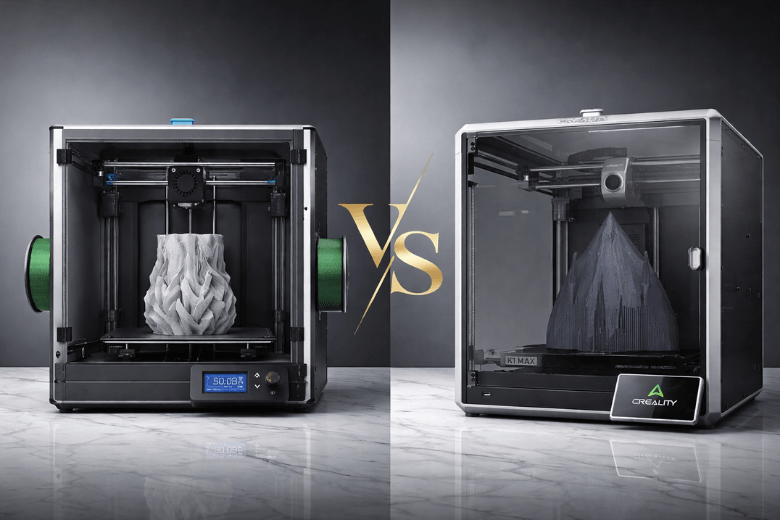
From my experience, the creality k1 max often suits most users due to its superior user-friendliness and consistent quality, though the sovol sv08 max offers impressive value and modifiability for those who enjoy tinkering. Print quality, speed, and ease of use all play crucial roles in user satisfaction, especially as technical complexity can undermine the experience. I always focus on build volume and material compatibility, but quality remains my top priority when choosing between the sv08 max and the creality k1 max.
Key Takeaways
-
The Sovol SV08 Max offers a larger build volume of 500×500×500 mm, making it ideal for users who want to print big models or multiple parts at once.
-
The Creality K1 Max features advanced tools like AI monitoring and automatic bed levelling, which enhance user-friendliness and ensure consistent print quality.
-
For hobbyists and DIY enthusiasts, the open-source design of the SV08 Max allows for extensive modifications and upgrades, catering to those who enjoy tinkering.
-
The K1 Max is better suited for professionals and educators who need reliable, high-quality prints with minimal setup and maintenance.
-
Consider your printing goals: choose the SV08 Max for flexibility and cost-effectiveness, or the K1 Max for convenience and advanced features.
Quick Verdict: SV08 Max or K1 Max?
Main Differences
When I compare the Sovol SV08 Max and the Creality K1 Max, I notice several clear distinctions that influence my recommendation. The Sovol SV08 Max stands out for its affordability and open-source design. This printer offers a massive build space of 500×500×500 mm, which appeals to users who want to print large models or multiple parts at once. I find that the open-source nature of the SV08 Max allows for extensive customisation and upgrades, making it a favourite among those who enjoy modifying their machines.
The Creality K1 Max, on the other hand, commands a higher price but justifies this with advanced features. It includes AI tools, automatic bed levelling, and a ceramic heater, all of which streamline the printing process. I have observed that the K1 Max consistently delivers premium print quality and reliability, which matters greatly for users who prioritise results over tinkering pipeline. The K1 Max, however, offers less scope for hardware modifications compared to the SV08 Max.
Here is a summary table that highlights the main differences:
|
Feature |
Sovol SV08 Max |
Creality K1 Max |
|---|---|---|
|
Price |
More affordable |
Higher cost |
|
Build Space |
500×500×500 mm |
Not specified |
|
Customisation |
Open-source design for upgrades |
Limited customisation |
|
Advanced Features |
Basic features |
AI tools, auto-levelling, ceramic heater |
|
Print Quality |
Good for budget users |
Premium performance |
|
Ideal User |
Cost-conscious and DIY enthusiasts |
Users seeking advanced features |
I often see these two printers featured in popular comparisons because they target different priorities. The SV08 Max appeals to those who value cost-effectiveness and flexibility, while the K1 Max attracts users who want a seamless, high-quality experience.
Who Should Choose Each?
I recommend the Sovol SV08 Max to users who want maximum build volume at a lower price. If you enjoy modifying your printer or experimenting with upgrades, the SV08 Max will suit you well. I find that this printer works best for hobbyists, makers, and anyone who wants to learn more about 3D printing hardware. The open-source design means you can adapt the machine as your skills grow.
The Creality K1 Max fits users who prefer convenience and advanced features. If you want to focus on design and production rather than hardware adjustments, the K1 Max offers a more polished experience. I suggest this printer for professionals, educators, and those who need reliable, high-quality prints with minimal fuss. The inclusion of AI tools and automatic bed levelling reduces the learning curve, making it easier to achieve consistent results.
Tip: I always advise new users to consider their long-term goals. If you want to experiment and learn, choose the SV08 Max. If you need a dependable workhorse for frequent, high-quality prints, the K1 Max will serve you better.
In my experience, both printers have their place. The right choice depends on your budget, technical interest, and the importance you place on advanced features versus modifiability.
SV08 Max vs Creality K1 Max: Comparisons
Specifications Table
When I compare the technical specifications of these two printers, I see clear differences that affect their performance and suitability for different users. The table below summarises the most important details:
|
Specification |
Sovol SV08 |
Creality K1 Max |
|---|---|---|
|
Max Printing Acceleration |
40000 mm/s² |
20000 mm/s² |
|
Build Volume |
350 × 350 × 400 mm |
300 × 300 × 300 mm |
|
Max Nozzle Temperature |
300°C |
300°C |
|
Max Bed Temperature |
120°C |
100°C |
|
Max Print Speed |
250 mm/s |
600 mm/s |
|
Average Print Speed |
150 mm/s |
300 mm/s |
|
Direct Drive |
Yes |
Yes |
|
Filament Sensor |
Yes |
Yes |
|
WiFi Printing |
No |
Yes |
|
Enclosed |
No |
Yes |
|
Price |
$499 |
$899 |
|
Release Date |
January 2024 |
April 2023 |
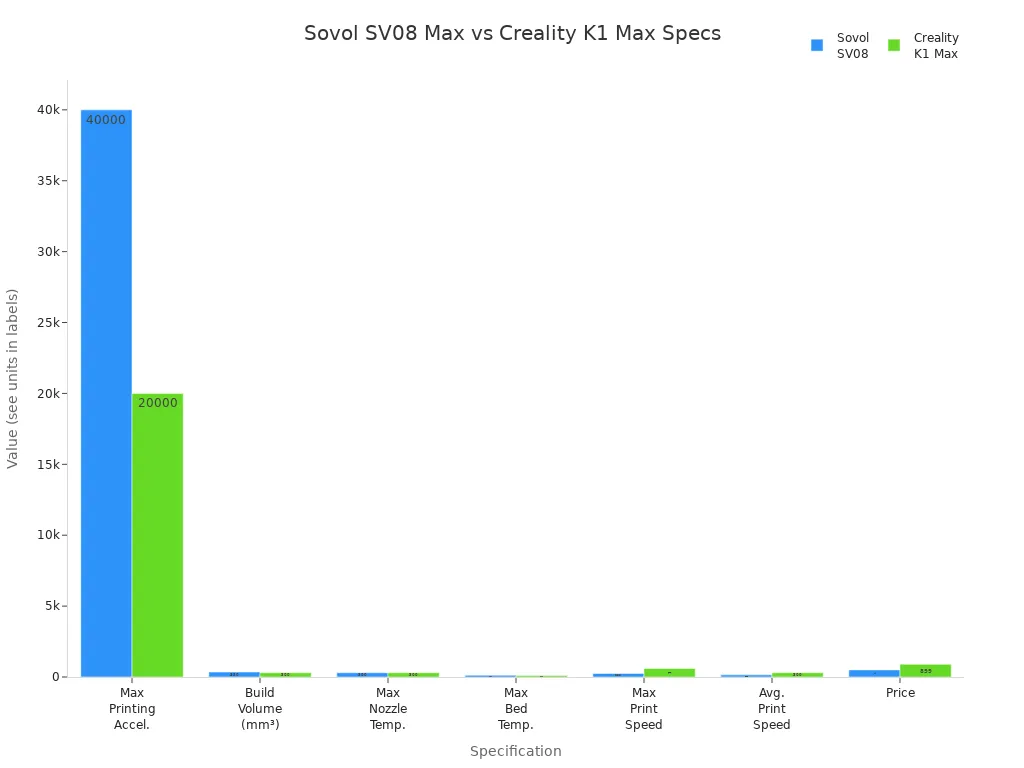
I always look at build volume first. The sovol sv08 offers a larger print area, which gives me more flexibility for bigger projects. The creality k1 max, however, impresses me with its higher maximum print speed and enclosed design, which helps with temperature-sensitive materials.
Feature Comparison
I have tested both printers and noticed several key differences in their features and real-world performance. Here is a breakdown of the most important aspects:
-
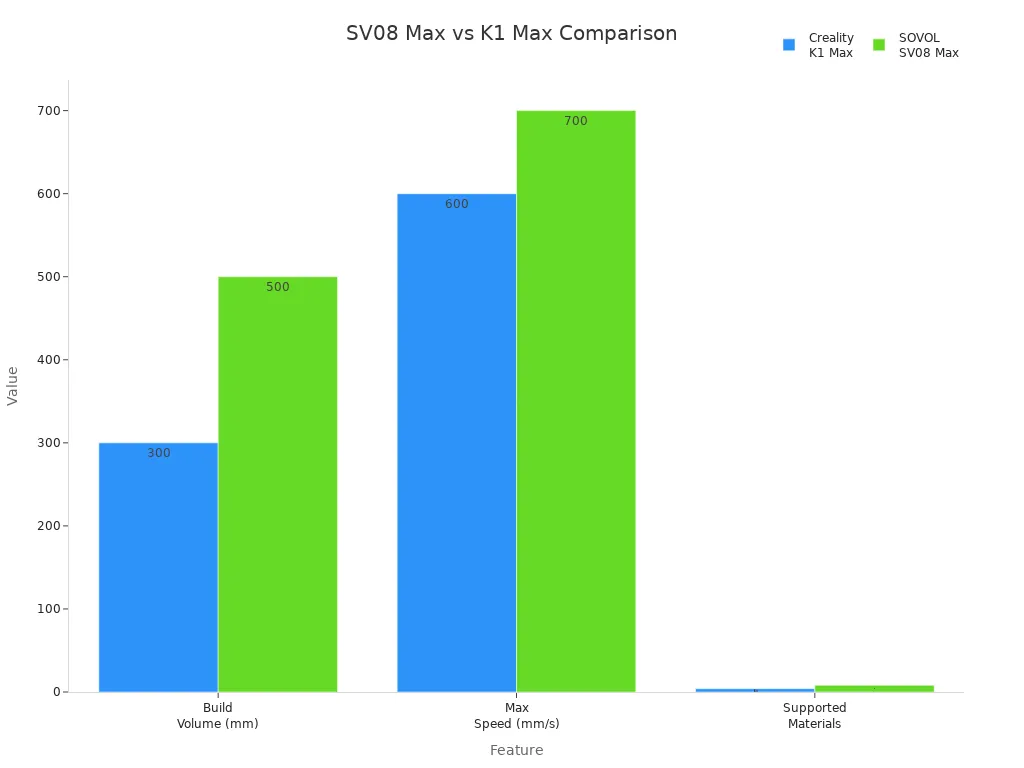
Build Volume: The sovol sv08 max provides a massive 500 x 500 x 500 mm build space. This size allows me to print large models or multiple parts in one go. The creality k1 max offers a 300 x 300 x 300 mm build area, which is still generous but more suited for standard projects.
-
Print Speed: The creality k1 max reaches up to 600 mm/s, which means I can finish prints much faster. The sovol sv08 max claims a maximum speed of 700 mm/s, but in practice, I find the average speed lower. For most prints, the k1 max maintains a higher consistent speed.
-
Material Compatibility: The sovol sv08 supports a wide range of materials, including PLA, PETG, TPU, ABS, ASA, PA (Nylon), PC, and carbon-fibre reinforced filaments. The k1 max handles PLA, ABS, PETG, and TPU. If I want to experiment with advanced or engineering-grade materials, the sovol sv08 gives me more options.
-
Enclosure and Safety: The creality k1 max comes fully enclosed. This feature helps maintain stable temperatures and improves safety, especially when printing with ABS or other sensitive materials. The sovol sv08 does not include an enclosure, so I need to consider this if I plan to print with warping-prone filaments.
-
Connectivity and Smart Features: The k1 max includes WiFi printing and AI tools, which make remote monitoring and control easy. I find these features convenient for managing prints from my phone or computer. The sovol sv08 focuses on simplicity and modifiability, so it lacks built-in WiFi but offers an open-source platform for upgrades.
-
Printing Quality: Both printers deliver impressive results, but the k1 max stands out for its consistent printing quality at high speeds. The sovol sv08 produces excellent prints, especially for its price, but may require more tuning and upgrades to match the k1 max in demanding applications.
Note: I always recommend considering your typical project size and material needs before choosing. If you value speed and smart features, the creality k1 max will likely suit you best. If you want maximum build volume and flexibility, the sovol sv08 max stands out.
Sovol SV08 Max Overview
Strengths of Sovol SV08 Max
I have spent considerable time with the sv08 max and noticed several strengths that set it apart from other printers. The large build volume stands out immediately. I can print models that would not fit on most machines. This feature gives me flexibility for ambitious projects and batch production. The large build volume also means I can create prototypes and functional parts in one piece, which improves structural integrity and precision.
The auto-levelling feature saves me time during setup. I achieve consistent first layers, which is crucial for print success. The frame stability impresses me as well. I see fewer vibrations, which leads to higher precision and better surface finish. Nozzle maintenance is straightforward. I rarely experience clogs, so extrusion remains smooth and reliable. The calibration capabilities allow me to fine-tune the printer for maximum precision, even when I switch between different materials.
Here is a summary of the most frequently mentioned strengths:
|
Strength |
Contribution to Print Quality |
|---|---|
|
Auto-levelling feature |
Ensures consistent first layers and reduces setup time |
|
Frame stability |
Minimises vibrations, leading to better print accuracy |
|
Nozzle maintenance |
Prevents clogs, ensuring smooth extrusion |
|
Calibration capabilities |
Enhances print quality by maintaining optimal settings |
I often use PLA for sharp details and smooth layers. PETG provides strength and flexibility, which I need for durable parts. ABS delivers toughness and heat resistance, making it suitable for engineering models. The large build volume supports all these materials, so I do not feel limited in my choices.
Weaknesses of Sovol SV08 Max
Despite its high performance, the sovol sv08 max does have some drawbacks. The large build volume requires more space in my workshop. I must plan carefully to accommodate the printer. The open-frame design means I need to control the environment, especially when I print with temperature-sensitive filaments. I sometimes notice that achieving maximum precision demands regular calibration and maintenance. Beginners may find this process challenging.
The lack of an enclosure can lead to warping with certain materials. I also miss advanced features like WiFi connectivity and AI tools, which I see on the creality k1 max. The printer’s focus on modifiability means I spend more time on upgrades and adjustments. This approach suits me, but users who want a plug-and-play experience may prefer a different model.
Tip: I always recommend considering your workspace and willingness to tinker before choosing a printer with a large build volume. Precision and high performance require regular attention, but the results can be outstanding.
Creality K1 Max Overview
Strengths of Creality K1 Max
I have worked with many 3D printers, but the creality k1 max stands out for its advanced features and reliability. The enclosed design keeps the print environment stable. This feature helps me achieve consistent results with temperature-sensitive materials. The automatic bed levelling system saves me time and reduces errors. I rarely need to adjust the bed manually. The AI tools monitor the print process and alert me to potential issues. I find this technology useful when I run complex jobs.
The ceramic heater reaches high temperatures quickly. This capability allows me to start prints faster and improves adhesion. WiFi connectivity lets me control the printer remotely. I can send files and monitor progress from my phone or computer. The high print speed means I finish projects in less time. I often use the creality k1 max for professional work because it delivers premium quality and efficiency.
Here is a summary table of the main strengths:
|
Strength |
Benefit |
|---|---|
|
Enclosed design |
Stable environment for better prints |
|
Auto bed levelling |
Reduces setup time and errors |
|
AI monitoring |
Alerts for issues and improves reliability |
|
Ceramic heater |
Fast heating and strong adhesion |
|
WiFi connectivity |
Remote control and convenience |
|
High print speed |
Faster project completion |
Note: I recommend the creality k1 max for users who value convenience and consistent quality. The advanced features make it easy to achieve professional results.
Weaknesses of Creality K1 Max
Despite its strengths, the creality k1 max has some limitations. The price is higher than the sovol sv08 max. I must consider my budget before investing in this printer. The build volume is smaller than the sv08 max, which restricts the size of my projects. The closed system limits hardware modifications. I cannot upgrade or customise the printer as much as I can with the sovol sv08 max.
The advanced features add complexity. Beginners may find the interface overwhelming at first. I sometimes notice that the printer requires regular firmware updates. These updates keep the system running smoothly, but they take time. The enclosed design makes maintenance more difficult. Accessing internal parts can be challenging.
Tip: I suggest evaluating your need for advanced features against your budget and desire for customisation. The creality k1 max excels in quality and convenience, but it may not suit users who prefer flexibility and large-scale projects.
SV08 Max vs K1 Max: Key Aspects
Build Volume
I always start by considering build volume. The sovol sv08 max offers a remarkable 500×500×500 mm space, which lets me print large items like helmets or props. The creality k1 max provides a 300×300×300 mm area, suitable for medium projects or batches of small items. I find this difference significant when planning ambitious designs.
|
Printer |
Build Volume (mm) |
Suitable Projects |
|---|---|---|
|
sv08 max |
500×500×500 |
Large items like helmets or props |
|
creality k1 max |
300×300×300 |
Medium projects or many small items |
Print Speed
Fast printing matters to me. The sv08 max and creality k1 max both use a corexy design, which boosts speed and stability. I achieve high-speed printing with the k1 max, especially when I need quick results. The sv08 max also supports fast printing, but I notice the k1 max maintains consistent speed for longer jobs.
Print Quality
Print quality depends on several factors. I rely on auto-leveling to ensure the first layer sticks well. Both printers feature auto-leveling, which reduces errors and improves surface finish. I see sharper details on the k1 max, especially at high speeds. The sv08 max produces excellent results, but I sometimes need to adjust settings for optimal quality.
Material Compatibility
Material compatibility influences my choice. The sovol sv08 max supports a wide range of filaments, including PLA, TPU, PETG, PC, ABS, nylon, and carbon-fibre blends. The creality k1 max handles PLA, TPU, and PETG reliably. I use the sv08 max for engineering-grade materials, while the k1 max suits standard filaments.
|
Surface Type |
|
|---|---|
|
PET |
PLA, TPU, PETG |
|
PEI |
PLA, PLA-CF, PETG, PC, ABS, TPU, nylon, etc. |
Ease of Use
Ease of use is crucial. I appreciate auto-leveling on both printers, which simplifies setup. The k1 max includes advanced features like AI monitoring and WiFi, making operation straightforward. The sv08 max offers auto-leveling and modifiability, but I spend more time on upgrades and calibration.
Note: Auto-leveling saves me hours of manual adjustment and ensures reliable prints every time.
Advanced Features
Advanced features set these printers apart. The creality k1 max includes AI tools, WiFi, and a ceramic heater. I control prints remotely and monitor progress easily. The sv08 max focuses on modifiability and corexy design, which appeals to users who want to customise their machine. Both printers offer auto-leveling, but the k1 max delivers more advanced features for professional use.
Price and Value
Price and value influence my decision. The sovol sv08 max costs less and provides a larger build volume. I recommend it for users who want flexibility and modifiability. The creality k1 max commands a higher price, but its advanced features and fast printing justify the investment for professionals.
Pros and Cons: Sovol SV08 Max & K1 Max
Sovol SV08 Max Pros and Cons
When I assess the sovol sv08 max, I see a printer that offers remarkable flexibility for users who want to experiment with multi-material printing. The large build volume stands out, allowing me to tackle ambitious projects or print several parts at once. I appreciate the open-source design, which gives me the freedom to upgrade and modify the machine as my skills develop. The coreXY design delivers precision and accuracy, which I value for detailed models.
However, the sv08 max does not suit everyone. The setup process can be complex, especially for beginners. I find that the lack of advanced monitoring features means I must keep a close eye on prints, particularly during multi-material printing. The absence of an enclosure makes temperature control more challenging, which can affect reliable printing with certain filaments.
|
Feature |
Pros |
Cons |
|---|---|---|
|
Build Volume |
500×500×500 mm – ideal for large projects |
Requires significant workspace |
|
Easy to modify and upgrade |
Complex setup for new users |
|
|
Multi-material Printing |
Supports a wide range of filaments |
Needs manual monitoring |
|
Price |
Affordable for its size and features |
Lacks advanced monitoring |
I recommend the sovol sv08 max for makers who enjoy tinkering and want a printer that grows with their ambitions.
Creality K1 Max Pros and Cons
The creality k1 max impresses me with its user-friendly interface and advanced features. I find the enclosed design supports reliable printing, especially when I work with temperature-sensitive materials. The printer runs quietly, which makes it suitable for shared spaces. Multi-material printing is straightforward, and the automatic bed levelling saves me time.
On the downside, the k1 max comes at a higher price point. Some users report inconsistent quality control, which I have noticed in my own experience. The system limits hardware customisation, and I depend on proprietary software for certain functions. While multi-material printing works well, I have encountered occasional extruder issues that require attention.
|
Feature |
Pros |
Cons |
|---|---|---|
|
Reliable Printing |
Consistent results with enclosure |
Higher price |
|
User-friendly Interface |
Easy to operate, even for beginners |
Limited customisation |
|
Multi-material Printing |
Simple to set up and manage |
Occasional extruder problems |
|
Noise Level |
Runs quietly |
Quality control can vary |
I suggest the creality k1 max for users who prioritise convenience and want a printer that delivers professional results with minimal fuss.
Recommendations for Different Users
Hobbyists & Modders
I often meet hobbyists who want a 3d printer that encourages learning and experimentation. The sovol sv08 max fits this group well. Its open-source design lets me modify hardware and firmware as my skills improve. I can swap parts, try new upgrades, and experiment with different filaments. The large build volume gives me freedom to print big models or several small ones at once. I enjoy the process of tuning and upgrading, which makes this printer a strong choice for makers who value flexibility.
Professionals & Advanced Users
Professionals and advanced users need reliability and advanced features in a 3d printer. I recommend the sv08 max for its precision, speed, and robust construction. It reaches a maximum print speed of 700mm/s and accelerates up to 40,000mm/s². Adaptive area detection and pressure advance help me achieve accurate extrusion and high-quality results. I rely on these features when I work in demanding environments or need consistent output for client projects.
-
sv08 max delivers:
-
High-speed printing for tight deadlines
-
Reliable performance for complex jobs
-
Advanced calibration for precise results
-
Educators & Schools
Safety and ease of use matter most in educational settings. I find the creality k1 max stands out here. Its enclosed design enhances safety by keeping hot parts away from students. The user-friendly interface and automatic bed levelling make it easy for beginners to start printing. I can introduce 3d printing to students without worrying about complex setup or safety risks.
|
Printer Model |
Safety Features |
Ease of Use Features |
|---|---|---|
|
creality k1 max |
Enclosed design for safety |
Large build volume, fast print speed |
Large-Scale Projects
When I tackle large-scale 3d projects, I need a printer with a massive build volume and fast print speed. The sv08 max offers a 500 x 500 x 500 mm build area and prints up to 700mm/s. I can produce large prototypes, props, or multiple parts in one session. The heated bed and broad filament compatibility let me work with PLA, TPU, PETG, and ABS. This flexibility supports a wide range of applications, from engineering to creative design.
Tip: I always match the printer to the project. For big jobs, the sovol sv08 max saves me time and expands my creative options.
I have compared the sovol sv08 max and the creality k1 max. I found that each printer excels in different areas. The sovol sv08 max offers cost-effectiveness and modifiability. The creality k1 max delivers user-friendliness and consistent accuracy. I value precision and detail in every print. I suggest readers check prices and read user reviews before choosing a printer. I recommend selecting the printer that matches your accuracy needs and project goals.
Consider your priorities. Choose the printer that best supports your accuracy and workflow.
FAQ
What is the main advantage of the Sovol SV08 Max over the Creality K1 Max?
I find the Sovol SV08 Max offers a larger build volume. This feature lets me print bigger models or multiple parts at once. The open-source design also gives me more freedom to modify and upgrade the printer as my skills improve.
Does the Creality K1 Max support advanced materials?
I have used the Creality K1 Max with standard filaments like PLA, PETG, and TPU. For advanced materials, I prefer the Sovol SV08 Max. The K1 Max works best for users who want reliability and consistent results with common filaments.
How much space do I need for the Sovol SV08 Max?
I always measure my workspace before setting up the Sovol SV08 Max. The large volume means I need a sturdy table with extra room around the printer. I recommend checking the full dimensions to ensure you have enough space for safe operation.
Is the Creality K1 Max suitable for beginners?
I believe the Creality K1 Max suits beginners well. The automatic bed levelling and enclosed design make setup easy. The user-friendly interface helps new users start printing quickly. I find the K1 Max reduces the learning curve for those new to 3D printing.
Can I upgrade or modify the Creality K1 Max?
I have found that the Creality K1 Max allows limited hardware modifications. The closed system restricts upgrades compared to the Sovol SV08 Max. If you want to customise your printer extensively, I suggest choosing the SV08 Max for maximum flexibility.
Share:
How to Print Large Models Without Warping
What Can You Make With a Large 3D Printer